Loading
Form preview
  • US Legal Forms
  • Other Templates
  • Executive Forms
  • Executive Department DOD Forms
  • Va Da 3161 2011

Get Va Da 3161 2011-2026

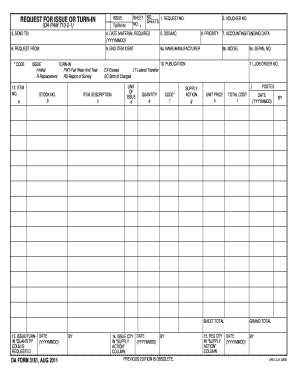
UNIT PRICE h TOTAL COST i SHEET TOTAL 13. ISSUE/TURN- DATE COLM IS REQUESTED DA FORM 3161 AUG 2011 BY 9c. SERIAL NO. ISSUE TURN-IN REQUEST FOR ISSUE OR TURN-IN DA PAM 710-2-1 SHEET NO. 1 1. REQUEST NO. 2. VOUCHER NO. 3. SEND TO 4. DATE MATERIAL REQUIRED YYYYMMDD 5. DODAAC 8. REQUEST FROM 9. END ITEM IDENT 9a* NAME/MANUFACTURER CODE 12. ITEM a I-Initial FWT-Fair Wear And Tear R-Replacement RS-Report of Survey STOCK NO. b 6. PRIORITY 7. ACCOUNTING/FUNDING DATA 9b. MODEL 10. PUBLICATION 11. JOB ORDER NO. EX-Excess LT-Lateral Transfer SC-Stmt of Charges ITEM DESCRIPTION* c UNIT OF d QUANTITY e f SUPPLY ACTION g j. 14. ISSUE QTY DATE COLUMN PREVIOUS EDITION IS OBSOLETE* 15. REC QTY POSTED DATE GRAND TOTAL APD LC v1. ISSUE TURN-IN REQUEST FOR ISSUE OR TURN-IN DA PAM 710-2-1 SHEET NO. 1 1. REQUEST NO. 2. VOUCHER NO. 3. SEND TO 4. DATE MATERIAL REQUIRED YYYYMMDD 5. DODAAC 8. REQUEST FROM 9. END ITEM IDENT 9a* NAME/MANUFACTURER CODE 12. 3. SEND TO 4. DATE MATERIAL REQUIRED YYYYMMDD 5. DODAAC 8.....

How it works

  1. Open form

    Open form follow the instructions

  2. Easily sign form

    Easily sign the form with your finger

  3. Share form

    Send filled & signed form or save

How to fill out the VA DA 3161 online

The VA DA 3161 form is essential for requesting the issue or turn-in of materials within the Department of Defense. This guide will provide you with clear, step-by-step instructions to help you successfully fill out the form online.

Follow the steps to complete the VA DA 3161 form online.

  1. Click 'Get Form' button to access the form and open it in your preferred editing tool.
  2. Begin by filling in the 'Request No.' and 'Voucher No.' fields, ensuring that you enter accurate and required information.
  3. In the 'Send To:' section, specify the appropriate recipient for the materials to be issued or turned in.
  4. Fill out the 'Date Material Required' using the format YYYYMMDD for clarity.
  5. Provide the 'DODAAC' which is the Department of Defense Activity Address Code relevant to your request.
  6. Complete the 'Request From:' section with the name or identifier of the person or department initiating the request.
  7. For 'End Item Ident', include the identifying information of the items involved in the request.
  8. Document the 'Item No.' to specify whether it's an issue or turn-in request, using the designations provided (e.g., Initial, Fair Wear and Tear, Replacement).
  9. Fill in the 'Stock No.', 'Unit of Issue', and 'Quantity' fields to outline the specific details of the items requested.
  10. Specify any relevant 'Accounting/Funding Data' that corresponds to the request.
  11. Complete additional sections such as 'Model', 'Publication', and 'Job Order No.' as needed for your request.
  12. Ensure calculations in 'Unit Price', 'Total Cost', and 'Sheet Total' are accurate for financial accountability.
  13. In the final section, review and either save your changes, download the completed form, print it, or share it electronically as appropriate.

Take action today by completing your VA DA 3161 form online to streamline your document management process.

Get form

Experience a faster way to fill out and sign forms on the web. Access the most extensive library of templates available.
Get form

Related content

a3161.pdf
BY. 15. REC QTY. IN "SUPPLY. ACTION". COLUMN. DATE. (YYYYMMDD). BY. DA FORM 3161, AUG...
Learn more
EE3161 - Social Issues and Ethics in Engineering
This course exposes students to major theoretical frameworks and principles of ethics to...
Learn more
Model 1351 Manual
HOW TO USE THIS MANUAL. This manual describes how to: • Properly mount and wire the...
Learn more

Related links form

DE Public Review Certificate Application Kit 2014 DE SL-1923 (Formerly SL-1904) 2006 FL PCLB C-0004 2013 Temporary Food Establishment Permit Application

Questions & Answers

Get answers to your most pressing questions about US Legal Forms API.

Contact support

The primary difference between the DA Form 3161 and DA Form 2062 lies in their specific functions. The 3161 is primarily for requests related to equipment issues and turn-in, while the 2062 is utilized for property accountability and inventory control. Understanding these distinctions helps ensure the correct documentation is used for various military transactions.

The Army equipment issue form primarily refers to the DA Form 3161, which manages requests for equipment and property issuance. This form tracks all requests and returns, providing vital documentation for accountability. By using the VA DA 3161, soldiers can streamline their equipment management processes and maintain accurate records.

A DA 3161 typically remains valid for a limited time, often dictated by unit policies or specific operational requirements. It is essential to check with your unit’s logistics officer for exact validity when using this form. Staying within the designated time frame ensures that the information remains current and relevant.

The DA Form 581 is specifically used for requesting and issuing ammunition within the military context. This form plays a critical role in tracking ammunition distribution and ensuring adherence to safety regulations. While the VA DA 3161 handles broader equipment needs, the DA Form 581 focuses solely on munitions management.

The DA Form 3161 serves as a versatile tool used for various purposes, including equipment transfer, inventory control, and material requisition. It helps military personnel request equipment or issue property, enabling the efficient management of resources. When used effectively, the VA DA 3161 promotes accountability within military operations.

The DA Form 3161 is a key document used for requesting the issuance or return of property and equipment in the military. This form details the items requested or returned, along with quantities and purpose. Utilizing the VA DA 3161 helps streamline these requests, ensuring that the appropriate approvals are in place for each transaction.

The procedures for ammunition issue and turn-in vary by unit, but generally involve using specific forms like the VA DA 3161. It is crucial to follow the guidelines set by the unit’s logistics officer to ensure compliance and accountability. Proper documentation helps maintain safety and facilitates effective management of resources, especially regarding munitions.

A request for issue or turn in is a formal procedure within the military to either acquire or return equipment and supplies. This process ensures accurate tracking and accountability of materials. When a unit needs to request new items or return unused equipment, they must complete a VA DA 3161 form to document the transaction properly.

A DA Form 3161 is typically valid until the request or turn-in has been processed or replaced by another form. It is important to complete the process promptly to maintain accurate records. Depending on the circumstances, the validity duration may vary. Keeping track of the VA DA 3161 helps in upholding efficient supply chain integrity.

The unit of issue section on the VA DA 3161 provides critical information about how items are measured and categorized. This section helps ensure that requests and turn-ins are correctly processed. Clearly defining the unit of issue within this section improves communication between supply personnel and users. It supports more organized inventory management.

Get This Form Now!

Use professional pre-built templates to fill in and sign documents online faster. Get access to thousands of forms.
Get form
If you believe that this page should be taken down, please follow our DMCA take down processhere.
Get VA DA 3161
Get form
  • Adoption
  • Bankruptcy
  • Contractors
  • Divorce
  • Home Sales
  • Employment
  • Identity Theft
  • Incorporation
  • Landlord Tenant
  • Living Trust
  • Name Change
  • Personal Planning
  • Small Business
  • Wills & Estates
  • Packages A-Z
  • Affidavits
  • Bankruptcy
  • Bill of Sale
  • Corporate - LLC
  • Divorce
  • Employment
  • Identity Theft
  • Internet Technology
  • Landlord Tenant
  • Living Wills
  • Name Change
  • Power of Attorney
  • Real Estate
  • Small Estates
  • Wills
  • All Forms
  • Forms A-Z
  • Other Templates
  • Legal Hub
  • About Us
  • Help Portal
  • Legal Resources
  • Blog
  • Affiliates
  • Contact Us
  • Delete My Account
  • Site Map
  • Industries
  • Forms in Spanish
  • Localized Forms
  • State-specific Forms
  • Forms Kit
  • Real Estate Handbook
  • All Guides
  • Notarize
  • Incorporation services
  • For Consumers
  • For Small Business
  • For Attorneys
  • USLegal
  • FormsPass
  • pdfFiller
  • signNow
  • altaFlow
  • DocHub
  • Instapage
Form Packages
  • Adoption
  • Bankruptcy
  • Contractors
  • Divorce
  • Home Sales
  • Employment
  • Identity Theft
  • Incorporation
  • Landlord Tenant
  • Living Trust
  • Name Change
  • Personal Planning
  • Small Business
  • Wills & Estates
  • Packages A-Z
Form Categories
  • Affidavits
  • Bankruptcy
  • Bill of Sale
  • Corporate - LLC
  • Divorce
  • Employment
  • Identity Theft
  • Internet Technology
  • Landlord Tenant
  • Living Wills
  • Name Change
  • Power of Attorney
  • Real Estate
  • Small Estates
  • Wills
  • All Forms
  • Forms A-Z
  • Other Templates
Customer Service
  • Legal Hub
  • About Us
  • Help Portal
  • Legal Resources
  • Blog
  • Affiliates
  • Contact Us
  • Delete My Account
  • Site Map
  • Industries
  • Forms in Spanish
  • Localized Forms
  • State-specific Forms
  • Forms Kit
Legal Guides
  • Real Estate Handbook
  • All Guides
Prepared for you
  • Notarize
  • Incorporation services
Our Customers
  • For Consumers
  • For Small Business
  • For Attorneys
Our Sites
  • USLegal
  • FormsPass
  • pdfFiller
  • signNow
  • altaFlow
  • DocHub
  • Instapage
Social Media
Call us now toll free:
+1 833 426 79 33
As seen in:
© Copyright 1999-2026 airSlate Legal Forms, Inc. 17 Station Street, Suite 303, Brookline, MA 02445
  • Your Privacy Choices
  • Terms of Service
  • Privacy Notice
  • Content Takedown Policy
  • Bug Bounty Program