Loading
Get Kindergarten Math Assessment - Pbvusd K12 Ca
How it works
-

Open form follow the instructions
-

Easily sign the form with your finger
-

Send filled & signed form or save
How to fill out the Kindergarten Math Assessment - Pbvusd K12 Ca online
Completing the Kindergarten Math Assessment - Pbvusd K12 Ca is a crucial step in evaluating students' foundational math skills. This guide provides clear, step-by-step instructions to help users fill out the form accurately and efficiently, ensuring a positive experience.
Follow the steps to successfully complete the assessment form.
- Press the ‘Get Form’ button to access the Kindergarten Math Assessment - Pbvusd K12 Ca document and open it for editing.
- Begin by entering the student's name in the designated field at the top of the form where it says 'Name__________.'
- Next, fill in the date by writing it in the area next to 'Date ________________.' Make sure to use the correct date format.
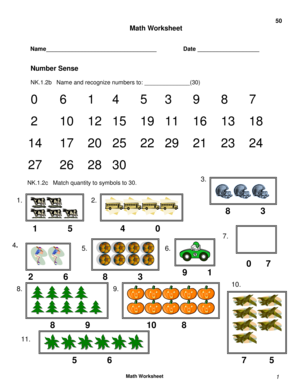
- Proceed to the 'Number Sense' section. For NK.1.2b, you will need to name and recognize numbers up to 30. Fill in the necessary response in the provided lines.
- For NK.1.2c, match the quantities to the symbols up to 30. Review the numbers provided and enter your answers in the blank spaces.
- Continue to NK.1.2d, where you will write numerals also up to 30. Make sure to fill this correctly in the specified area.
- In the 'Addition' section under NK.2.1a, use manipulatives to perform basic addition problems under 10. Write your answers in the boxes provided.
- Next, move to NK.2.1b, where you will also perform basic subtraction operations. Fill out all necessary subtraction problems using manipulatives.
- In the 'Algebra and Functions' section, for AK.1.1, classify the given attributes as per the instructions. Record your answers accordingly.
- For the 'Measurement and Geometry' section MK.1.1, complete all tasks involving comparisons and circling the correct responses based on the provided questions about length, weight, and capacity.
- Proceed through each remaining section, filling out answers as required for concepts of time, identifying shapes, data analysis, and mathematical reasoning.
- Once you have filled out all fields and sections of the document, ensure all information is accurate.
- Finally, save your changes, and consider downloading, printing, or sharing the completed form as necessary.
Start filling out the Kindergarten Math Assessment - Pbvusd K12 Ca online now to support your child's learning journey.
DocuMaster: Doc/Docx Editor is a powerful and user-friendly application for creating, editing, and reading doc and docx files, providing users with a comprehensive suite of tools for document management on their Windows device.