At can fire when its overall length is reduced by folding, telescoping or some other means to less than 660 mm (26 inches). Any firearm prescribed as restricted (including some long guns). A prohibited firearm is: A handgun with a barrel length of 105 mm (4.1 inches) or less. A handgun designed or adapted to discharge 25 or 32 calibre ammunition. A rifle or shotgun that has been altered to make it less than 660 mm (26 inches) in overall length. A rifle or shotgun that has been altered to make th.
Loading

Open form follow the instructions

Easily sign the form with your finger

Send filled & signed form or save
How to fill out the Canada RCMP GRC 5589e online
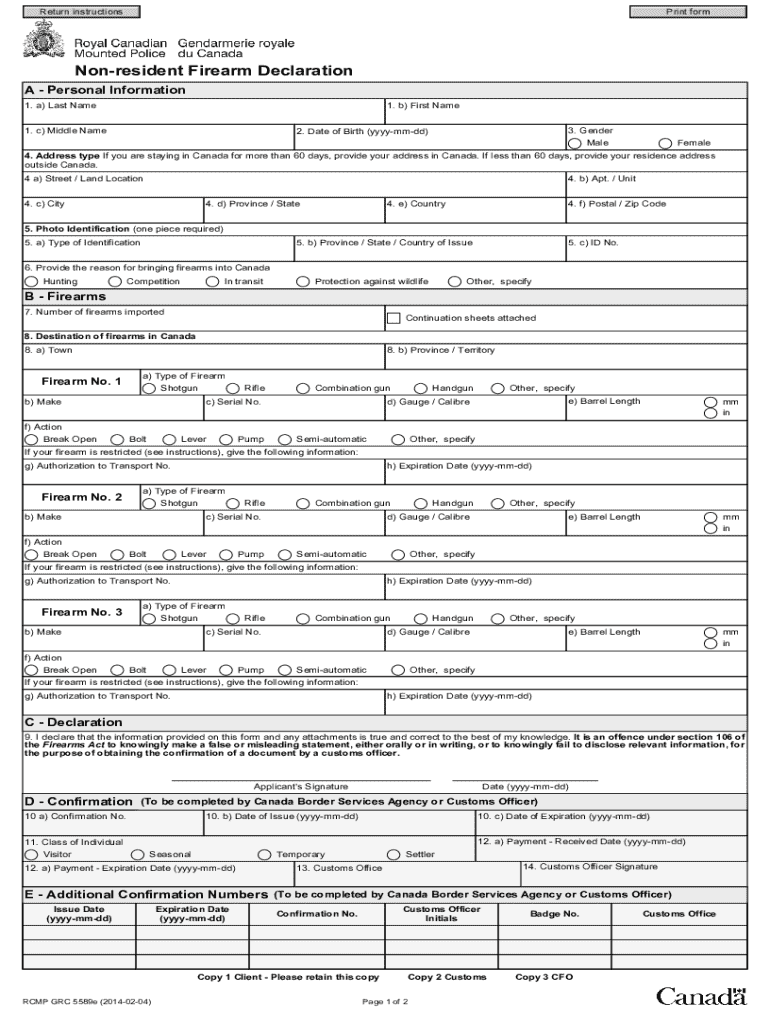
The Canada RCMP GRC 5589e form is essential for individuals declaring firearms when entering Canada. This guide provides clear, step-by-step instructions to help you accurately complete the form online, ensuring a smooth and compliant declaration process.
Follow the steps to successfully fill out the Canada RCMP GRC 5589e form.
- To begin, press the ‘Get Form’ button to obtain the Canada RCMP GRC 5589e form and open it in your preferred editor.
- Navigate to Section A - Personal Information. Here, you will need to fill out your last name, first name, middle name, and select your gender. Additionally, input your date of birth in the format YYYY-MM-DD.
- In Box 4, specify your address type. If your stay in Canada is for 60 days or less, provide your residence address outside Canada. For stays longer than 60 days, enter the address where you will be staying in Canada. If applicable, detail your land location in Box 4a.
- Box 5 requires you to indicate one piece of photo identification. This identification must be an official government-issued ID with a number and your photograph. Provide the type of identification and its issuing authority.
- In Section B - Firearms, begin with Box 7 to state the number of firearms you are declaring. If declaring more than three firearms, be prepared to attach a continuation sheet (RCMP GRC 5590).
- Next, in Box 8, indicate the destination of your firearms in Canada. Provide details such as the town and province or territory.
- For each firearm, fill out the required fields including type, make, serial number, gauge/calibre, barrel length, and action. If you indicate a restricted firearm, you must provide the Authorization to Transport number and its expiration date.
- In Section C, read the declaration statement carefully. Afterwards, sign your full name to confirm the accuracy of the information provided.
- Section D is to be completed by a Canada Border Services Agency or Customs Officer; you do not need to fill this out.
- Review all provided information for accuracy. Once verified, you can save any changes made, download the completed form, print it for your records, or share it as necessary.
Complete your Canada RCMP GRC 5589e form online to ensure you have the necessary documentation for your firearm declaration.
Experience a faster way to fill out and sign forms on the web. Access the most extensive library of templates available.
Related content
Non-Resident Firearm Declaration Continuation Sheet. Notice: This form is only valid if it...
Get answers to your most pressing questions about US Legal Forms API.
What form do I need to bring a gun into Canada?
To bring a gun into Canada, you need to complete the Canada RCMP GRC 5589e Non-Resident Firearm Declaration form. This document must be submitted at the border of entry, along with all necessary identification and permits. Ensure you understand the firearm laws in Canada to avoid any complications, which our platform can help clarify for you.
Do you need to be a Canadian citizen to join the RCMP?
No, you do not need to be a Canadian citizen to join the Canada RCMP GRC 5589e; however, permanent residency is required. Recruits must successfully pass a rigorous selection process, which includes physical and written assessments. This pathway opens doors for many who wish to contribute to law enforcement in Canada.
Do you have to be Canadian to join the RCMP?
While Canadian citizenship is the preferred status for joining the Canada RCMP GRC 5589e, it is not entirely necessary. Prospective candidates can apply if they are permanent residents of Canada and meet all other qualifications. This policy allows for a diverse applicant pool, enriching the force with various perspectives and experiences.
Can Americans join the RCMP?
Yes, Americans can join the Canada RCMP GRC 5589e, but they must meet specific requirements. Applicants must be able to obtain permanent residency in Canada and fulfill all other eligibility criteria, such as age and background checks. It's a remarkable opportunity for those interested in serving in law enforcement within Canada.
How much does a RCMP earn in Canada?
The salary of a member of the Canada RCMP GRC 5589e varies depending on their rank and experience. Typically, a new recruit can expect to earn around $53,000 annually, while experienced officers may earn over $100,000. Also, officers enjoy various benefits, including health insurance and pension plans, which add significant value to their overall compensation package.
Do non-restricted firearms need to be registered in Canada?
In Canada, non-restricted firearms do not require registration. However, they must be stored safely and legally. Understanding these distinctions is vital, and resources like the Canada RCMP GRC 5589e can help clarify your responsibilities.
What is the firearm form?
The firearm form is a document that provides essential information about the possession of firearms in Canada. It includes details on registration and ownership. The Canada RCMP GRC 5589e is one such form to help non-residents comply with Canadian firearm laws.
What is the non-resident firearm form for Canada?
The non-resident firearm form for Canada is known as the Canada RCMP GRC 5589e. This form allows non-residents to temporarily bring firearms into Canada for specific purposes. It’s important to complete it accurately to avoid complications.
Can I leave my gun at the Canadian border?
You cannot leave a firearm unattended at the Canadian border. It's essential to go through the proper procedures by either declaring or surrendering the firearm. As you navigate this process, the Canada RCMP GRC 5589e offers necessary guidance.
Can you legally carry a handgun in Canada?
Carrying a handgun in Canada is highly restricted. You can only carry a handgun if you have a specific license and valid reasons, such as employment in security. For more details on requirements, refer to the Canada RCMP GRC 5589e.
Use professional pre-built templates to fill in and sign documents online faster. Get access to thousands of forms.
If you believe that this page should be taken down, please follow our DMCA take down process here.
This form is available in several versions. Select the version you need from the drop-down list below.