Loading
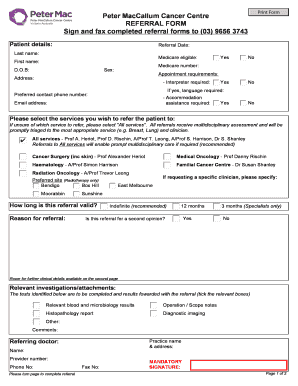
Get Peter Maccallum Cancer Centre Referral Form Sign And Fax - Petermac
How it works
-

Open form follow the instructions
-

Easily sign the form with your finger
-

Send filled & signed form or save
How to fill out the Peter MacCallum Cancer Centre Referral Form Sign And Fax - Petermac online
Filling out the Peter MacCallum Cancer Centre referral form is a crucial step in ensuring that patients receive the care they need. This guide provides clear, step-by-step instructions to help users complete the form accurately and efficiently, with an emphasis on user-friendliness and accessibility.
Follow the steps to complete the referral form effectively.
- Click ‘Get Form’ button to obtain the form and open it in the editor.
- Begin by entering the patient's details, including their last name, first name, date of birth (D.O.B), and Medicare number. Indicate whether the patient is Medicare eligible by selecting ‘Yes’ or ‘No.’
- Fill in the patient's address and preferred contact phone number, ensuring that all information is accurate and up-to-date.
- Select the appointment requirements, including whether an interpreter is needed and the preferred language, as well as if accommodation assistance is required.
- Choose the services you wish to refer the patient to. If unsure, select ‘All services’ for comprehensive multidisciplinary assessment.
- Specify the preferred site for radiation therapy, if applicable, from the provided options.
- Indicate how long the referral should remain valid by selecting one of the time frames: indefinite, 12 months, or 3 months.
- State the reason for the referral and whether it is for a second opinion.
- Provide relevant clinical information, previous medical history, current medications, and any known allergies on the second page of the form.
- Complete the details of the referring doctor, including name, practice name, address, provider number, and contact details.
- Ensure that you sign the form in the mandatory signature field before submission.
- Once all sections are filled out, save the completed form, and choose to download, print, or share as necessary.
Complete your documents online today for a streamlined referral process.
Please call (03) 8559 8110 to make an appointment.
Industry-leading security and compliance
US Legal Forms protects your data by complying with industry-specific security standards.
-
In businnes since 199725+ years providing professional legal documents.
-
Accredited businessGuarantees that a business meets BBB accreditation standards in the US and Canada.
-
Secured by BraintreeValidated Level 1 PCI DSS compliant payment gateway that accepts most major credit and debit card brands from across the globe.