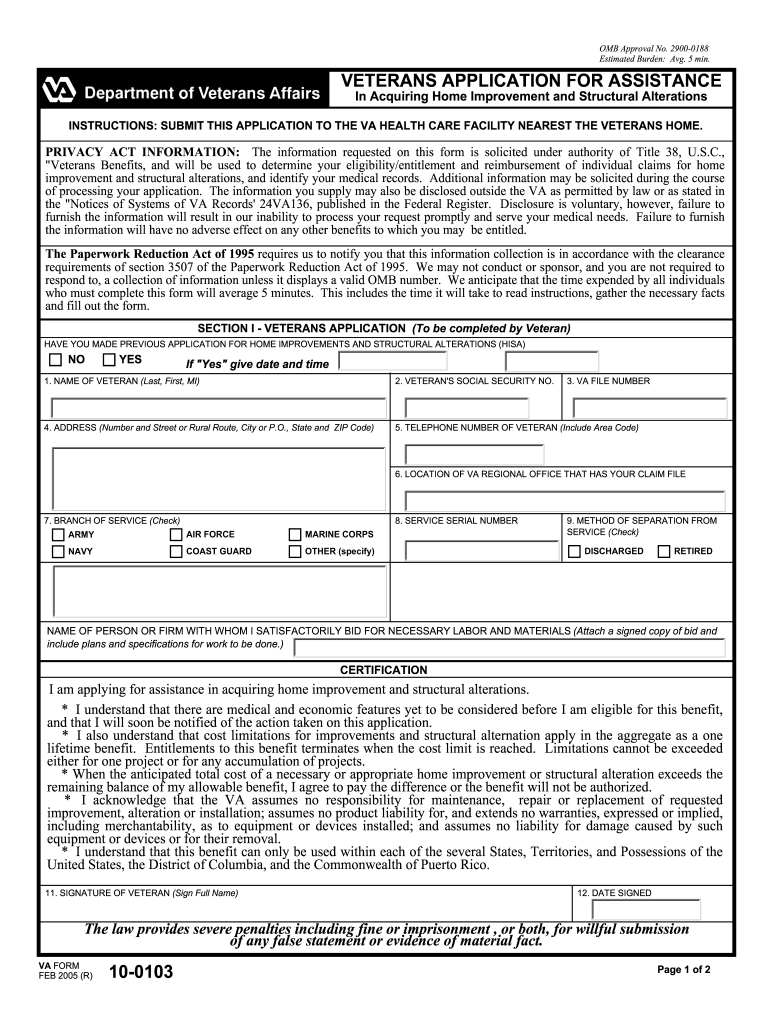
Limitations cannot be exceeded either for one project or for any accumulation of projects. * When the anticipated total cost of a necessary or appropriate home improvement or structural alteration exceeds the remaining balance of my allowable benefit, I agree to pay the difference or the benefit will not be authorized. * I acknowledge that the VA assumes no responsibility for maintenance, repair or replacement of requested improvement, alteration or installation; assumes no product liability fo.
Loading

Open form follow the instructions

Easily sign the form with your finger

Send filled & signed form or save
How to fill out the VA 10-0103 online
Filling out the VA 10-0103 form is a crucial step for veterans seeking assistance in acquiring home improvements and structural alterations. This guide provides clear, step-by-step instructions to help you complete the form accurately and efficiently online.
Follow the steps to successfully complete the VA 10-0103 form.
- Click the ‘Get Form’ button to retrieve the VA 10-0103 form and display it in your online editor.
- In Section I, you will need to provide your personal information, including your name, social security number, and contact details. Make sure to fill in all mandatory fields to avoid any processing delays.
- Indicate whether you have made a previous application for home improvements and structural alterations by selecting 'Yes' or 'No'. If 'Yes', provide the date and time of your previous application in the specified format.
- Fill in your VA file number, the location of the VA regional office handling your claim, and your service serial number. Ensure you complete Section I thoroughly.
- In the certification area, read each statement carefully. By signing, you acknowledge your understanding of the conditions regarding your application and the limitations of benefits.
- Make sure to sign and date the form in the appropriate fields at the bottom of the page.
- After completing the form, review all the provided information for accuracy. Once confirmed, you can save changes, download a copy of the form, print it, or share it as needed.
Take the next step in securing your benefits by completing your application online today.
Experience a faster way to fill out and sign forms on the web. Access the most extensive library of templates available.
Related content
Jun 10, 2025 — Form name: Veterans Application for Assistance in Acquiring Home...
(2) A completed and signed VA Form 10-0103, Veterans Application for Assistance in...
Compact packaging has become critical in more and more electrical installations. The VMX...
Get answers to your most pressing questions about US Legal Forms API.
Is VA duty to assist error a good thing?
Addressing a VA duty to assist error can be beneficial as it highlights the VA's responsibility to help veterans navigate the system effectively. Although it may seem negative initially, correcting such errors strengthens your claim and your access to resources. The VA form 10-0103 is vital for initiating this correction. Ultimately, it improves the overall process for all veterans.
Is VA correcting an error a good thing?
Yes, VA correcting an error is beneficial as it allows for adjustments that can directly impact your benefits. This correction process aims to rectify mistakes and ensure that veterans receive accurate support and compensation. Submitting your VA form 10-0103 is an integral part of this process. Embracing this corrective action can lead to positive changes in your benefits.
Is VA correcting an error good or bad?
VA correcting an error is a positive step toward ensuring that you receive the benefits you rightfully deserve. It shows the agency's commitment to accuracy and accountability. However, the initial error may cause some frustration, so addressing it with the VA form 10-0103 is crucial. Taking action increases your chances of a favorable resolution.
How long is the VA taking to correct an error?
The time it takes for the VA to correct an error varies depending on the complexity of the issue and the current workload of the office handling your submission. Generally, you may expect a response within several weeks to a few months. To get a better idea of the timeline, you can follow up with the VA after submitting your VA form 10-0103. Patience is essential during this process.
Where do I send my VA form 10 0103?
You should send your VA form 10-0103 to the appropriate VA office in your area, which may vary based on your location and specific situation. It's advisable to check the VA’s official website or contact their customer service for detailed instructions. Ensuring that it reaches the right department can expedite your correction request. Remember to keep a copy of the form for your records.
What happens when VA makes an error?
When the VA makes an error, it can impact your benefits and delay your claims. You have the right to request a correction, and this is where the VA form 10-0103 comes into play. Submitting this form helps document the issue and initiate the correction process. It's essential to keep records of all communications for reference.
What is an example of a lay statement?
An example of a lay statement might detail a personal account of how a veteran's service-related condition affects their daily activities. For instance, you might describe how a veteran struggles with mobility due to an injury. This personal touch reinforces the validity of claims related to the VA form 10-0103.
How do I fill out a VA lay statement?
Filling out a VA lay statement requires you to be precise and relevant. Begin by stating your name and relationship to the veteran, then narrate your observations concerning their service or disability. Refer to the VA form 10-0103 for any specific information needed to support the claim effectively.
How to fill out VA Buddy statement form?
To fill out the VA Buddy statement form, start by gathering all the relevant information needed for the form. Provide a thorough account of your relationship to the veteran and any significant experiences you can share. This will bolster the claims while ensuring your statements align with VA form 10-0103 requirements.
How do you write a good lay statement for the VA?
Writing a good lay statement for the VA involves being clear and straightforward. Provide your observations based on personal experiences, focusing on facts rather than opinions. Use the VA form 10-0103 as a reference point to align your statement with the necessary details to enhance your claim.
Use professional pre-built templates to fill in and sign documents online faster. Get access to thousands of forms.
If you believe that this page should be taken down, please follow our DMCA take down process here.