Loading
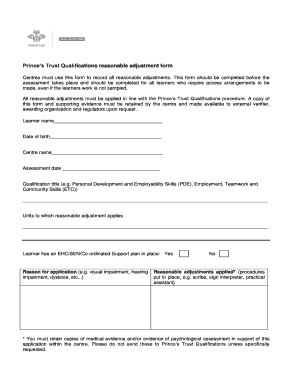
Get Princes Trust Qualifications Reasonable Adjustment Form
How it works
-

Open form follow the instructions
-

Easily sign the form with your finger
-

Send filled & signed form or save
How to fill out the Princes Trust Qualifications Reasonable Adjustment Form online
Filling out the Princes Trust Qualifications Reasonable Adjustment Form is an essential process for ensuring that learners receive the appropriate support during assessments. This guide offers clear, step-by-step instructions to help users successfully complete the form online, ensuring compliance with the Prince’s Trust's procedures.
Follow the steps to complete the form effectively
- Click the ‘Get Form’ button to obtain the Princes Trust Qualifications Reasonable Adjustment Form and access it in your designated online editing tool.
- Begin by entering the learner's name in the designated field provided at the top of the form.
- Next, fill in the learner's date of birth, ensuring that you use the correct format as specified.
- Complete the centre name field, which identifies the specific training centre submitting the form.
- Input the assessment date to indicate when the assessment is scheduled to take place.
- Select the qualification title from the list or write it in if not specified (e.g., Personal Development and Employability Skills, Employment, Teamwork and Community Skills).
- Identify the units that require reasonable adjustments and fill in that information in the allocated space.
- Indicate whether the learner has an Educational Health Care Plan (EHC), Special Educational Needs (SEN), or a Co-ordinated Support Plan by checking 'Yes' or 'No'.
- Provide a detailed reason for the application, specifying the nature of the learner's needs (e.g., visual impairment, dyslexia).
- List the reasonable adjustments that will be applied during the assessment (e.g., provision of a scribe, sign interpreter), ensuring all procedures are documented.
- Confirm all statements by signing and dating the form in the designated area, ensuring that all details provided are accurate.
- Once completed, you can save your changes, download a copy of the form, print it for records, or share it as necessary.
Compile and submit your documents online to ensure proper handling of reasonable adjustments.
There's lots of ways to get in touch with us, however the quickest and easiest way is to either call us on 0800 842 842 or start a live chat. We're open from 9am to 6pm, Monday to Friday and one of our advisers will be happy to help with your enquiries.