Get Loan Application Form - Iskysoft
How it works
-

Open form follow the instructions
-

Easily sign the form with your finger
-

Send filled & signed form or save
How to fill out the LOAN APPLICATION FORM - ISkySoft online
Completing the loan application form is an essential step for users seeking financial assistance through ISkySoft. This guide provides a comprehensive overview of each section in the form, allowing users to fill it out accurately and efficiently.
Follow the steps to successfully complete your loan application form.
- Click ‘Get Form’ button to obtain the form and open it in your editor.
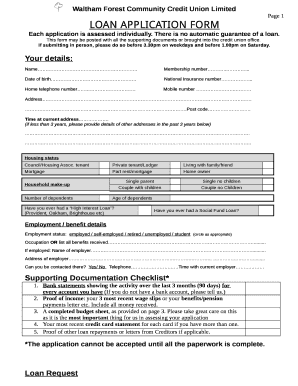
- Provide your personal details in the 'Your details' section. Ensure you fill in your full name, membership number, date of birth, national insurance number, home and mobile telephone numbers, as well as your current address. If you have lived at your current address for less than three years, list any previous addresses.
- Indicate your housing status by selecting one of the provided options, such as council or housing association tenant, private tenant, or homeowner. Also, describe your household makeup, including the number of dependents and their ages.
- Answer whether you have ever had a high-interest loan or a social fund loan, providing details if you respond affirmatively.
- In the 'Employment / benefit details' section, indicate your employment status and occupation, or list all benefits you currently receive. If employed, include the name and address of your employer along with the duration of your employment.
- Review the supporting documentation checklist. Gather and attach all necessary documents including bank statements for the last three months, proof of income, a completed budget sheet, and details of any other loan repayments.
- In the 'Loan Request' section, specify the amount you wish to borrow and the repayments you can afford. Also, indicate if you wish to save a certain amount alongside your loan repayments.
- Complete the 'Health Status' section by indicating whether you have received treatment for any illness or injury in the last six months, providing details if applicable.
- Fill out the 'Other Debts' section. List all current debts, including loans, credit card balances, mortgages, and any outstanding bills.
- Read the declaration carefully and ensure all information provided is accurate before signing it. If applicable, a second applicant should also sign.
- Complete the budget sheet provided on page 3 to ensure you can afford the loan, including listing all income and essential spending.
- Once you have filled out all sections and attached necessary documents, save your changes. You can then download, print, or share the application form as needed.
Take the next step in your financial journey by completing your loan application form online today.
Personal loans generally aren't hard to get and are available from credit unions, banks, and online lenders. There are various types of personal loans to consider, depending on how much money you need to borrow. How Hard Is It To Get A Personal Loan? Is It Easy? | CU SoCal cusocal.org https://.cusocal.org › Financial-Guidance › Blog › h... cusocal.org https://.cusocal.org › Financial-Guidance › Blog › h...
Industry-leading security and compliance
-
In businnes since 199725+ years providing professional legal documents.
-
Accredited businessGuarantees that a business meets BBB accreditation standards in the US and Canada.
-
Secured by BraintreeValidated Level 1 PCI DSS compliant payment gateway that accepts most major credit and debit card brands from across the globe.