Loading
Form preview
  • US Legal Forms
  • Other Templates
  • Industry Forms
  • Industry Insurance & Medical Forms
  • Wsu Rabies Vaccination Certificate

Get Wsu Rabies Vaccination Certificate

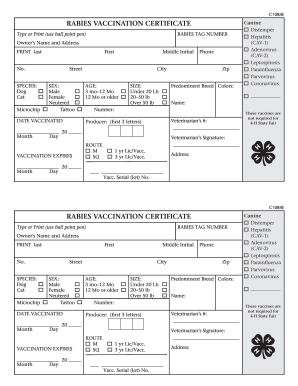
No. First City SEX: Male Female Neutered Tattoo AGE: 3 mo–12 Mo 12 Mo or older DATE VACCINATED Month Day Day Zip Predominent Breed Colors: Name: Number: These vaccines are not required for 4-H State Fair Veterinarian’s #: Producer: (first 3 letters) 20 Veterinarian’s Signature: ROUTE M SQ VACCINATION EXPIRES Month SIZE: Under 20 Lb 20–50 lb Over 50 lb Phone Canine Distemper Hepatitis (CAV-1) Adenovirus (CAV-2) Leptospirosi.

How it works

  1. Open form

    Open form follow the instructions

  2. Easily sign form

    Easily sign the form with your finger

  3. Share form

    Send filled & signed form or save

How to fill out the WSU Rabies Vaccination Certificate online

Filling out the WSU Rabies Vaccination Certificate online is an essential step in ensuring that your pet is vaccinated against rabies. This guide will walk you through the process clearly and thoroughly to help you complete the certificate accurately.

Follow the steps to complete the WSU Rabies Vaccination Certificate online.

  1. Press the ‘Get Form’ button to obtain the WSU Rabies Vaccination Certificate and open it in the online editor.
  2. Begin by entering the rabies tag number in the designated field to provide proof of vaccination identification.
  3. Input the owner’s name and address. Include the last name, middle initial, first name, street address, city, state, and zip code.
  4. Indicate the species of your pet by selecting either Dog, Cat, or Microchip.
  5. Select the sex of your pet by marking either Male, Female, or Neutered, and note any tattoo number if applicable.
  6. Specify the pet's age by selecting either 3 months to 12 months or 12 months or older.
  7. Input the date vaccinated by selecting the month, day, and year of vaccination.
  8. Indicate the vaccination expiration date in the same manner as you did for the date vaccinated.
  9. Select the size of your pet by choosing between Under 20 lbs, 20-50 lbs, or Over 50 lbs.
  10. Record the predominant breed colors and complete the name and number fields as required.
  11. Enter the veterinarian’s phone number and registration number to validate the vaccination.
  12. Have the veterinarian complete the signature field and select the route of vaccination - either M for intramuscular or SQ for subcutaneous.
  13. Lastly, review all the entered information for accuracy, and make any necessary corrections.
  14. Once satisfied with the information, you can save changes, download, print, or share the completed form.

Start completing your WSU Rabies Vaccination Certificate online today for a hassle-free process.

Get form

Experience a faster way to fill out and sign forms on the web. Access the most extensive library of templates available.
Get form

Related content

Small Animal Import Requirements
All dogs, cats, and ferrets over 90 days old must have a current rabies vaccination listed...
Learn more
RABIES VACCINATION CERTIFICATE
Vaccines listed in the shaded portion of this Certificate are not required for...
Learn more

Related links form

LG&E and KU Electrical and Gas Load Data Sheet 2015 Lions Clubs International TK-21A 2013 Little League Baseball & Softball National Facility Survey 2015 Mega Sports Camp Registration Form 2011

Questions & Answers

Get answers to your most pressing questions about US Legal Forms API.

Contact support

To fill out a rabies vaccination certificate correctly, ensure you include all necessary information about your dog. Typically, you will need to input the vaccination date, vaccine type, and your pet's information. It's crucial to have the certificate signed by a licensed veterinarian to validate it. If you would like a structured format, US Legal Forms provides templates for the WSU Rabies Vaccination Certificate, making the process quicker and easier.

Filling out a rabies certificate requires you to include specific details about your pet and the vaccination. Start with your dog's name, age, and breed, then list the date of vaccination and the type of vaccine used. Don’t forget to add your contact information and sign the certificate. If you are unsure about the process, consider using the WSU Rabies Vaccination Certificate template, available through US Legal Forms, to streamline the process.

Rabies vaccine paperwork, specifically the WSU Rabies Vaccination Certificate, typically includes your pet's name, breed, age, and the date of vaccination. It also features the veterinarian's name and signature, along with details about the vaccine used. This official document serves as proof of your dog's vaccination status and should be kept accessible for any necessary checks. If you need help, platforms like US Legal Forms offer templates for easy documentation.

You can prove your dog's rabies vaccination by obtaining a copy of the WSU Rabies Vaccination Certificate from your veterinarian. This certificate contains important information, such as your dog's vaccination date and the vaccine's expiration date. Keep this document in a safe place as it may be required for boarding, traveling, or licensing your pet. Always ensure that the certificate is signed and properly filled out by the veterinarian.

To obtain proof of vaccination for your dog, you should first contact the veterinarian who administered the rabies vaccine. They can provide you with a WSU Rabies Vaccination Certificate, which serves as official documentation. If you cannot reach your veterinarian, consider visiting the clinic's website or submitting a request for records. This certificate is essential for various situations, including travel and pet registration.

To prove your dog has received a rabies shot, present the WSU Rabies Vaccination Certificate issued by your vet. This certificate contains vital details that confirm the vaccination. Keeping a copy of this document is essential for compliance with local regulations and for any situations that require proof of vaccination.

To obtain a copy of your rabies tag, reach out to your veterinarian's office. They usually maintain records of rabies tags and can issue replacements, ensuring you have the necessary documentation. Always keep your WSU Rabies Vaccination Certificate and tag together for easy reference.

You can look up your dog's rabies vaccine by checking the WSU Rabies Vaccination Certificate provided by your veterinarian. Many clinics maintain digital records, so you can also contact them for assistance. If you need more detailed information, make sure to have your dog’s identification details handy.

To print your rabies certificate, including the WSU Rabies Vaccination Certificate, contact your veterinarian's office for guidance. Many vets offer electronic versions of vaccination certificates that you can download and print easily. If you need a hard copy, your veterinarian can also provide one upon request.

Yes, veterinarians provide rabies vaccination certificates after administering the vaccine. The WSU Rabies Vaccination Certificate includes your dog’s details and vaccination date, ensuring its validity. If you have any concerns, discuss them with your vet during your next visit.

Get This Form Now!

Use professional pre-built templates to fill in and sign documents online faster. Get access to thousands of forms.
Get form
If you believe that this page should be taken down, please follow our DMCA take down processhere.
Get WSU Rabies Vaccination Certificate
Get form
  • Adoption
  • Bankruptcy
  • Contractors
  • Divorce
  • Home Sales
  • Employment
  • Identity Theft
  • Incorporation
  • Landlord Tenant
  • Living Trust
  • Name Change
  • Personal Planning
  • Small Business
  • Wills & Estates
  • Packages A-Z
  • Affidavits
  • Bankruptcy
  • Bill of Sale
  • Corporate - LLC
  • Divorce
  • Employment
  • Identity Theft
  • Internet Technology
  • Landlord Tenant
  • Living Wills
  • Name Change
  • Power of Attorney
  • Real Estate
  • Small Estates
  • Wills
  • All Forms
  • Forms A-Z
  • Other Templates
  • Legal Hub
  • About Us
  • Help Portal
  • Legal Resources
  • Blog
  • Affiliates
  • Contact Us
  • Delete My Account
  • Site Map
  • Industries
  • Forms in Spanish
  • Localized Forms
  • State-specific Forms
  • Forms Kit
  • Real Estate Handbook
  • All Guides
  • Notarize
  • Incorporation services
  • For Consumers
  • For Small Business
  • For Attorneys
  • USLegal
  • FormsPass
  • pdfFiller
  • signNow
  • altaFlow
  • DocHub
  • Instapage
Form Packages
  • Adoption
  • Bankruptcy
  • Contractors
  • Divorce
  • Home Sales
  • Employment
  • Identity Theft
  • Incorporation
  • Landlord Tenant
  • Living Trust
  • Name Change
  • Personal Planning
  • Small Business
  • Wills & Estates
  • Packages A-Z
Form Categories
  • Affidavits
  • Bankruptcy
  • Bill of Sale
  • Corporate - LLC
  • Divorce
  • Employment
  • Identity Theft
  • Internet Technology
  • Landlord Tenant
  • Living Wills
  • Name Change
  • Power of Attorney
  • Real Estate
  • Small Estates
  • Wills
  • All Forms
  • Forms A-Z
  • Other Templates
Customer Service
  • Legal Hub
  • About Us
  • Help Portal
  • Legal Resources
  • Blog
  • Affiliates
  • Contact Us
  • Delete My Account
  • Site Map
  • Industries
  • Forms in Spanish
  • Localized Forms
  • State-specific Forms
  • Forms Kit
Legal Guides
  • Real Estate Handbook
  • All Guides
Prepared for you
  • Notarize
  • Incorporation services
Our Customers
  • For Consumers
  • For Small Business
  • For Attorneys
Our Sites
  • USLegal
  • FormsPass
  • pdfFiller
  • signNow
  • altaFlow
  • DocHub
  • Instapage
Social Media
Call us now toll free:
+1 833 426 79 33
As seen in:
© Copyright 1999-2026 airSlate Legal Forms, Inc. 17 Station Street, Ste. 203, Brookline, MA 02445
  • Your Privacy Choices
  • Terms of Service
  • Privacy Notice
  • Content Takedown Policy
  • Bug Bounty Program