Loading
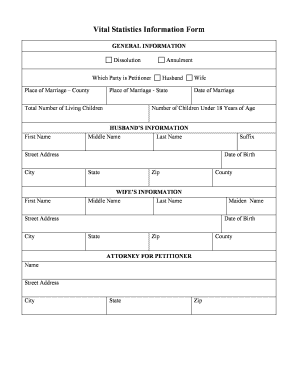
Get Vital Statistics Information Form - Collierclerkcom
How it works
-

Open form follow the instructions
-

Easily sign the form with your finger
-

Send filled & signed form or save
How to fill out the Vital Statistics Information Form - CollierClerkcom online
The Vital Statistics Information Form is an important document used for legal processes such as dissolution or annulment of marriage. This guide provides clear, step-by-step instructions to help you fill out the form accurately and efficiently online.
Follow the steps to successfully complete the form.
- Click ‘Get Form’ button to obtain the form and open it in the editor.
- In the general information section, indicate whether this form is for dissolution or annulment. Specify which party is the petitioner, and enter the place of marriage, including the county and state.
- Enter the total number of living children you have, along with the first names and last names of both parties involved.
- Fill in the date of marriage and the number of children under 18 years of age. Ensure accuracy as this information is crucial.
- For the husband's information, provide their first name, middle name, last name, and any suffix, followed by the street address, date of birth, city, state, and zip code.
- Next, enter the wife's information in a similar manner, including first name, middle name, last name, maiden name, street address, city, date of birth, state, and zip code.
- Include the attorney's information if applicable, including name, street address, city, state, and zip code.
- Once all sections are filled out, review your entries carefully for any errors or omissions. Make any necessary corrections.
- Finally, save your changes, and you will have the option to download, print, or share the form as needed.
Complete your documents online today to ensure a smooth filing process.
Florida certificates are issued through the Bureau of Vital Statistics at the Department of Health. Orders may be placed in person, by mail, or online through VitalChek.