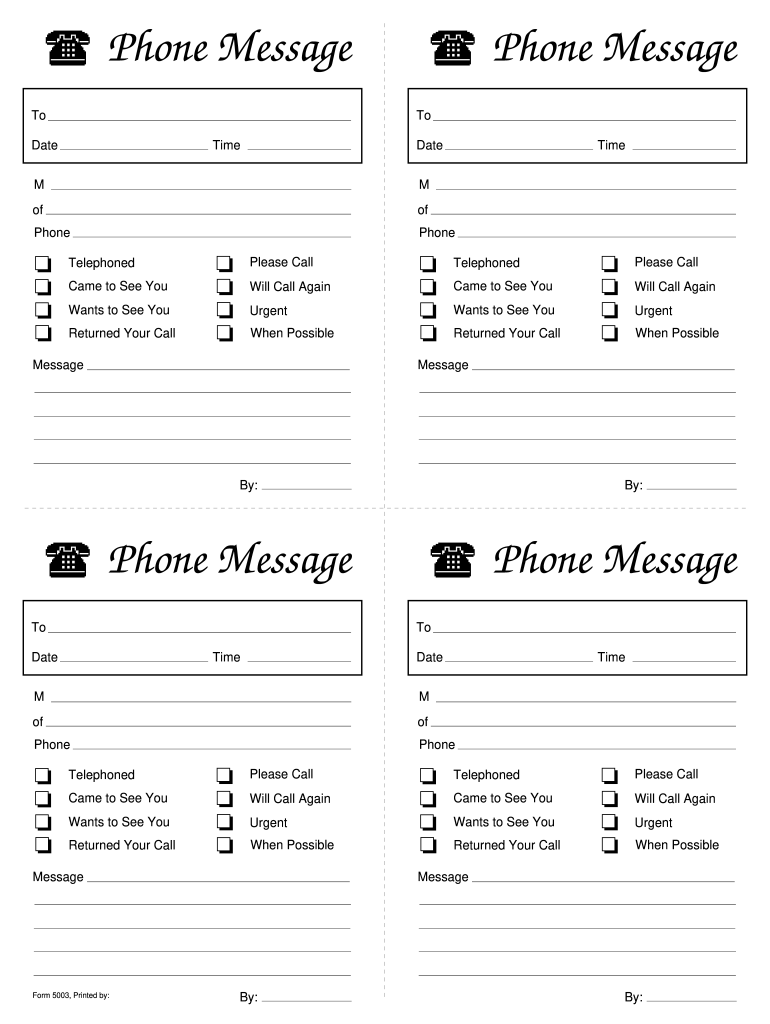
Ur Call t t t t Please Call Will Call Again Urgent When Possible Message t t t t Telephoned Came to See You Wants to See You Returned Your Call t t t t Please Call Will Call Again Urgent When Possible Message By: By: Phone Message To Phone Message To Date Time Date Time M M of of Phone Phone t t t t Telephoned Came to See You Wants to See You Returned Your Call t t t t Please Call Will Call Again Urgent When Possible Message Form 5003, Printed by: t t t t Telephoned.
Loading

Open form follow the instructions

Easily sign the form with your finger

Send filled & signed form or save
How to fill out the Telephone Message Slips Form 500 online
This guide provides step-by-step instructions for filling out the Telephone Message Slips Form 500 online. Whether you are familiar with digital forms or are new to this process, you will find clear guidance to help you complete the form effectively.
Follow the steps to accurately complete the Telephone Message Slips Form 500.
- Click ‘Get Form’ button to access the Telephone Message Slips Form 500. This will allow you to open the form in an online editor.
- Fill in the 'To' field with the name of the person or department that the message is directed to. Ensure you have accurate spelling to avoid confusion.
- Enter the date of the message. This should reflect the day the communication took place to maintain accurate records.
- Input the time the message was recorded. Use the 12-hour or 24-hour format as necessary, but be consistent.
- Specify the method of contact by selecting an option from the available choices: 'Telephoned,' 'Came to See You,' 'Wants to See You,' or 'Returned Your Call.' Select the one that accurately reflects the interaction.
- Indicate the priority of the message by choosing from options such as 'Urgent,' 'Will Call Again,' or 'When Possible.' This helps the recipient prioritize their response.
- Compose the message content in the designated area. Be concise and clear, ensuring you communicate the essential details.
- Lastly, sign off the message with your name or the name of the sender in the 'By' section to verify who recorded the message.
- Once all fields are completed, save your changes. You may also choose to download, print, or share the completed form as needed.
Start filling out your documents online today!
Experience a faster way to fill out and sign forms on the web. Access the most extensive library of templates available.
Related content
Oct 31, 2022 — Includes telephone message slips, tracking logs, routing slips, fax cover...
Text messages on the telephone. Received messages will be indicated by a flashing. Message...
Get answers to your most pressing questions about US Legal Forms API.
How do I get my telephone messages?
To get your telephone messages, you can check your message log if you're using a digital platform or refer to your written notes. If you utilize a structured format, like the Telephone Message Slips Form 500, retrieving this information becomes straightforward and organized. Make it a habit to review your messages regularly to stay updated.
What are the requirements of a telephone message?
The requirements of a telephone message include the caller's name, contact number, date and time of the call, and the message details. It is essential to capture this information accurately to ensure effective communication. Using the Telephone Message Slips Form 500 makes it easier to meet these requirements systematically.
When taking a phone message, it is most important to?
When taking a phone message, it is most important to ensure clarity and accuracy. Focus on listening attentively and recording key details such as the caller's name and the message content. Utilizing the Telephone Message Slips Form 500 can streamline this process and help avoid misunderstandings.
How to take a telephone message?
To take a telephone message effectively, listen carefully and write down important details immediately. Use a standard format, like the Telephone Message Slips Form 500, to organize the caller's name, phone number, and the message itself. This approach helps ensure nothing is overlooked and that the message is accurate.
What details need to be taken when taking a telephone message?
When taking a telephone message, it is important to capture the caller's name, contact number, and the time and date of the call. Additionally, record the message content clearly and any specific instructions or follow-up requests. Using the Telephone Message Slips Form 500 can be helpful in structuring this information efficiently.
How do you take and leave messages?
Taking and leaving messages efficiently involves clarity and attention to detail. When taking a message, ensure you gather all relevant information using the Telephone Message Slips Form 500. If leaving a message, be concise, state who you are, and clearly mention how the recipient can get back to you.
How to fill a telephone message pad?
When filling a telephone message pad, start with the date and time of the call at the top. Then, write the caller's name, their contact number, and message clearly. Utilizing the Telephone Message Slips Form 500 can make this process easier, as it provides a template for organizing information effectively.
How to take down a telephone message?
To take down a telephone message, listen attentively to the caller and write down their information promptly. Use a structured format, such as the Telephone Message Slips Form 500, to help you capture all key details, including the message content. Always repeat the message back to the caller to confirm accuracy before ending the conversation.
How to fill out a telephone message form?
Filling out a telephone message form involves providing essential details. Start by recording the caller's name, number, and the date and time of the call. Clearly write down the message or purpose of the call using the Telephone Message Slips Form 500 to help you organize this information efficiently.
How to properly take a phone message?
To properly take a phone message, begin by clearly identifying yourself and asking for the caller's name. Note the date and time of the call as well as the purpose of the call. Use the Telephone Message Slips Form 500 to ensure all necessary information is recorded accurately. Finally, confirm the details with the caller before ending the call.
Use professional pre-built templates to fill in and sign documents online faster. Get access to thousands of forms.
If you believe that this page should be taken down, please follow our DMCA take down process here.