Loading
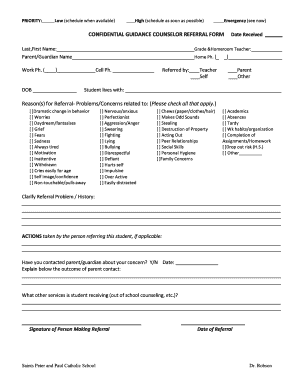
Get Confidential Guidance Counselor Referral Form Date - Sppnb
How it works
-

Open form follow the instructions
-

Easily sign the form with your finger
-

Send filled & signed form or save
How to fill out the CONFIDENTIAL GUIDANCE COUNSELOR REFERRAL FORM Date - Sppnb online
This guide provides clear and detailed instructions for successfully completing the Confidential Guidance Counselor Referral Form Date - Sppnb online. By following the steps outlined below, users can ensure that they fill out the form accurately and completely.
Follow the steps to fill out the form correctly.
- Click the ‘Get Form’ button to access the Confidential Guidance Counselor Referral Form Date - Sppnb. This action will allow you to open the form in a format that is easy to fill out.
- Begin by entering the last and first name of the student in the designated field. Ensure accuracy to aid in proper identification.
- Next, fill in the parent or guardian's name. This section helps provide context on the student's support system.
- Add the work phone number of the parent or guardian. Include the area code for clarity.
- Input the student's date of birth in the specified format to ensure proper age assessment.
- Record the date the form is received to maintain appropriate timelines for referral processing.
- Indicate the student's grade and homeroom teacher. This information is essential for referral processing.
- Provide the home phone number of the parent or guardian to facilitate any necessary communication.
- Enter the cell phone number of the parent or guardian if available. This is helpful for urgent communications.
- Identify the individual or entity making the referral by checking the corresponding box (teacher, self, parent, or other).
- Indicate with whom the student lives by marking the appropriate selection.
- In the 'Reasons for Referral' section, check all boxes that apply to the problems or concerns related to the student. These options guide the counselor in addressing specific issues.
- Provide a detailed clarification of the referral problem or history in the space provided. Be thorough to assist in understanding the context.
- If applicable, outline any actions taken by the person referring the student. This gives additional context to the referral.
- Confirm whether the parent or guardian has been contacted about the concern by answering 'Yes' or 'No' and provide the date of contact if applicable.
- Explain the outcome of the parent contact in the designated space. This could influence subsequent steps in the referral process.
- List any other services the student is receiving outside of school, such as counseling or therapy, in the relevant section.
- Finally, the person who is making the referral should sign the form to validate the referral.
- Include the date of the referral, ensuring all components are up-to-date.
- Once all sections are completed, review your entries for accuracy before submitting. Users can save changes, download, print, or share the form as needed.
Complete your forms online with confidence by following these detailed instructions.
Industry-leading security and compliance
US Legal Forms protects your data by complying with industry-specific security standards.
-
In businnes since 199725+ years providing professional legal documents.
-
Accredited businessGuarantees that a business meets BBB accreditation standards in the US and Canada.
-
Secured by BraintreeValidated Level 1 PCI DSS compliant payment gateway that accepts most major credit and debit card brands from across the globe.