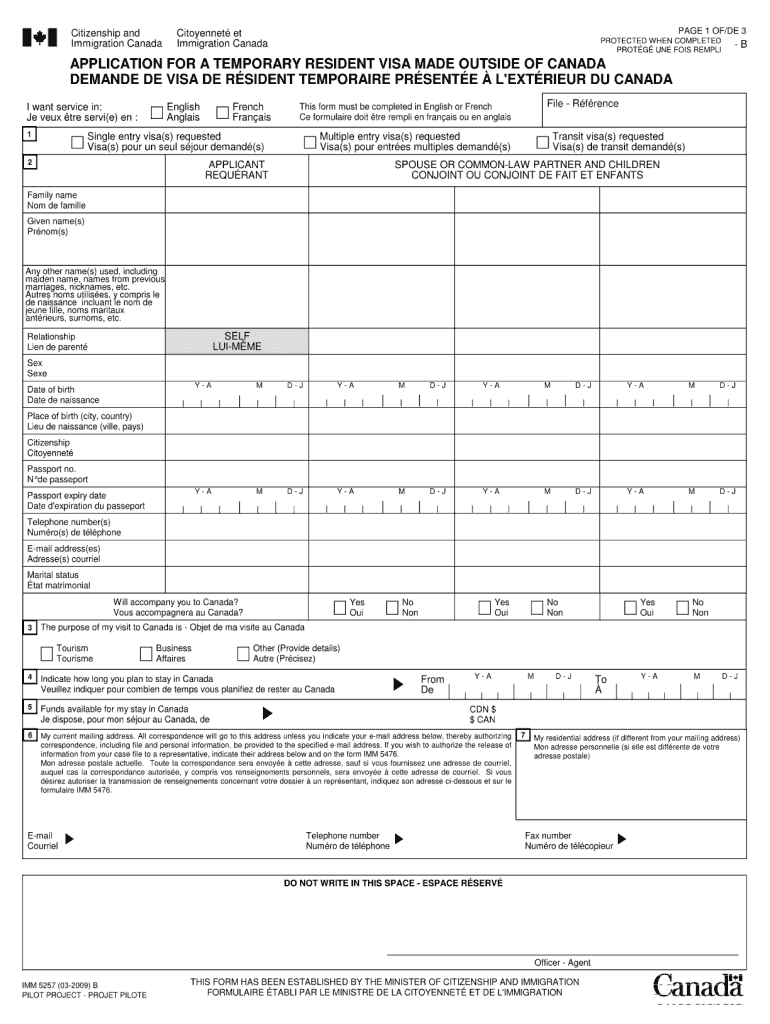
Fillable Form Citizenship and Immigration Canada Citoyennet et Immigration Canada PAGE 1 OF/DE 3 PROTECTED WHEN COMPLETED PROT G UNE FOIS REMPLI -B APPLICATION FOR A TEMPORARY RESIDENT VISA MADE OUTSIDE.
Loading

Open form follow the instructions

Easily sign the form with your finger

Send filled & signed form or save
How to fill out and sign Canada IMM 5257 E online?
Get your online template and fill it in using progressive features. Enjoy smart fillable fields and interactivity.Follow the simple instructions below:
Legal, taxation, commercial as well as other electronic documents require a high degree of adherence to the law and safeguarding.
Our forms are consistently revised in line with the most recent legislative updates.
Our solution enables you to manage the entire procedure of completing legal forms online. Consequently, you save hours (if not days or weeks) and eliminate extraneous costs. From this point forward, complete Canada IMM 5257 E from the convenience of your home, office, and even while traveling.
- Access the document in the comprehensive online editor by clicking on Get form.
- Fill in the necessary fields highlighted in yellow.
- Press the green arrow labeled Next to navigate from one field to the next.
- Utilize the e-signature tool to affix an electronic signature on the document.
- Insert the pertinent date.
- Review the entire document to ensure that you haven't overlooked any crucial information.
- Click Done and download the final document.
Tips on how to fill out, edit and sign Canada IMM 5257 E online
How to fill and sign Canada IMM 5257 E
Get your online template and fill it in using progressive features. Enjoy smart fillable fields and interactivity.Follow the simple instructions below:
Legal, taxation, commercial as well as other electronic documents require a high degree of adherence to the law and safeguarding.
Our forms are consistently revised in line with the most recent legislative updates.
Our solution enables you to manage the entire procedure of completing legal forms online. Consequently, you save hours (if not days or weeks) and eliminate extraneous costs. From this point forward, complete Canada IMM 5257 E from the convenience of your home, office, and even while traveling.
- Access the document in the comprehensive online editor by clicking on Get form.
- Fill in the necessary fields highlighted in yellow.
- Press the green arrow labeled Next to navigate from one field to the next.
- Utilize the e-signature tool to affix an electronic signature on the document.
- Insert the pertinent date.
- Review the entire document to ensure that you haven't overlooked any crucial information.
- Click Done and download the final document.
How to edit Canada IMM 5257 E
How to modify Get Canada IMM 5257 E 2009: personalize forms online
Select a trustworthy document editing service you can depend on. Modify, complete, and sign Get Canada IMM 5257 E 2009 securely online.
Frequently, dealing with documents like Get Canada IMM 5257 E 2009 can be challenging, particularly if you have them in a digital format but lack access to specialized software. While there are some alternatives to navigate this, you may risk obtaining a form that fails to meet submission standards. Utilizing a printer and scanner is also not a viable solution as it consumes time and resources.
We provide a more streamlined and effective approach to completing files. An extensive range of document templates that are simple to personalize and authorize, making them fillable for others. Our solution goes well beyond just a collection of templates. One of the greatest advantages of using our service is that you can edit Get Canada IMM 5257 E 2009 directly on our platform.
Being an online service, it spares you from needing to download any software. Additionally, not all company policies permit you to install applications on your work laptop. Here’s how you can effortlessly and securely manage your paperwork with our service.
Forget about paper and other inefficient methods for altering your Get Canada IMM 5257 E 2009 or other documents. Use our tool instead, which possesses one of the most comprehensive libraries of ready-to-personalize forms and a robust document editing feature. It's convenient and secure, and can save you a significant amount of time! Don’t just take our word for it; try it out for yourself!
- Click the Get Form > you’ll be instantly guided to our editor.
- Once opened, you can commence the editing process.
- Select checkmark or circle, line, arrow, and cross among other options to annotate your document.
- Choose the date option to insert a specific date into your template.
- Include text boxes, images, notes, and more to enhance the content.
- Utilize the fillable fields option on the right to establish fillable fields.
- Select Sign from the top toolbar to generate and create your legally-binding signature.
- Click DONE and save, print, share, or download the document.
How to fill and sign Canada IMM 5257 E
Get your online template and fill it in using progressive features. Enjoy smart fillable fields and interactivity.Follow the simple instructions below:
Legal, taxation, commercial as well as other electronic documents require a high degree of adherence to the law and safeguarding.
Our forms are consistently revised in line with the most recent legislative updates.
Our solution enables you to manage the entire procedure of completing legal forms online. Consequently, you save hours (if not days or weeks) and eliminate extraneous costs. From this point forward, complete Canada IMM 5257 E from the convenience of your home, office, and even while traveling.
- Access the document in the comprehensive online editor by clicking on Get form.
- Fill in the necessary fields highlighted in yellow.
- Press the green arrow labeled Next to navigate from one field to the next.
- Utilize the e-signature tool to affix an electronic signature on the document.
- Insert the pertinent date.
- Review the entire document to ensure that you haven't overlooked any crucial information.
- Click Done and download the final document.
Experience a faster way to fill out and sign forms on the web. Access the most extensive library of templates available.
Related content
Along with the Application for a Temporary Resident Travel Document (IMM 5257), please...
IMM 5257E Schedule 1 Application for a Temporary Resident The information you provide on...
Feb 10, 2014 — IMM 5257E. Additional Family Information. IMM 5406E. Application for...
Get answers to your most pressing questions about US Legal Forms API.
What is the minimum bank balance for visitor visa in Canada?
When applying for a visitor visa, the Canada IMM 5257 E, having a minimum bank balance of CAD 1,000 to CAD 1,500 per month is advisable. This amount helps demonstrate your capability to cover travel expenses and stay in Canada. Always include supporting documents, like bank statements, to clarify your financial situation to immigration officials.
Do I need to fill IMM5257?
If you plan to visit Canada as a tourist, you need to complete the IMM5257 form, which is essential for the Canada IMM 5257 E visa process. This form collects your personal information, travel details, and financial status. Accurate completion of this form is crucial for the success of your visa application.
Is IMM 5257 the same as IMM5257e?
Yes, IMM 5257 and IMM5257E refer to the same form used for applying for a Canada tourist visa. The 'E' simply signifies the electronic version of the form, making it easier to fill out and submit online. Using the correct version is important to ensure your application process goes smoothly.
How much bank balance is required for a Canada tourist visa?
To apply for a Canada tourist visa, the Canada IMM 5257 E, you should ideally have sufficient funds to support yourself during your visit. A good rule of thumb is to have CAD 1,000 to CAD 1,500 for each month of your stay. However, you also need to account for your accommodation and other travel costs when determining your financial requirements.
What is the minimum bank balance for tourist visa?
While there isn't an official minimum bank balance required for a Canada tourist visa like the Canada IMM 5257 E, financial stability is crucial. Generally, having a balance that shows you can cover your trip expenses—at least CAD 1,000 per month—will be beneficial in the application process. It's advisable to provide recent bank statements as proof of your financial capability.
How much funds are required for a Canada tourist visa?
To obtain a Canada tourist visa, specifically the Canada IMM 5257 E, you need to demonstrate that you have sufficient funds to support your stay. Typically, this means having at least CAD 1,000 to CAD 1,500 per month, depending on your travel plans and duration of stay. Ensure you consider your accommodation, travel, and daily expenses when calculating the total amount needed.
Who can use the new IRCC portal?
The new IRCC portal is available for individuals applying for various immigration programs, including visitor visas, permanent residency, and more. This user-friendly platform provides all applicants a streamlined way to submit their information and track their application status. By using the IRCC portal, applicants benefit from a digital system that simplifies the submission process. Be sure to check the portal’s eligibility requirements to ensure you can utilize its features.
Is IMM 5645 mandatory?
The IMM 5645 form, also known as the Family Information form, is mandatory for most applicants when applying for a visitor visa in Canada. This form collects information about your family members and is critical for the immigration assessment process. If you do not include this form when required, it could delay or even hinder your application. Always ensure you have the necessary forms, including the IMM 5645, ready for submission.
Can I download a visa application form?
Yes, you can download the visa application form for Canada, specifically the IMM 5257, via the official IRCC website. This option allows you to fill it out offline at your convenience. However, while downloading the form is possible, submitting it electronically often results in a quicker processing time. You might also explore the US Legal Forms platform for additional resources and guidance on completing your application.
Who needs to fill IMM5257?
The IMM5257 form is required for individuals applying for a visitor visa to Canada. This includes tourists, business visitors, and people visiting family or friends. If you fall under any of these categories, you must complete this form to proceed with your visa application. Ensuring accuracy and thoroughness when filling out the IMM5257 is crucial for a successful application.
Use professional pre-built templates to fill in and sign documents online faster. Get access to thousands of forms.
If you believe that this page should be taken down, please follow our DMCA take down process here.
This form is available in several versions. Select the version you need from the drop-down list below.