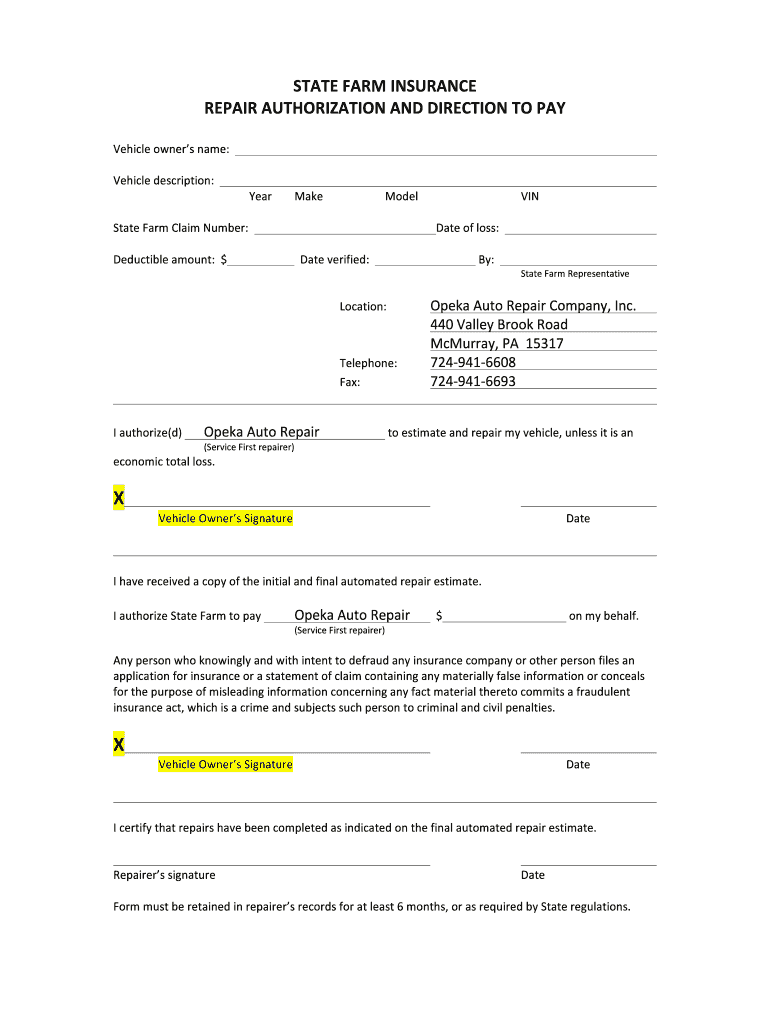
Nature Date I certify that repairs have been completed as indicated on the final automated repair estimate. Repairer’s signature Date .
Loading

Open form follow the instructions

Easily sign the form with your finger

Send filled & signed form or save
How to fill out the Repair authorization and direction to pay online
Completing the Repair authorization and direction to pay form is an essential step in managing vehicle repairs efficiently. This guide provides clear instructions to help you properly fill out the form, ensuring a smooth process for authorizing repairs and facilitating payment.
Follow the steps to complete the form accurately.
- To start, click the ‘Get Form’ button to access the form and open it in your preferred digital document editor. This step will allow you to begin filling out the necessary information.
- Enter the vehicle owner's name in the designated field to identify the individual who holds ownership of the vehicle requiring repairs.
- In the vehicle description section, provide a brief description of the vehicle, including its make, model, and year, to ensure proper identification.
- Input the State Farm claim number, which connects your repair request to your insurance claim, ensuring that your repairs are linked to the correct case.
- Indicate the deductible amount in the relevant field to inform the repair facility of any cost-sharing that may apply before the insurance coverage kicks in.
- Record the date of loss and the date verified in their respective sections. These dates help establish the timeline for your repair process.
- In the location section, fill in the repair facility's name and address. For this form, use Opeka Auto Repair Company, Inc., and include the complete address.
- Sign and date the form in the vehicle owner's signature area, indicating your authorization for the repairs and payment processing.
- If applicable, ensure the repairer signs the form after completing the necessary repairs, confirming that the work meets the requirements outlined in the estimate.
- After thoroughly reviewing the form for accuracy and completeness, save your changes, and download, print, or share the document as needed for your records or submission.
Complete your Repair authorization and direction to pay form online today to streamline your vehicle repair process.
Experience a faster way to fill out and sign forms on the web. Access the most extensive library of templates available.
Related content
Some contractors may ask you to sign a “direction to pay” form that allows your...
A “direction to pay” payment authorization form should be completed at the repair shop...
Verify with the repair engineer or authorized entity after repair is done to be sure the...
Get answers to your most pressing questions about US Legal Forms API.
What is the direction of payment authorization form?
The direction of payment authorization form is a document that grants permission to an insurance company to send payments directly to repair shops or service providers. This form is crucial in simplifying the claims process and ensuring that repairs begin without financial delays. When you authorize payment, it enhances the efficiency of managing your claims. By using US Legal Forms, you can easily create and submit this necessary paperwork.
What is a signed direction to pay form?
What is a Direct to Pay Form? A direction to pay form is a document that authorizes a financial institution to make a payment from one account to another. The form typically includes information about the payee, the amount of the payment, and the date the payment is to be made.
What is the authorization and direction to pay form?
What is authorization and direction pay form? This form is a Direction To Pay. It allows payment from the insurance company to be issued directly to the shop. Also understand this DTP is required so that your vehicle may be released upon completion of repairs.
What does pay to direction mean?
Some contractors may ask you to sign a “direction to pay” form that allows your insurance company to pay the firm directly. This form is a legal document, so you should read it carefully to be sure you are not also assigning your entire claim over to the contractor.
What is direction to pay Canada?
Direction to Pay means the document by which the Council directs Canada to deposit the Compensation in ance with Article 2.0, authorized by the corresponding Band Council Resolution for Payment, substantially in the form attached to this Settlement Agreement as Schedule 2.
Use professional pre-built templates to fill in and sign documents online faster. Get access to thousands of forms.
If you believe that this page should be taken down, please follow our DMCA take down process here.