Loading
Get Free Forms Payroll Record
How it works
-

Open form follow the instructions
-

Easily sign the form with your finger
-

Send filled & signed form or save
How to fill out the Free Forms Payroll Record online
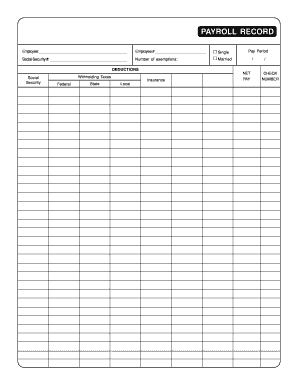
The Free Forms Payroll Record is an essential document for tracking employee earnings and deductions. This guide will provide you with a clear and comprehensive overview of how to fill out this form online, helping you ensure accuracy and compliance.
Follow the steps to complete the Payroll Record accurately
- Click the ‘Get Form’ button to access the Payroll Record and open it in the online editor.
- In the first section, fill out the employee's name in the designated space, ensuring correct spelling for identification purposes.
- Next, input the employee number provided by your organization in the respective field. This is crucial for record-keeping.
- Indicate the employee's marital status by selecting either 'Single' or 'Married'. This information is necessary for tax calculations.
- Enter the social security number in the appropriate field. Ensure that this number is accurate to avoid issues with tax reporting.
- Specify the number of exemptions claimed by the employee. This will impact withholding tax calculations.
- In the pay period section, input the relevant dates corresponding to the payroll period being documented.
- Fill out the deductions section, indicating the amounts for social security, federal withholding taxes, state withholding taxes, local taxes, and any insurance deductions.
- Calculate and enter the net pay after deductions have been accounted for. This represents the employee's take-home pay.
- Finally, record the check number associated with this payroll processing to maintain organized financial records.
- Once all fields are completed, review the form for accuracy. You can save changes, download the document, print it, or share it as needed.
Complete your documents online for efficient payroll management.
Related links form
Step 1: Have all employees complete a W-4 form. ... Step 2: Find or sign up for Employer Identification Numbers. ... Step 3: Choose your payroll schedule. ... Step 4: Calculate and withhold income taxes. ... Step 5: Pay payroll taxes. ... Step 6: File tax forms & employee W-2s.