Loading
Get Odm 07216 E
How it works
-

Open form follow the instructions
-

Easily sign the form with your finger
-

Send filled & signed form or save
How to fill out the Odm 07216 E online
This guide provides clear and comprehensive instructions on completing the Odm 07216 E online. By following these steps, users can ensure accurate and efficient submission of essential information for health coverage and related matters.
Follow the steps to fill out the Odm 07216 E form correctly.
- Press the ‘Get Form’ button to access the Odm 07216 E form and open it in your preferred editor.
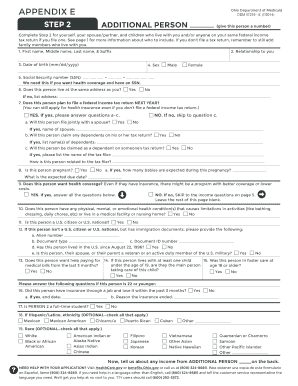
- Begin filling out Step 2 by providing your details, including your first, middle, last name, and suffix. Indicate your relationship to the additional person you are listing.
- Enter the date of birth of the additional person in the format mm/dd/yyyy.
- Select the appropriate sex for the additional person by indicating ‘Male’ or ‘Female.’
- Provide the Social Security number (SSN) of the additional person, as it is necessary for health coverage applications.
- Indicate if the additional person resides at the same address as you by selecting 'Yes' or 'No.' If 'No,' please enter their address.
- Answer whether the additional person plans to file a federal income tax return next year, and follow up with any relevant questions about their filing status and relationship to the tax filer.
- State if the additional person is pregnant and provide details regarding the number of expected babies and the due date.
- Select if the additional person wants health coverage 'Yes' or 'No,' and skip to the income questions if 'No.'
- Indicate whether the additional person has any physical, mental, or emotional health conditions that limit their activities.
- Confirm if the additional person is a U.S. citizen or national; provide immigration details if they are not.
- Fill in specific questions regarding military service, pregnancy, income, employment, and other relevant information about the additional person.
- If required, detail any self-employment income, current job information, and different income sources, specifying amounts and frequencies.
- Once all sections are completed, review the information for accuracy. You may save your changes, download, print, or share the completed form as needed.
Now that you have this guide, proceed to complete the Odm 07216 E online for your health coverage needs.
Related links form
Call the Ohio Medicaid Consumer Hotline at 1-800-324-8680 and choose CareSource!