Loading
Get Listing Presentation Script
How it works
-

Open form follow the instructions
-

Easily sign the form with your finger
-

Send filled & signed form or save
How to fill out the Listing Presentation Script online
This guide provides step-by-step instructions on how to efficiently complete the Listing Presentation Script online. By following these directions, you will ensure that all relevant information is captured accurately and effectively.
Follow the steps to complete your Listing Presentation Script with ease.
- Click the ‘Get Form’ button to access the Listing Presentation Script and open it in the editor.
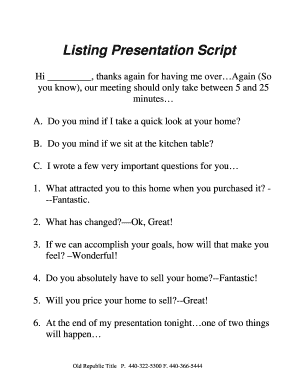
- Begin by greeting the users. Insert the client’s name at the top of the script to personalize your approach. For example, start with 'Hi [Client's Name], thanks again for having me over...'
- Inform the client about the expected duration of the meeting. You can say, 'Our meeting should only take between 5 and 25 minutes...'
- Enter the initial questions: First, ask for consent to view their home and their preference for seating. Utilize the prepared questions to initiate the conversation about their motivations for selling.
- As you progress through the script, use the provided questions to gather feedback about their experiences and expectations. Note their responses clearly in the appropriate sections.
- Discuss the Comparative Market Analysis (CMA). Clearly explain its components, ensuring the client understands the difference between listed and sold prices.
- Make a price recommendation for the home, filling in the suggested price as you advise the client on listing their property.
- Prompt the client for their target price and engage in dialogue about the value of their home based on market comparisons.
- Address the topic of pricing strategy, explaining the implications of overpricing a home and how it could affect market interest.
- Conclude by suggesting a competitive listing price, ensuring that the client understands the next steps, such as going to contract if they agree.
- Once the form is complete, review all filled information before saving. You can save changes, download, print, or share the document as necessary.
Start completing your Listing Presentation Script online today to enhance your real estate presentation effectiveness.
Must-Have Items in Your Listing Presentation A Preliminary CMA (Comparative Market Analysis) ... Exceptional photography and graphic design. ... Past seller success stories + testimonials. ... Relevant statistics and results. ... Neighborhood-specific track record. ... Authority-building content and media coverage.