Loading
Get Authorized Fleet Contacts Form - Fleet One
How it works
-

Open form follow the instructions
-

Easily sign the form with your finger
-

Send filled & signed form or save
How to fill out the Authorized Fleet Contacts Form - Fleet One online
Filling out the Authorized Fleet Contacts Form - Fleet One is an essential step for authorizing specific individuals to manage inquiries and changes to your account. This guide will lead you through the necessary steps to ensure your form is completed accurately and efficiently.
Follow the steps to successfully complete the Authorized Fleet Contacts Form.
- Click ‘Get Form’ button to obtain the form and open it for completion.
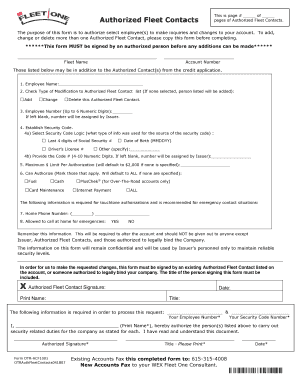
- Enter the fleet name in the designated field, which identifies the fleet associated with the account.
- Input the account number to link this form to the correct account.
- List the name of the employee you wish to authorize. Ensure to write the full name clearly.
- Select the type of modification to the Authorized Fleet Contact list by marking one of the checkboxes for 'Add', 'Change', or 'Delete'. If none is selected, the person listed will be added by default.
- Fill in the employee number with up to 6 numeric digits. If left blank, a number will be assigned.
- Establish a security code. Choose the logic for the source of the security code by marking the appropriate checkbox (e.g., last four digits of Social Security Number, driver’s license number, etc.). Then, provide the code, which should be between 4 to 10 numeric digits.
- Specify the maximum limit per authorization. If left blank, the default limit will be $2,000.
- Indicate the aspects that the authorized person can handle by checking the applicable boxes for fuel, cash, card maintenance, Internet payment, and so on. If no boxes are checked, it will default to all permissions.
- Provide a home phone number for emergency contacts, along with permission for contact during emergencies by marking 'Yes' or 'No'.
- Ensure that an existing Authorized Fleet Contact signs the form. Include their printed name, date, and title. This signature is required for processing changes.
- Complete the final section by printing the name of the person authorizing the changes, alongside their title and signature.
- After filling out all necessary fields and sections, save the changes, download the completed form for your records, and print or share it as needed.
Start completing the Authorized Fleet Contacts Form online today to ensure your fleet contacts are properly authorized.
Industry-leading security and compliance
US Legal Forms protects your data by complying with industry-specific security standards.
-
In businnes since 199725+ years providing professional legal documents.
-
Accredited businessGuarantees that a business meets BBB accreditation standards in the US and Canada.
-
Secured by BraintreeValidated Level 1 PCI DSS compliant payment gateway that accepts most major credit and debit card brands from across the globe.