Loading
Get Application For Food Stamps
How it works
-

Open form follow the instructions
-

Easily sign the form with your finger
-

Send filled & signed form or save
How to fill out the Application For Food Stamps online
Completing the Application For Food Stamps online can be a straightforward process with the right guidance. This step-by-step guide will help you navigate the requirements and fill out the form accurately to ensure your eligibility for food assistance.
Follow the steps to successfully submit your application.
- Click ‘Get Form’ button to access the application form and open it for editing.
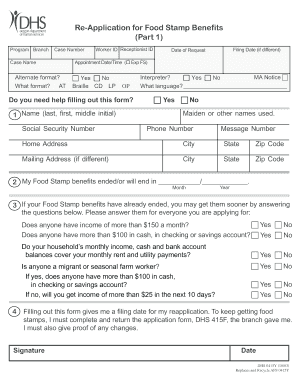
- Begin by filling out your basic information. Access the section labeled 'Program Branch' and provide your case number and case name as requested. If you need an alternate format, indicate your preferences here.
- Input your contact information, including your phone number, home address, city, state, and zip code. If your mailing address is different, complete that section as well.
- If your benefits have already ended, answer the eligibility questions carefully. Indicate your household income and cash or bank account balances, and check off whether anyone in your household is a migrant or seasonal farm worker.
- Lastly, be sure to read the statement regarding your filing date and signature requirements. Sign and date the form to validate your application.
- After completing the form, save your changes, and download a copy for your records. You can also choose to print or share the document as necessary.
Start filling out your Application For Food Stamps online today to ensure you receive the assistance you need.
Your net income is your gross income minus any allowable deductions. And assets are "countable resources" like cash, money in a bank account, and certain vehicles. For fiscal year 2023 (Oct. 1, 2022 – Sept. 30, 2023), a two-member household with a net monthly income of $1,526 (100% of poverty) might qualify for SNAP.