Loading
Get Export Declaration
How it works
-

Open form follow the instructions
-

Easily sign the form with your finger
-

Send filled & signed form or save
How to fill out the Export Declaration online
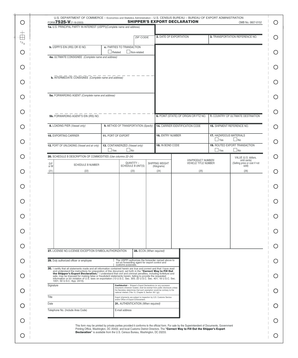
The Export Declaration is a crucial document for individuals and entities looking to export goods from the United States. This guide will help users understand and fill out the form correctly, ensuring compliance with export regulations.
Follow the steps to complete the Export Declaration form accurately.
- Click 'Get Form' button to access the Export Declaration form and open it in the online editor.
- Enter the U.S. Principal Party in Interest (USPPI) information, including the complete name and address in the designated fields. Ensure that the ZIP code is included.
- Provide the USPPI’s Employer Identification Number (EIN) or ID number in the appropriate section.
- Fill in the date of exportation, which should reflect the actual date the goods are being exported.
- Enter the transportation reference number, a unique identifier for the shipping process.
- Indicate the point of origin, including the state or Foreign Trade Zone (FTZ) number, in the corresponding field.
- Specify the country of ultimate destination, which is where the goods will ultimately end up.
- Input the carrier identification code used for the mode of transport chosen.
- Fill in any shipment reference numbers if applicable, which may help in tracking the shipment.
- Provide complete details about the ultimate consignee, including their name and address.
- If applicable, include information about the intermediate consignee in the designated fields.
- Enter the forwarding agent's complete name and address along with their EIN if available.
- Indicate the loading pier if the shipment involves vessel transport.
- Specify the method of transportation that will be used for the export.
- Fill in the exporting carrier's details in the required section.
- Provide the port of export, which is where the goods will leave the United States.
- If applicable, indicate the port of unloading, especially for vessel and air transport.
- Fill in details about containerization if relevant to the shipment.
- Specify any hazardous materials included in the shipment, as well as relevant codes.
- For routed export transactions, indicate if applicable.
- Provide a description of commodities using the Schedule B description columns.
- Fill in the Schedule B number, quantity, and units for the items being exported.
- Include the value of the shipment in U.S. dollars, omitting cents.
- Certify the information provided by signing in the appropriate section once you have reviewed the form.
- After ensuring that all fields are accurately completed, save your changes, then download or print the form for your records.
- You may also share the completed form with necessary parties as needed.
Complete your Export Declaration online today to ensure compliance and smooth shipment processing.
How do you make an export declaration? You must lodge your customs declaration electronically, using Revenue's Automated Entry Processing (AEP) system, which is described later in this guide. The customs declaration gives all the information needed about what are the goods and what is happening to the shipment.