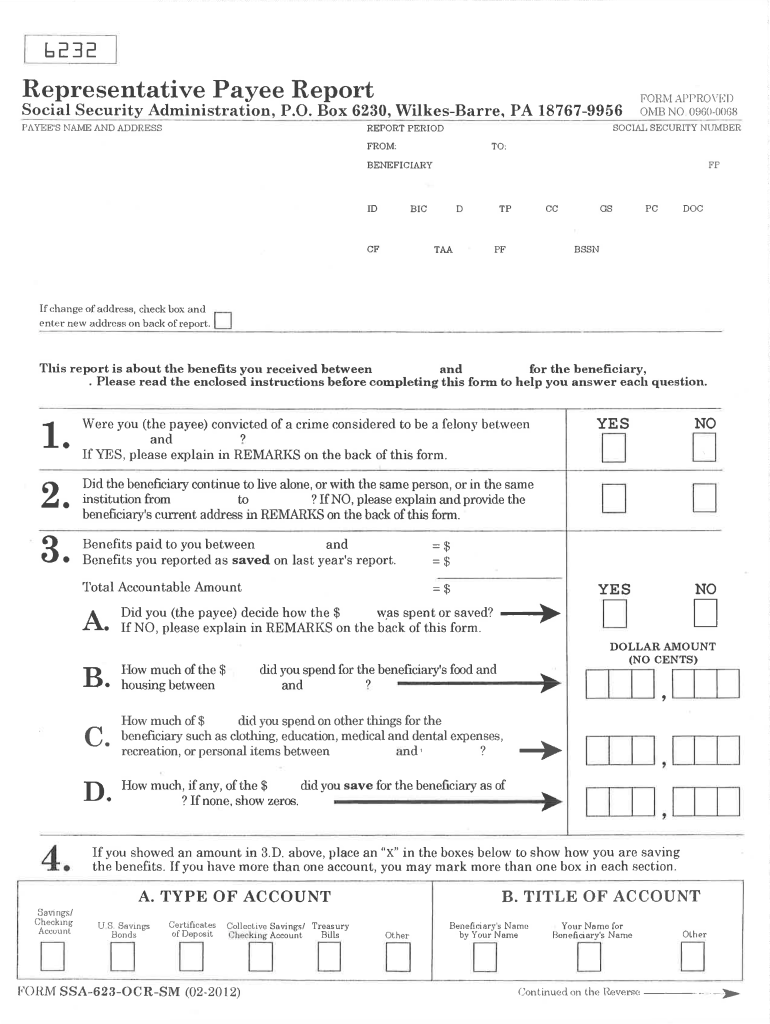
EPORT PERIOD FROM: TO: FP BENEFICIARY ID TP TAA CF If change at' address, check box and enter new address on back of report. D BIC CC GS PC DOC BSSN PF 0 This report is about the benefits you received between and for the beneficiary, . Please read the enclosed instructions before completing this fonn to help you answer each question. 1. 2. 3. YES Benefits paid to you between and Benefits you reported as saved on last year's report. =$ .. .. .. Did you (the saved? A • If .
Loading

Open form follow the instructions

Easily sign the form with your finger

Send filled & signed form or save
How to fill out the SSA-623-OCR-SM online
The SSA-623-OCR-SM is a Representative Payee Report used to communicate how benefits were managed for individuals receiving Social Security. This guide will provide comprehensive step-by-step instructions for filling out the form online, ensuring a smooth process.
Follow the steps to complete the SSA-623-OCR-SM online.
- Click ‘Get Form’ button to obtain the form and open it in the designated editor.
- Begin by entering the payee's name and address in the appropriate fields. Ensure all information is accurate and up-to-date.
- Next, provide the Social Security number and specify the report period, including the start date and end date.
- Enter details for the benefits received during the specified period, including any money saved from previous reports.
- Indicate how the benefits were spent for the beneficiary’s food, housing, and other expenses, providing dollar amounts as necessary.
- Answer yes or no to questions regarding the beneficiary's living situation and criminal convictions. If necessary, provide explanations in the remarks section.
- Complete the account information, indicating types of accounts where benefits are saved, and fill in details as required.
- Signature is required from the payee. If signed by mark, ensure two witnesses sign below along with their dates.
- Finally, review all information for accuracy, save changes, and decide whether to download, print, or share the completed form.
Complete your SSA-623-OCR-SM online today to ensure timely reporting of your benefits.
Experience a faster way to fill out and sign forms on the web. Access the most extensive library of templates available.
Related content
Nov 14, 2013 - This section summarizes instructions in preceding sections about how to...
resource for information about all of Social Security's ... Social Security or...
Get answers to your most pressing questions about US Legal Forms API.
What do you need to become a representative payee for Social Security?
You must complete form SSA-11 (Request to be selected as payee) and show us documents to prove your identity. You will need to provide your social security number, or if you represent an organization, the organization's employer identification number.
Can a representative payee set up a My Social Security account?
Sign in to or create your personal my Social Security account today! Select my Social Security to use the Representative Payee Portal for your own business: ... Check the status of your Social Security application. Set up or change your direct deposit information.
How do I become a representative payee for Social Security?
To apply to become a representative payee, you must complete Form SSA-11, provide your Social Security Number for a background check, and be interviewed by someone with the SSA.
Can I fill out the Representative Payee Report Online?
You must be 18 or older to complete the Representative Payee Accounting Report online. If you are under 18 and a representative payee, you must complete the paper Representative Payee Report form you received in the mail and return it to the address shown on the form.
What is Form SSA 623?
The representative payee is required to provide the Social Security Administration (SSA) with detailed information on a regular basic about how benefits are spent. This is the purpose of the form SSA-623. Why This Form is Important. A payee acts as an advocate and accountant for a disabled individual.
What is Social Security Representative Payee Report?
A representative payee is a person or an organization. We appoint a payee to receive the Social Security or SSI benefits for anyone who can't manage or direct the management of his or her benefits. . ... When we request a report, a payee must provide an accounting to us of how he or she used or saved the benefits.
How do I report a payee representative?
If you feel the Representative Payee has in some fashion misused the benefits being issued for the beneficiary, contact the OIG Fraud Hotline. You should provide as much identifying information as possible regarding the suspect. Such information should include: Name of the Representative Payee and the beneficiary.
Will my representative payee get my stimulus check?
Stimulus payments belong to beneficiaries Because the stimulus payment isn't an SSA benefit, representative payees do not have to account for the payment or how it was spent in their annual report. The SSA offers this advice: A representative payee should discuss the economic impact payment (EIP) with the beneficiary.
How do I change my representative payee for SSI?
Even if your payee was appointed for you, you may request a new payee (though you must give adequate reason for changing). When you want to change your rep payee, go to your Social Security Administration field office and request a change of payee.
Use professional pre-built templates to fill in and sign documents online faster. Get access to thousands of forms.
If you believe that this page should be taken down, please follow our DMCA take down process here.