E screening of passengers and their baggage at all commercial airports in the United States and its territories. If you have experienced a loss or damage to your property and you feel that this loss or damage occurred as a direct result of negligence by a TSA employee, you may file a claim with TSA. If you feel the loss or damage was due to the negligence of your air carrier, please file a claim directly with the air carrier. If filing with TSA, you must include proof of your loss or damage as w.
Loading

Open form follow the instructions

Easily sign the form with your finger

Send filled & signed form or save
How to fill out the SF 95 online
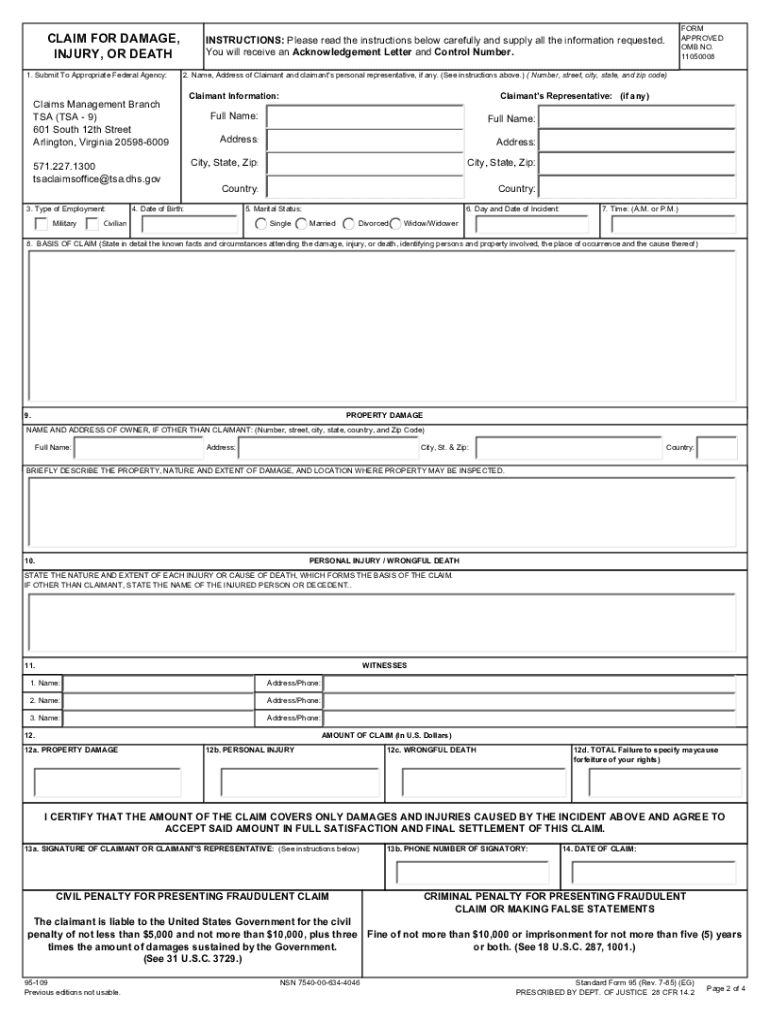
The Standard Form 95 (SF 95) is a crucial document for filing claims against the Transportation Security Administration (TSA) for any loss or damage experienced due to negligence by TSA employees. This guide provides you with a comprehensive, step-by-step process to fill out the SF 95 online, ensuring clarity and correctness in your submission.
Follow the steps to successfully complete the SF 95.
- Press the ‘Get Form’ button to access the SF 95 form and open it in your preferred editor.
- Enter your contact information, including your full name, address, and email. Ensure to provide accurate details so that TSA can reach you.
- Fill in the date of birth and marital status. This information helps establish your identity and the claim details.
- Specify the date, time, and location of the incident in question. Be as precise as possible to facilitate the assessment of your claim.
- Describe the basis of your claim in detail. Clearly outline the facts and circumstances surrounding the loss or damage, identifying all relevant parties involved.
- Complete the property damage section by describing the nature and extent of the damage, along with the location where the property can be inspected.
- If applicable, provide details regarding any personal injuries or wrongful death, including the nature and extent of the injuries.
- List any witnesses to the incident along with their contact information, if available.
- Specify the amount of your claim by entering the total amount of damages in U.S. dollars in the appropriate section.
- Sign the form either electronically or by printing it out and signing by hand. Without a signature, the claim cannot be processed.
- Save your completed form and any supporting documents you may have collected, including receipts and incident reports.
- Submit your claim by chosen method: either through mail or fax. Include all backup documentation with your submission.
Complete your SF 95 claim online for a smooth filing process.
Experience a faster way to fill out and sign forms on the web. Access the most extensive library of templates available.
Related content
BASIS OF CLAIM (State in detail the known facts and circumstances attending the damage...
Aug 5, 2024 — A CLAIM SHALL BE DEEMED TO HAVE BEEN PRESENTED WHEN A FEDERAL. AGENCY...
SF-95. 0.95-2.3GHZ. 17dB. 7. DC13-18V. LNB Gain=52-60dB. *: Under the following test...
Get answers to your most pressing questions about US Legal Forms API.
How long does it take to file SF 95?
Filing SF 95 can take anywhere from a short time to several days, depending on your preparedness. If you have all necessary details and documents ready, completing the form may only take a few hours. However, allow additional time for reviewing and ensuring accuracy. To simplify this process, use resources available at uslegalforms, which can help you understand each step.
What are the requirements for a FTCA claim?
To file a FTCA claim, you must first use the SF 95 form to submit your claim in writing. You need to provide a clear statement of your claim, including facts, the nature of the injury, and any supporting evidence. Additionally, the claim must arise from actions by federal employees while acting within the scope of their duties. For assistance with requirements and filing, uslegalforms can offer invaluable support.
How long does it take to file a USPS insurance claim?
Filing a USPS insurance claim usually takes a few minutes if you have all the necessary information ready. However, the processing time can take several days to weeks, depending on the nature of the claim and the amount of documentation required. When submitting an insurance claim, it's beneficial to provide thorough details about your situation. Consider using tools available on the uslegalforms platform to streamline the process.
What is an SF 95 form?
The SF 95 form is a standard claim form used to request compensation for damages from the United States government. It serves as a formal way to document your claim for personal injury, wrongful death, or property damage caused by federal agency actions. Completing this form accurately is essential for a successful claim. For support in filling out the SF 95, consider using resources like uslegalforms.
How long do you have to file Form 95?
You typically have two years from the date of the incident to file Form 95 against the US government. This timeframe applies to claims under the Federal Tort Claims Act (FTCA). It’s crucial to be aware of this deadline to ensure you don't miss your opportunity to seek compensation. Always check for any specific regulations that may pertain to your situation.
How do I file a claim against the US government?
To file a claim against the US government, you generally need to use the SF 95 form. This form allows you to present your case for claims related to personal injury, death, or property damage due to government actions. You should submit your completed SF 95 to the respective government agency, ensuring you meet the necessary deadlines. Remember to keep detailed records and copies of all communication.
How do I submit SF 95?
To submit SF 95, you first need to complete the form fully and accurately. After filling it out, you can send it to the appropriate federal agency that caused your injury or damage. It's important to use certified mail or another trackable method to ensure your submission is received. Keep a copy for your records as evidence of your claim.
What are the four things required to prove that a tort occurred?
To prove that a tort occurred, you must establish the existence of a duty, a breach of that duty, causation, and damages. This means showing that the federal employee had a responsibility to act, failed to meet that responsibility, directly caused your injury, and that you suffered a loss. Documenting each element thoroughly is vital for your claim process. Employing tools from our platform can streamline this documentation.
What is required in a Federal Tort Claims Act notice?
A notice under the Federal Tort Claims Act must include a clear statement of your claim, describing the facts of the incident and the federal agency involved. You should also specify your damages and provide supporting evidence. Filing an SF 95 form correctly fulfills this need, ensuring you detail every necessary aspect of your case. We recommend using structured guides available on platforms like uslegalforms.
What are the requirements for filing a FTCA claim?
Filing a FTCA claim requires you to submit a completed SF 95 form along with supporting documentation that outlines your damages. You must provide evidence of the negligence and specify the amount you are claiming. It is vital to ensure that all claims adhere to the required deadlines set by the FTCA. Our platform can aid you in understanding these requirements thoroughly.
Use professional pre-built templates to fill in and sign documents online faster. Get access to thousands of forms.
If you believe that this page should be taken down, please follow our DMCA take down process here.
This form is available in several versions. Select the version you need from the drop-down list below.