Loading
Get Skyward D155
How it works
-

Open form follow the instructions
-

Easily sign the form with your finger
-

Send filled & signed form or save
How to fill out the Skyward D155 online
This guide provides step-by-step instructions for completing the Skyward D155 form, ensuring a smooth and efficient process for users. By following these directions, individuals can effectively manage their transcript requests online.
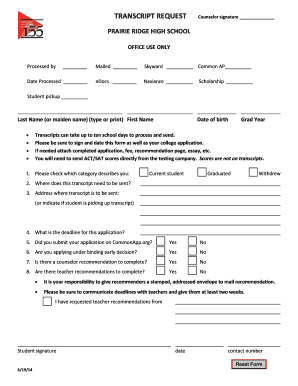
Follow the steps to complete your transcript request form.
- Click ‘Get Form’ button to obtain the form and open it in the editor.
- Begin by entering your last name (or maiden name) and first name in the appropriate fields. Ensure that the names are clearly typed or printed as this is crucial for identification purposes.
- Fill in your date of birth. This information helps verify your identity and ensures accurate processing of your request.
- Indicate your graduation year. This is important for the school to locate the correct transcript associated with your academic records.
- Choose the category that best describes your status: current student, graduated, or withdrew. This helps the school understand which transcripts are required.
- Specify the destination for your transcript. If applicable, indicate whether you will be picking up the transcript in person.
- Enter the address where the transcript should be sent, ensuring it is accurate to avoid any delivery issues.
- Indicate the deadline for your application. Providing a specific deadline is essential for timely processing of your request.
- State whether you submitted your application on CommonApp.org by selecting 'Yes' or 'No.' This information is useful for the processing office.
- Answer whether you are applying under binding early decision by selecting 'Yes' or 'No.' This can impact the processing timeline.
- Indicate if a counselor recommendation is needed and whether teacher recommendations are required by selecting 'Yes' or 'No.' If so, make sure to provide stamped, addressed envelopes for your recommenders.
- Lastly, sign and date the form in the designated area and provide a contact number for any follow-up. This is important for communication regarding your request.
- Once you have completed the form, review all entries for accuracy. You can then save changes, download, print, or share the form as needed.
Complete your Skyward D155 transcript request form online today.