Loading
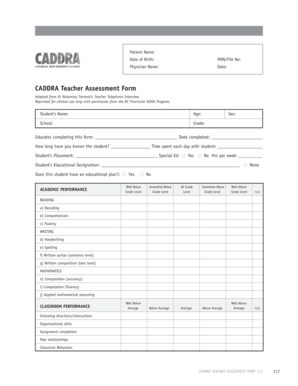
Get Patient Name Date Of Birth Caddra Teacher Assessment Form
How it works
-

Open form follow the instructions
-

Easily sign the form with your finger
-

Send filled & signed form or save
How to fill out the Patient Name Date Of Birth CADDRA Teacher Assessment Form online
This guide provides comprehensive instructions for completing the Patient Name Date Of Birth CADDRA Teacher Assessment Form online. Follow these steps to fill out the form accurately and efficiently.
Follow the steps to complete the assessment form online.
- Click ‘Get Form’ button to access the form and open it in the digital interface.
- Begin by entering the patient's name and date of birth in the designated fields. Ensure that the names are spelled correctly and that the date is formatted appropriately.
- Next, input the medical record number or file number if applicable. This helps in identifying the patient’s file accurately.
- Proceed to fill in the physician's name and the date of completion of this assessment form. Accurate information is essential for maintaining clear communication.
- In the student information section, enter the student's name, age, school, and grade. This section provides context to the assessor.
- Indicate the educator completing the form and the date this section was completed. This establishes accountability.
- Detail how long the educator has known the student and the amount of time spent with them each day. These insights are crucial for understanding the student's context.
- Specify the student's placement and whether they receive special education services. If applicable, note the hours of support received each week.
- Fill out the student's educational designation and whether they have an educational plan, providing a snapshot of their academic support.
- Assess the student's academic performance in various subjects, including reading, writing, and mathematics, using the provided scales.
- Evaluate the student’s classroom performance, noting strengths and areas for improvement in behaviors and social skills.
- Provide detailed feedback on the student's strengths, educational plan recommendations, accommodations, and overall behavior in class.
- Describe the student’s transition skills, peer relationships, and any conflicts or aggression they may exhibit.
- Conclude by entering information about medications, parent involvement, or any additional comments that are relevant to the assessment.
- After completing all sections, ensure all information is reviewed for accuracy. Save any changes, and if required, download, print, or share the form as needed.
Complete the Patient Name Date Of Birth CADDRA Teacher Assessment Form online to ensure an effective assessment of the student's needs.
The purpose of assessment forms is to gather data, analyze it, and make informed decisions or evaluations based on the collected information. Assessment forms are designed to collect data and information in order to evaluate or assess a particular subject or situation.
Industry-leading security and compliance
US Legal Forms protects your data by complying with industry-specific security standards.
-
In businnes since 199725+ years providing professional legal documents.
-
Accredited businessGuarantees that a business meets BBB accreditation standards in the US and Canada.
-
Secured by BraintreeValidated Level 1 PCI DSS compliant payment gateway that accepts most major credit and debit card brands from across the globe.