Loading
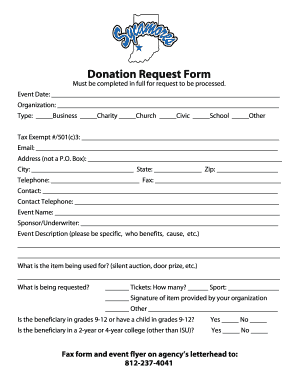
Get Donation Request Form - Indiana State Sycamores
How it works
-

Open form follow the instructions
-

Easily sign the form with your finger
-

Send filled & signed form or save
How to fill out the Donation Request Form - Indiana State Sycamores online
Filling out the Donation Request Form for the Indiana State Sycamores is an important step to ensure your request is processed smoothly. This guide provides clear instructions to help you navigate each section of the form with ease.
Follow the steps to complete your Donation Request Form accurately.
- Press the ‘Get Form’ button to acquire the Donation Request Form. This will open the form for you to fill out online.
- In the 'Event Date' section, provide the date of the event for which you are requesting a donation.
- Fill in the 'Organization' field with the name of your organization seeking the donation.
- Indicate the type of organization by selecting one of the options: Business, Charity, Church, Civic, School, or Other.
- Enter your organization's Tax Exempt Number or 501(c)(3) designation in the corresponding field.
- Input your email address in the designated field for communication regarding your request.
- Provide a physical address (no P.O. Box) where your organization is located, including the city, state, and zip code.
- Include your telephone number and fax number for any follow-up necessary regarding your request.
- Identify the contact person for this request by entering their name and contact telephone number.
- Specify the 'Event Name' that is associated with the donation request.
- Detail the 'Sponsor/Underwriter' for the event if applicable.
- In the 'Event Description' section, provide detailed information about the event, including who benefits and the cause it supports.
- Clarify 'What is the item being used for?' by indicating whether it is for a silent auction, door prize, or another purpose.
- Specify what is being requested: tickets (and the quantity), a signature item from your organization, or other requests.
- Indicate whether the beneficiary is in grades 9-12 or has a child in grades 9-12 by selecting yes or no.
- Indicate whether the beneficiary is in a 2-year or 4-year college (other than ISU) by selecting yes or no.
- Complete the form by faxing it along with the event flyer on your agency's letterhead to 812-237-4041.
- Review all the information entered for accuracy, then save your changes, download, print, or share the form as needed.
Complete your Donation Request Form online today to ensure timely processing of your request.
ISU competes in NCAA Division I Athletics. Women's sports include basketball, cross-country, softball, indoor and outdoor track and field, volleyball, golf and soccer. Men's sports include baseball, basketball, cross-country, football, and indoor and outdoor track and field.
Industry-leading security and compliance
US Legal Forms protects your data by complying with industry-specific security standards.
-
In businnes since 199725+ years providing professional legal documents.
-
Accredited businessGuarantees that a business meets BBB accreditation standards in the US and Canada.
-
Secured by BraintreeValidated Level 1 PCI DSS compliant payment gateway that accepts most major credit and debit card brands from across the globe.