Loading
Form preview
  • US Legal Forms
  • Other Templates
  • More Forms
  • More Uncategorized Forms
  • Standard Operating Procedure - Employee Training Standard Operating Procedure - Employee Training

Get Standard Operating Procedure - Employee Training Standard Operating Procedure - Employee Training

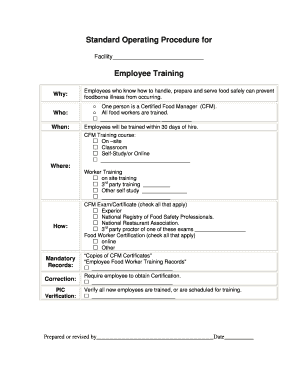
Standard Operating Procedure for Facility Employee Training Why: Who: When: Employees who know how to handle, prepare and serve food safely can prevent foodborne illness from occurring. One person.

How it works

  1. Open form

    Open form follow the instructions

  2. Easily sign form

    Easily sign the form with your finger

  3. Share form

    Send filled & signed form or save

How to fill out the Standard Operating Procedure - Employee Training online

Filling out the Standard Operating Procedure for Employee Training is essential for ensuring that employees are adequately trained to handle food safely. This guide provides clear instructions on how to complete the form online.

Follow the steps to fill out the procedure effectively.

  1. Click ‘Get Form’ button to obtain the form and open it for editing.
  2. Begin by entering the facility name in the designated space labeled 'Facility'. This identifies the location associated with the training.
  3. In the 'Why' section, provide a brief explanation of the importance of employee training in preventing foodborne illnesses.
  4. Specify 'Who' is responsible for the training. Indicate that a Certified Food Manager must be present and that all food workers are required to undergo training.
  5. Fill in 'When' employees will receive their training. Generally, training should be completed within 30 days of hiring.
  6. Choose the CFM Training course type by checking the applicable option: on-site, classroom, self-study/or online, or any other method.
  7. In the 'Where' section, specify the location of the training, ensuring it meets the necessary requirements.
  8. Outline how the training will be conducted in the 'How' section. This details the methods and procedures used for training.
  9. Complete the 'Worker Training' options by selecting all that apply: on-site training, third-party training, or other self-study methods.
  10. Indicate all applicable CFM Exam/Certificate options, such as Experior, National Registry of Food Safety Professionals, and others. Include any third-party proctor details if necessary.
  11. List all applicable options for Food Worker Certification, including online and any other relevant methods.
  12. Ensure that copies of CFM Certificates and Employee Food Worker Training Records are maintained as required.
  13. Confirm that you require all employees to obtain certification as indicated in the checklist.
  14. Verify that all new employees are trained or are scheduled for training where indicated.
  15. Finally, fill out the 'Prepared or revised by' section with the name of the preparer and the date of completion.
  16. Once all fields are filled out, review the document for accuracy. You can then choose to save changes, download the form, print it, or share it as needed.

Complete your documents online today to ensure proper training compliance.

Get form

Experience a faster way to fill out and sign forms on the web. Access the most extensive library of templates available.
Get form

Related content

QMS Standard Operating Procedure (SOP) Template...
Scope. This training procedure is used to ensure that training has taken place with each...
Learn more
SOP 013 Employee Orientation and Training...
The AD reviews health and safety principles and relevant standard operating procedures...
Learn more
Staff Wiki: Policies and Procedures Management...
Policy and Procedures Software with workflow, training, quizzes and checklists. ... Bring...
Learn more

Related links form

PROFORMA FOR ISSUE OF LOOK OUT ... - SBS Nagar Police 2020 Scientific Method Worksheet Anyone Who Has Ever Read A Mystery 2020 Spdcl Name Change Application Form 2020 Declaration Under Penalty Of Perjury Template 2020

Questions & Answers

Get answers to your most pressing questions about US Legal Forms API.

Contact support

In general, administrative/programmatic SOPs will consist of five elements: Title page, Table of Contents, Purpose, Procedures, Quality Assurance/Quality Control, and References.

You can categorize SOPs into three different types: step-by-step, hierarchical steps, and flowcharts. Some business processes are better suited for certain types than others, depending on their complexity. Let's take a closer look at each SOP format.

5 Essentials for Every SOP Keep a Clear User Viewpoint. You should always be thinking about your end user when you write an SOP. ... Format Clearly. As well as being careful with language, process documentation should always use intuitive formatting. ... Keep Scope in Mind. ... Observe Roles and Impacts. ... Seek Authority and Approval.

A standard operating procedure (SOP) is an easy-to-understand, step-by-step document for office workflows and routine operations. It consists of systemizing all of your company processes and putting them in one file.

Standard Operating Procedures (SOPs) are top-level documents. They describe what actions are to be taken under certain circumstances. Standard work instructions are the lowest-level documents. They provide detailed instructions on how to perform procedures.

How to write a standard operating procedure (SOP) document Step 1: Identify how things work now. ... Step 2: Determine where to document. ... Step 3: Identify your audience. ... Step 4: Write up the SOP. ... Step 5: Improve your process. ... Step 6: Update your SOP. ... Step 7: Continue to refine and update.

Get This Form Now!

Use professional pre-built templates to fill in and sign documents online faster. Get access to thousands of forms.
Get form
If you believe that this page should be taken down, please follow our DMCA take down processhere.
Get Standard Operating Procedure - Employee Training Standard Operating Procedure - Employee Training
Get form
  • Adoption
  • Bankruptcy
  • Contractors
  • Divorce
  • Home Sales
  • Employment
  • Identity Theft
  • Incorporation
  • Landlord Tenant
  • Living Trust
  • Name Change
  • Personal Planning
  • Small Business
  • Wills & Estates
  • Packages A-Z
  • Affidavits
  • Bankruptcy
  • Bill of Sale
  • Corporate - LLC
  • Divorce
  • Employment
  • Identity Theft
  • Internet Technology
  • Landlord Tenant
  • Living Wills
  • Name Change
  • Power of Attorney
  • Real Estate
  • Small Estates
  • Wills
  • All Forms
  • Forms A-Z
  • Other Templates
  • Legal Hub
  • About Us
  • Help Portal
  • Legal Resources
  • Blog
  • Affiliates
  • Contact Us
  • Delete My Account
  • Site Map
  • Industries
  • Forms in Spanish
  • Localized Forms
  • State-specific Forms
  • Forms Kit
  • Real Estate Handbook
  • All Guides
  • Notarize
  • Incorporation services
  • For Consumers
  • For Small Business
  • For Attorneys
  • USLegal
  • FormsPass
  • pdfFiller
  • signNow
  • altaFlow
  • DocHub
  • Instapage
Form Packages
  • Adoption
  • Bankruptcy
  • Contractors
  • Divorce
  • Home Sales
  • Employment
  • Identity Theft
  • Incorporation
  • Landlord Tenant
  • Living Trust
  • Name Change
  • Personal Planning
  • Small Business
  • Wills & Estates
  • Packages A-Z
Form Categories
  • Affidavits
  • Bankruptcy
  • Bill of Sale
  • Corporate - LLC
  • Divorce
  • Employment
  • Identity Theft
  • Internet Technology
  • Landlord Tenant
  • Living Wills
  • Name Change
  • Power of Attorney
  • Real Estate
  • Small Estates
  • Wills
  • All Forms
  • Forms A-Z
  • Other Templates
Customer Service
  • Legal Hub
  • About Us
  • Help Portal
  • Legal Resources
  • Blog
  • Affiliates
  • Contact Us
  • Delete My Account
  • Site Map
  • Industries
  • Forms in Spanish
  • Localized Forms
  • State-specific Forms
  • Forms Kit
Legal Guides
  • Real Estate Handbook
  • All Guides
Prepared for you
  • Notarize
  • Incorporation services
Our Customers
  • For Consumers
  • For Small Business
  • For Attorneys
Our Sites
  • USLegal
  • FormsPass
  • pdfFiller
  • signNow
  • altaFlow
  • DocHub
  • Instapage
Social Media
Call us now toll free:
+1 833 426 79 33
As seen in:
© Copyright 1999-2026 airSlate Legal Forms, Inc. 17 Station Street, Ste. 203, Brookline, MA 02445
  • Your Privacy Choices
  • Terms of Service
  • Privacy Notice
  • Content Takedown Policy
  • Bug Bounty Program