Loading
Get Forsyth County Nc Absentee Ballot Request
How it works
-

Open form follow the instructions
-

Easily sign the form with your finger
-

Send filled & signed form or save
How to fill out the Forsyth County NC absentee ballot request online
This guide provides a step-by-step approach to completing the Forsyth County NC absentee ballot request form online, ensuring that all users, regardless of experience, can navigate the process with ease. Use this guide to obtain and fill out your absentee ballot request effectively.
Follow the steps to complete the absentee ballot request form online.
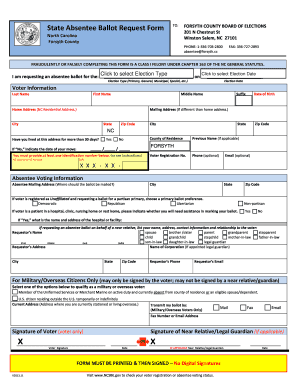
- Click ‘Get Form’ button to obtain the Forsyth County NC absentee ballot request form and open it in the editor.
- Begin by filling in your voter information, including your last name, first name, middle name, suffix, date of birth, home address, and county of residence. Ensure that your home address reflects your current North Carolina residential address.
- Indicate whether you have lived at your current address for more than 30 days by selecting 'Yes' or 'No'. If you select 'No', provide the date you moved to your current address.
- Provide at least one identification number from the options given: NC license or ID number, social security number, or voter registration number.
- Specify your absentee mailing address if it is different from your home address. Fill in the city, state, and zip code for the mailing address.
- If you are an unaffiliated voter requesting a ballot for a partisan primary, select your primary ballot preference: Democratic, Republican, Libertarian, or Non-partisan.
- If you require assistance due to being in a hospital, clinic, nursing home, or rest home, select 'Yes' and provide the name and address of the facility. If you are filling the form out on behalf of a near relative, include your name, address, contact information, and relationship to the voter.
- If applicable, provide information for military or overseas voters, including your current address and transmission method for the ballot (mail, fax, or email).
- Complete the form by signing it. Remember, the signature must be that of the voter unless a near relative or qualified legal guardian is submitting the request.
- Finally, review all information for accuracy and clarity. You can save your changes, download, print, or share the form as necessary.
Take action now and fill out your absentee ballot request form online to ensure your voice is heard.
Related links form
Industry-leading security and compliance
US Legal Forms protects your data by complying with industry-specific security standards.
-
In businnes since 199725+ years providing professional legal documents.
-
Accredited businessGuarantees that a business meets BBB accreditation standards in the US and Canada.
-
Secured by BraintreeValidated Level 1 PCI DSS compliant payment gateway that accepts most major credit and debit card brands from across the globe.