Loading
Get Complaint Form - Seat24
How it works
-

Open form follow the instructions
-

Easily sign the form with your finger
-

Send filled & signed form or save
How to fill out the Complaint Form - Seat24 online
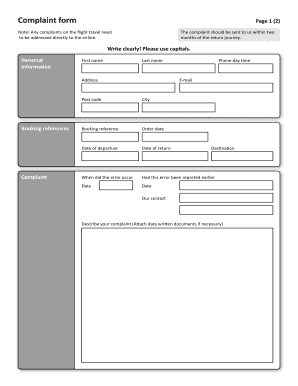
Filling out the Complaint Form - Seat24 online is a straightforward process that allows you to formally address any issues related to your travel experience. This guide will walk you through each section of the form to ensure that you provide all the necessary information clearly and accurately.
Follow the steps to successfully complete the Complaint Form
- Press the ‘Get Form’ button to access the Complaint Form - Seat24 online and open it in the editing interface.
- Start by entering your personal information in the designated fields. Include your first name, last name, and email address clearly. Make sure to use capital letters for readability.
- Fill in your address, including the city, post code, and phone number for daytime contact. Ensure all details are accurate to avoid delays in processing your complaint.
- Provide your booking references, including the order date, date of departure, and date of return. This information is crucial for referencing your travel details.
- Indicate when the error you are complaining about occurred and whether this issue has been reported previously. Provide the relevant dates as required.
- In the 'Describe your complaint' section, clearly articulate the details of your issue. If necessary, attach any supporting documents, such as tickets or receipts, that provide additional context.
- In the 'Claim' section, describe the correction you are seeking and how you calculated the amount. This ensures that your request is clear and justified.
- Attach any relevant documentation in the 'Attachments' section, specifying up to five files that support your complaint.
- Finally, provide date and signature fields to confirm the submission of your complaint. Ensure all information is correct before saving changes.
- Once completed, you can save changes, download the form, print it, or share it according to your preference.
Start filling out your Complaint Form - Seat24 online to address your travel concerns today.
It's often best to email or write to the airline's consumer office at its corporate headquarters. DOT requires airlines that fly to, from, or within the United States to state on their websites how and where complaints can be submitted.