Loading
Get Renewal Declaration - Vero Liability Insurance
How it works
-

Open form follow the instructions
-

Easily sign the form with your finger
-

Send filled & signed form or save
How to fill out the RENEWAL DECLARATION - Vero Liability Insurance online
Completing the RENEWAL DECLARATION for Vero Liability Insurance online is an important step in ensuring your business remains covered. This guide will walk you through each section of the form, providing clear instructions for a smooth and efficient completion process.
Follow the steps to fill out the RENEWAL DECLARATION effectively.
- Press the ‘Get Form’ button to obtain the form and open it in your preferred editor.
- Begin by entering your client number and the name of the underwriter in the provided fields.
- Input the renewal date to indicate when the policy is due.
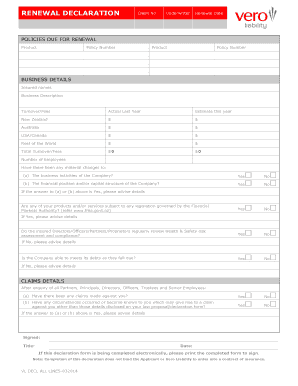
- In the 'POLICIES DUE FOR RENEWAL' section, list each product and its corresponding policy number. Ensure all current policies are included.
- Under 'BUSINESS DETAILS', add the insured names and provide a brief description of your business.
- Fill out the turnover/fees section for the actual revenue from the last year and your estimated revenue for the current year across different regions, including New Zealand, Australia, USA/Canada, and the rest of the world.
- Total the turnover/fees to reflect an accurate overall financial picture.
- Indicate the number of employees working at your business.
- Answer the questions regarding any material changes to the business activities or financial position. If changes have occurred, provide details in the space provided.
- Respond to the question about whether any products/services are subject to legislation governed by the Financial Markets Authority, and provide details if applicable.
- Confirm if the insured directors/officers regularly review health and safety compliance, and add details if they do not.
- State if the company can meet its debts as they fall due, providing information if it cannot.
- In the 'CLAIMS DETAILS' section, answer questions regarding any claims or potential claims. Provide explanations if applicable.
- Sign and date the form, ensuring to print the completed document to sign it if you are filing electronically.
- Finally, review the entire document for accuracy before selecting options to save changes, download, print, or share the form.
Begin completing your documents online today to ensure proper insurance coverage for your business.
Employers Liability is designed to provide protection against settlements or damages payable where an employee has sued for a work-related illness that Accident Compensation Commission does not cover.