Loading
Get Raymond Corcoran Trucking
How it works
-

Open form follow the instructions
-

Easily sign the form with your finger
-

Send filled & signed form or save
How to fill out the Raymond Corcoran Trucking online
Filling out the Raymond Corcoran Trucking form online is a straightforward process that requires attention to detail. This guide will walk you through each section, ensuring you complete the form accurately and thoroughly.
Follow the steps to complete the form effectively.
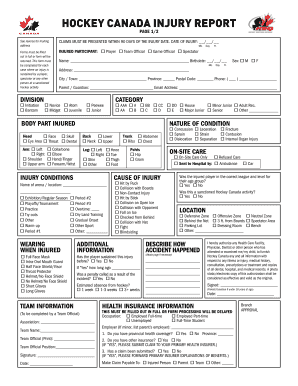
- Click ‘Get Form’ button to obtain the form and access it in the editor.
- Begin by entering the date of injury in the specified format, including the month, day, and year.
- Indicate the role of the injured participant by selecting one of the options: Player, Team Official, Game Official, or Spectator.
- Provide the division of the participant by checking the appropriate category, such as Initiation, Novice, Bantam, Atom, Midget, Juvenile, or Junior.
- Fill out the injured participant's name, birthdate, address, city or town, province, and contact details including phone number and email address.
- Specify the category of play by marking one of the listed options like AAA, A, BB, CC, etc.
- Select the specific body part that was injured by checking the relevant boxes.
- Describe the nature of the injury by choosing from the provided options, such as laceration or concussion.
- Detail the on-site care received by selecting the appropriate option: On-Site Care Only, Refused Care, or Sent to Hospital.
- Indicate the cause of injury by checking the relevant circumstances that occurred at the time of the incident.
- Provide additional information regarding protective gear worn at the time of the injury.
- Address whether the player has previously sustained this injury and if any penalties were called during the incident.
- Complete the team information section if applicable, including association, team name, and official's name.
- Describe how the accident happened, using an additional page if necessary.
- Authorize the release of medical information by signing and dating the form, ensuring to include a parent or guardian signature if the injured participant is under 18.
- Fill out the health insurance information thoroughly to avoid processing delays.
- Complete the physician's statement if applicable, providing all necessary details about the injury and treatment.
- If dental treatment is part of the claim, complete the dentist's statement section with precise information.
- Finalize the form by reviewing all entered details, ensuring accuracy before saving, downloading, printing, or sharing.
Complete your forms online for a seamless experience.