Loading
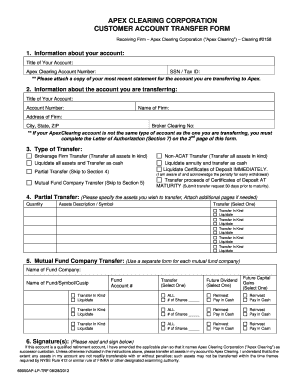
Get Apex Clearing Corporation Customer Account Transfer Form
How it works
-

Open form follow the instructions
-

Easily sign the form with your finger
-

Send filled & signed form or save
How to fill out the APEX CLEARING CORPORATION CUSTOMER ACCOUNT TRANSFER FORM online
The APEX CLEARING CORPORATION CUSTOMER ACCOUNT TRANSFER FORM is essential for transferring your investment account to Apex Clearing Corporation. This guide provides a clear, step-by-step process to help you complete the form online with ease.
Follow the steps to efficiently complete your account transfer form.
- Click ‘Get Form’ button to access the APEX CLEARING CORPORATION CUSTOMER ACCOUNT TRANSFER FORM and open it in your preferred application.
- Provide information about your account in Section 1, including your account title, Apex Clearing account number, and your SSN or Tax ID. Ensure to attach a copy of your most recent statement for the account you are transferring.
- In Section 2, enter the details of the account you are transferring, such as the account title, account number, firm name, and the address of the firm. Complete the Broker Clearing Number if applicable.
- Indicate the type of transfer you are requesting in Section 3. Choose the appropriate option such as Brokerage Firm Transfer, Liquidation, or Partial Transfer. If transferring partially, skip to Section 4.
- If you selected Partial Transfer, specify the assets you wish to transfer in Section 4. List the quantity and description for each asset and select whether you want to transfer in kind or liquidate them.
- For mutual fund transfers, complete Section 5. Use a separate form for each mutual fund, providing the fund company name, account number, and whether you wish to reinvest or receive dividends and capital gains in cash.
- In Section 6, read the signature requirements carefully. If applicable, sign on the primary and secondary signature lines and include dates to affirm the account transfer instructions.
- If required, complete Section 7 with any additional authorizations necessary if the account type differs from the original. Be sure to sign and date this section as well.
- Finally, review all information for accuracy. You can save your changes, download a copy, print it out, or share the form as needed.
Get started on your account transfer by completing the form online today!
To speak to a Customer Service representative, please call (800) 840-9152 or follow the link below.
Industry-leading security and compliance
US Legal Forms protects your data by complying with industry-specific security standards.
-
In businnes since 199725+ years providing professional legal documents.
-
Accredited businessGuarantees that a business meets BBB accreditation standards in the US and Canada.
-
Secured by BraintreeValidated Level 1 PCI DSS compliant payment gateway that accepts most major credit and debit card brands from across the globe.