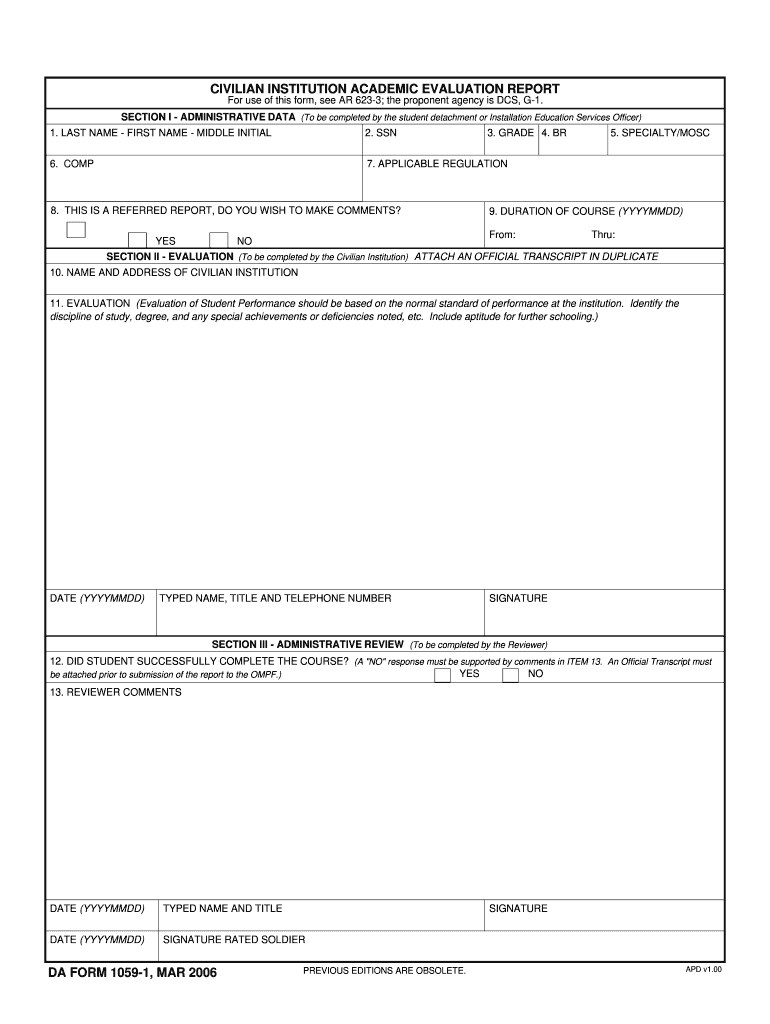
An Official Transcript must be attached prior to submission of the report to the OMPF. 13. REVIEWER COMMENTS TYPED NAME AND TITLE SIGNATURE RATED SOLDIER DA FORM 1059-1 MAR 2006 PREVIOUS EDITIONS ARE OBSOLETE. APD v1. CIVILIAN INSTITUTION ACADEMIC EVALUATION REPORT For use of this form see AR 623-3 the proponent agency is DCS G-1. SECTION I - ADMINISTRATIVE DATA To be completed by the student detachment or Installation Education Services Officer 1. LAST NAME - FIRST NAME - MIDDLE INITIAL 2. SSN 6. COMP 7. APPLICABLE REGULATION 8. THIS IS A REFERRED REPORT DO YOU WISH TO MAKE COMMENTS 3. GRADE 4. BR 5. SPECIALTY/MOSC 9. DURATION OF COURSE YYYYMMDD From Thru YES NO SECTION II - EVALUATION To be completed by the Civilian Institution ATTACH AN OFFICIAL TRANSCRIPT IN DUPLICATE 10. NAME AND ADDRESS OF CIVILIAN INSTITUTION 11. EVALUATION Evaluation of Student Performance should be based on the normal standard of performance at the institution* Identify the discipline of study degree and any s....
Loading

Open form follow the instructions

Easily sign the form with your finger

Send filled & signed form or save
How to fill out the DA 1059-1 online
The DA 1059-1 is an important form used for reporting academic evaluations in civilian institutions. This guide will provide a step-by-step approach for successfully completing the form online.
Follow the steps to fill out the DA 1059-1 accurately and effectively.
- Click ‘Get Form’ button to obtain the DA 1059-1 and open it in your preferred editing platform.
- In Section I, provide the administrative data. Fill in your last name, first name, and middle initial in the designated fields. Enter your social security number (SSN), grade, and BR, as well as your specialty or MOSC. Specify the applicable regulation and the duration of the course with start and end dates in YYYYMMDD format. Indicate if this report is referred and whether you wish to make comments.
- Move to Section II to complete the evaluation by the civilian institution. Enter the name and address of the institution. Provide an evaluation of student performance, noting the discipline of study, degree, and any special achievements or deficiencies. This section should reflect the normal standards of performance at the institution. Attach an official transcript in duplicate. Include the date, your typed name, title, and contact number, followed by your signature.
- In Section III, the reviewer will assess whether the student successfully completed the course. A ‘No’ response must include comments in Item 13. Ensure an official transcript is attached before submitting the report to the OMPF. Include the date, your typed name and title, and your signature alongside the rated soldier's signature.
- After completing all sections, carefully review your entries for accuracy. Save your changes, then download the form or print it for your records. You may also share the completed form as necessary.
Start filling out the DA 1059-1 online today to ensure your academic evaluation is submitted correctly.
Experience a faster way to fill out and sign forms on the web. Access the most extensive library of templates available.
Related content
Displaying title 26, up to date as of 9/03/2025. Title 26 was last amended 7/11/2025. view...
Mar 11, 2025 — o Army The Registrar issues an AER (DA Form 1059-2 or 1059-1) for each...
311-1059-1-ND. YAGEO. CC0603JRNPO9BN120. 0603. 2. 2. C33 C58. 0.47 Uf. CAP CER 0.47UF 16V...
Get answers to your most pressing questions about US Legal Forms API.
What is a marginal 1059?
A marginal DA 1059 indicates that a soldier's performance was below the standards expected during their course or training. This designation highlights areas requiring improvement and serves as a prompt for further development. Utilizing the DA 1059-1, soldiers can identify specific skills to work on, ensuring they address these areas effectively. This process encourages growth and helps soldiers align their performance with organizational expectations.
Who signs 1059 first?
The first signature on the DA 1059 typically belongs to the evaluating officer, who is responsible for completing the evaluation. This officer reviews the soldier's performance and provides an informed assessment. Following this, the soldier also signs the DA 1059-1 to affirm their understanding of the evaluation and feedback provided. This two-signature process enhances accountability and transparency in the evaluation system.
What is the DA 1059?
The DA 1059 is an official document recognized by the United States Army, designed for documenting evaluations of soldiers in training or education settings. This form captures crucial information about a soldier's capabilities and accomplishments. When you complete the DA 1059-1, you ensure that a soldier’s hard work and achievements are recorded effectively. It provides valuable insight into their performance and readiness for future challenges.
What is a DA form 1059 used for?
The DA form 1059 is used to record academic evaluation reports for military personnel. This form emphasizes a soldier's performance during training or educational courses, helping to assess their skills and potential. By utilizing the DA 1059-1, leaders can provide feedback that fosters professional development. It serves as an essential tool for tracking progress and achievements in a military career.
How to access army 1059?
You can access the DA 1059-1 from various military training programs or through official military channels. If you've recently completed a course, your training institution should provide you with a copy. For a seamless experience, consider visiting platforms like USLegalForms, which offer guidance on obtaining and completing various military forms, including the DA 1059-1.
Are NCOERs on iPERMS?
Yes, Non-Commissioned Officer Evaluation Reports (NCOERs) are stored electronically in the Interactive Personnel Electronic Management System (iPERMS). You can access your NCOERs alongside your DA 1059-1, allowing you to maintain a comprehensive view of your performance evaluations. Regularly reviewing these documents can assist you in your career progression.
How to access the Army training network?
To access the Army training network, you need a military-issued Common Access Card (CAC) to log into the system. Once logged in, you can explore various training resources, including courses that could lead to your DA 1059-1 completion. Utilize these resources to enhance your skills and qualifications on your career path.
How do I access my army Orb?
To access your Army's Official Record Brief (ORB), you must visit the Army Knowledge Online (AKO) portal. Log into your account, navigate to the 'Records' section, and select 'ORB.' Keep in mind that having the DA 1059-1 on hand can help you present your credentials effectively if needed.
What is a form 1059 used for?
The DA 1059-1 is used to record the completion of professional military education. It serves as an official document that tracks a soldier's training and educational achievements. By utilizing this form, you can present a clear record of your career development, which is essential for promotions and duty assignments.
Where can I find my DA form 1059?
Your DA form 1059-1 can be located on iPERMS or in your personnel records maintained by your unit. It's important to know where to find this form because it plays a crucial role in your evaluations. If you encounter issues accessing it, consider using uslegalforms for quick solutions.
Use professional pre-built templates to fill in and sign documents online faster. Get access to thousands of forms.
If you believe that this page should be taken down, please follow our DMCA take down process here.