Loading
Get Kartu Contoh Tanda Tangan
How it works
-

Open form follow the instructions
-

Easily sign the form with your finger
-

Send filled & signed form or save
How to fill out the Kartu Contoh Tanda Tangan online
The Kartu Contoh Tanda Tangan is a crucial document for verifying signatures. This guide provides a step-by-step approach to assist users in filling out the form effectively in a digital format.
Follow the steps to complete your Kartu Contoh Tanda Tangan online.
- Click ‘Get Form’ button to obtain the form and open it in the editor.
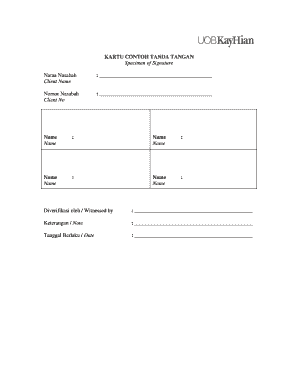
- In the section labeled 'Nama Nasabah' (Client Name), clearly enter your full name in the provided space.
- Next, locate the field named 'Nomor Nasabah' (Client No) and input your unique client number accurately.
- In the subsequent sections labeled 'Name', provide additional names if required, ensuring clarity and correct spelling.
- For the 'Diverifikasi oleh / Witnessed by' field, input the name of the individual witnessing the signature.
- Use the 'Keterangan / Note' section for any additional notes or important information relevant to the signature.
- Finally, fill in the 'Tanggal Berlaku / Date' field with the date the signature is valid from.
- Once all sections are completed, ensure to review your inputs, then save changes, download, print, or share the completed form as needed.
Complete your Kartu Contoh Tanda Tangan online today for efficient documentation.
Tips Membuat Tanda Tangan yang Baik dan Benar Bersih dan Bebas dari Coretan. ... 2. Lebih Bagus Jika Bisa Dibaca oleh Orang Lain. ... 3. Hindari Mencoret Nama Kamu Sendiri di dalam Tanda Tangan. ... Memperlihatkan Nama Jelas. ... Gunakan Huruf Kapital di Awal. ... 6. Gunakan Garis Bawah. ... 7. Tambahkan Simbol yang Unik.