Loading
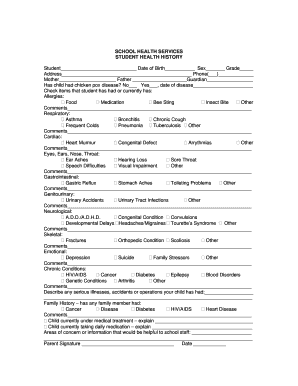
Get School Health Services Student Health History
How it works
-

Open form follow the instructions
-

Easily sign the form with your finger
-

Send filled & signed form or save
How to fill out the SCHOOL HEALTH SERVICES STUDENT HEALTH HISTORY online
Filling out the School Health Services Student Health History form online is an essential step to ensure your child's health needs are communicated effectively to school staff. This guide will provide you with a clear and structured approach to accurately complete the form and submit it for your child's school health records.
Follow the steps to fill out the form thoroughly and accurately.
- Click the ‘Get Form’ button to access the form and open it in the online editor.
- Begin by filling in your child's full name in the designated field followed by their date of birth, sex, and grade, ensuring accuracy in each entry.
- Provide your current address and phone number for contact purposes.
- Next, fill in the names of the child's mother, father, and guardian, as applicable.
- Indicate whether the child has had chicken pox by selecting either 'No' or 'Yes', and if applicable, include the date of the disease.
- In the allergies section, check all that apply (food, medication, bee sting, insect bite, or other) and provide any additional comments if necessary.
- For the respiratory section, check any relevant items such as asthma or bronchitis, and include comments for further clarification.
- Move to the cardiac section and indicate any heart-related issues, along with comments if needed.
- Continue to the eyes, ears, nose, throat section by checking applicable items and providing comments.
- Fill out the gastrointestinal section by indicating any issues such as gastric reflux and adding any relevant comments.
- In the genitourinary section, check any conditions and add comments as needed.
- Complete the neurological section, indicating any concerns such as ADHD, and provide comments.
- In the skeletal section, check any relevant conditions such as fractures and add comments.
- For the emotional section, check any relevant items and provide additional comments.
- In the chronic conditions section, indicate any ongoing health issues and add comments for context.
- Describe any serious illnesses, accidents, or surgeries your child has had in the provided space.
- Answer the family history question by checking any conditions that family members have experienced and provide comments.
- State whether your child is currently under medical treatment or taking daily medication. Provide necessary explanations in the designated spaces.
- Finally, include any additional areas of concern or information that would be helpful for school staff in the provided section.
- Sign and date the form to complete your submission, ensuring all parts are filled out accurately.
Complete the School Health Services Student Health History form online today to ensure your child's health needs are addressed.
School health services staff can help all students with preventive care such as flu shots and vision and hearing screening, as well as acute and emergency care.
Industry-leading security and compliance
US Legal Forms protects your data by complying with industry-specific security standards.
-
In businnes since 199725+ years providing professional legal documents.
-
Accredited businessGuarantees that a business meets BBB accreditation standards in the US and Canada.
-
Secured by BraintreeValidated Level 1 PCI DSS compliant payment gateway that accepts most major credit and debit card brands from across the globe.