Loading
Form preview
  • US Legal Forms
  • Other Templates
  • More Forms
  • More Uncategorized Forms
  • Autodraft Payment Plan Authorization Form - 21st Mortgage

Get Autodraft Payment Plan Authorization Form - 21st Mortgage

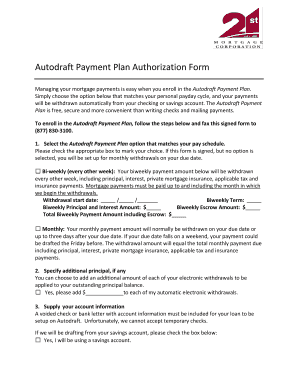
Autodraft Payment Plan Authorization Form Managing your mortgage payments is easy when you enroll in the Autodraft Payment Plan. Simply choose the option below that matches your personal payday cycle,.

How it works

  1. Open form

    Open form follow the instructions

  2. Easily sign form

    Easily sign the form with your finger

  3. Share form

    Send filled & signed form or save

How to fill out the Autodraft Payment Plan Authorization Form - 21st Mortgage online

Enrolling in the Autodraft Payment Plan can simplify your mortgage payment process by automatically withdrawing payments from your bank account. This guide provides step-by-step instructions on how to complete the Autodraft Payment Plan Authorization Form online, ensuring a smooth and efficient experience.

Follow the steps to fill out the Autodraft Payment Plan Authorization Form online.

  1. Click ‘Get Form’ button to obtain the form and open it in the editor.
  2. Select the Autodraft Payment Plan option that corresponds with your pay schedule. Mark the appropriate box for either bi-weekly or monthly withdrawals. If no option is selected, accounts will automatically be set for monthly withdrawals on the due date.
  3. If you choose the bi-weekly option, specify the withdrawal start date, biweekly term, and both the biweekly principal and interest amount and escrow amount. Calculate the total biweekly payment amount including escrow and enter it accordingly.
  4. For the additional principal section, indicate if you would like to add an additional amount to each electronic withdrawal. If so, fill in the amount you wish to add.
  5. Provide your bank account information. Include a voided check or a bank letter with your account information, as temporary checks cannot be used. If you will be withdrawing from a savings account, check the appropriate box.
  6. Review the Terms and Conditions thoroughly. Confirm your understanding of the terms related to your mortgage payment obligations and the Autodraft Payment Plan.
  7. Sign and date the form in the designated areas. Ensure that both borrowers sign if funds are to be drafted from the account of a non-borrower.
  8. Once all sections are complete, save the changes to the form. Choose to download, print, or share the completed form as needed.

Start completing your Autodraft Payment Plan Authorization Form online today for a hassle-free mortgage payment experience.

Get form

Experience a faster way to fill out and sign forms on the web. Access the most extensive library of templates available.
Get form

Related content

You have protections when it comes to automatic...
Nov 23, 2015 — Before you give anyone your bank account number and permission to...
Learn more
Billing, Payments and Refunds | One Stop...
Billing, Payments and Refunds; My Bill & University Finances; Financial ... you must sign...
Learn more
BMI Agent Quick Reference Guide - UserManual.wiki
Builders Mutual provides a complete range of coverage options for residential, ... With...
Learn more

Related links form

Liner Protrusion Worksheet 2020 Medication Review Form For Patient With Diabetes 2020 Attorney Registration Form - Johannesburg - Eservices Joburg Org 2020 Substation Checklist Form 2020

Questions & Answers

Get answers to your most pressing questions about US Legal Forms API.

Contact support

The Auto Draft Payment service automatically drafts your scheduled payment from your bank account.

They can often be set up online through your mortgage company or there may be a section of your paper bill to set up autopay. When setting up autopay for a mortgage, check if you can adjust or cancel your automatic payments, and how easy that is to do. Also check if you can choose the withdrawal date.

This means your lender automatically withdraws the mortgage payment from your bank account on a specific day each month. This option can be set up through your lender's website, and once it is in place, the payments will repeat each month.

A customer can schedule an automatic bill payment in several ways: through their bank/financial institution, through a vendor's website, or through cloud-based accounting software, to list a few. Regular payments can be authorized through the credit card, debit card, checking/savings account, or money market account.

If you are experiencing financial hardships and are worried that you cannot make your scheduled loan payments, please call 21st Mortgage today at 800-955-0021 so that one of our experienced Financial Counselors can review the options that are available to assist you.

How to set up a biweekly mortgage payment plan Your lender allows a biweekly mortgage payment plan. Extra payments are applied to the principal. There are no prepayment penalties. No fees are charged for setting up or maintaining a biweekly payment plan. Your interest rate remains fixed for the life of the loan.

You can refinance any type of mortgage loan. Refinancing may be your only option to change your monthly payment if you have a government-backed loan or a jumbo loan. You can choose a new lender.

Principal-only payments on mortgages are allowed in all states, but may not be allowed by every lender. Talk to your lender and see if you can make additional payments toward your principal.

Get This Form Now!

Use professional pre-built templates to fill in and sign documents online faster. Get access to thousands of forms.
Get form
If you believe that this page should be taken down, please follow our DMCA take down processhere.
Get Autodraft Payment Plan Authorization Form - 21st Mortgage
Get form
  • Adoption
  • Bankruptcy
  • Contractors
  • Divorce
  • Home Sales
  • Employment
  • Identity Theft
  • Incorporation
  • Landlord Tenant
  • Living Trust
  • Name Change
  • Personal Planning
  • Small Business
  • Wills & Estates
  • Packages A-Z
  • Affidavits
  • Bankruptcy
  • Bill of Sale
  • Corporate - LLC
  • Divorce
  • Employment
  • Identity Theft
  • Internet Technology
  • Landlord Tenant
  • Living Wills
  • Name Change
  • Power of Attorney
  • Real Estate
  • Small Estates
  • Wills
  • All Forms
  • Forms A-Z
  • Other Templates
  • Legal Hub
  • About Us
  • Help Portal
  • Legal Resources
  • Blog
  • Affiliates
  • Contact Us
  • Delete My Account
  • Site Map
  • Industries
  • Forms in Spanish
  • Localized Forms
  • State-specific Forms
  • Forms Kit
  • Real Estate Handbook
  • All Guides
  • Notarize
  • Incorporation services
  • For Consumers
  • For Small Business
  • For Attorneys
  • USLegal
  • FormsPass
  • pdfFiller
  • signNow
  • altaFlow
  • DocHub
  • Instapage
Form Packages
  • Adoption
  • Bankruptcy
  • Contractors
  • Divorce
  • Home Sales
  • Employment
  • Identity Theft
  • Incorporation
  • Landlord Tenant
  • Living Trust
  • Name Change
  • Personal Planning
  • Small Business
  • Wills & Estates
  • Packages A-Z
Form Categories
  • Affidavits
  • Bankruptcy
  • Bill of Sale
  • Corporate - LLC
  • Divorce
  • Employment
  • Identity Theft
  • Internet Technology
  • Landlord Tenant
  • Living Wills
  • Name Change
  • Power of Attorney
  • Real Estate
  • Small Estates
  • Wills
  • All Forms
  • Forms A-Z
  • Other Templates
Customer Service
  • Legal Hub
  • About Us
  • Help Portal
  • Legal Resources
  • Blog
  • Affiliates
  • Contact Us
  • Delete My Account
  • Site Map
  • Industries
  • Forms in Spanish
  • Localized Forms
  • State-specific Forms
  • Forms Kit
Legal Guides
  • Real Estate Handbook
  • All Guides
Prepared for you
  • Notarize
  • Incorporation services
Our Customers
  • For Consumers
  • For Small Business
  • For Attorneys
Our Sites
  • USLegal
  • FormsPass
  • pdfFiller
  • signNow
  • altaFlow
  • DocHub
  • Instapage
Social Media
Call us now toll free:
+1 833 426 79 33
As seen in:
© Copyright 1999-2026 airSlate Legal Forms, Inc. 17 Station Street, Ste. 203, Brookline, MA 02445
  • Your Privacy Choices
  • Terms of Service
  • Privacy Notice
  • Content Takedown Policy
  • Bug Bounty Program