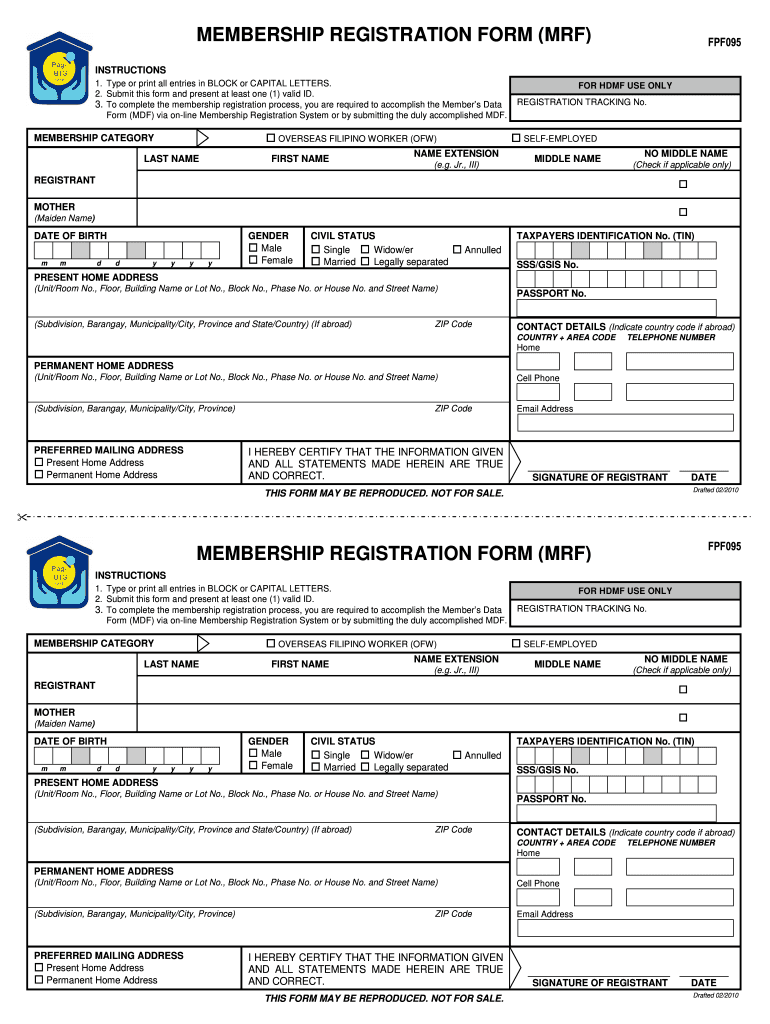
Ip registration process, you are required to accomplish the Member’s Data Form (MDF) via on-line Membership Registration System or by submitting the duly accomplished MDF. MEMBERSHIP CATEGORY OVERSEAS FILIPINO WORKER (OFW) LAST NAME FIRST NAME FOR HDMF USE ONLY REGISTRATION TRACKING No. SELF-EMPLOYED NAME EXTENSION (e.g. Jr., III) MIDDLE NAME NO MIDDLE NAME (Check if applicable only) REGISTRANT MOTHER (Maiden Name) DATE OF BIRTH m m d d y y y y GENDER Male Female CIVIL STAT.
Loading

Open form follow the instructions

Easily sign the form with your finger

Send filled & signed form or save
How to fill out the PH Pag-IBIG FPF095 online
The PH Pag-IBIG FPF095 is an essential membership registration form, particularly for overseas workers and self-employed individuals. This guide provides clear instructions to help users effectively complete the form online.
Follow the steps to fill out the PH Pag-IBIG FPF095 online.
- Click ‘Get Form’ button to access the PH Pag-IBIG FPF095 online. This will allow you to obtain the form in digital format.
- Begin by entering your membership category. You may select 'Overseas Filipino Worker (OFW)' or 'Self-Employed' based on your eligibility.
- Fill in your last name, first name, and, if applicable, any name extension (e.g., Jr., III). You also have the option to indicate if you have no middle name.
- Provide your date of birth in the specified format (mm/dd/yyyy). Make sure to double-check the accuracy of this information.
- Select your gender by choosing either 'Male' or 'Female'.
- Indicate your civil status by selecting from the provided options: Single, Widow/er, Married, or Legally separated.
- Enter your Taxpayer Identification Number (TIN) or Social Security System (SSS)/Government Service Insurance System (GSIS) number, as required.
- Complete your present home address with all necessary details, including room number, street name, subdivision, barangay, municipality or city, province, and zip code.
- Provide your passport number if applicable, followed by your contact details, including country code, area code, telephone number, and cell phone number.
- Enter your email address and choose your preferred mailing address, indicating whether it is your present or permanent home address.
- Affirm that the information you have provided is true and correct by signing in the designated area and entering the date.
- Once all fields are accurately completed, review the information for correctness, save your changes, and proceed to download, print, or share the form as needed.
Begin filling out the PH Pag-IBIG FPF095 online today to complete your membership registration.
Experience a faster way to fill out and sign forms on the web. Access the most extensive library of templates available.
Related content
Submit this form and present at least one (1) valid ID. 3. To complete the membership...
membership savings ibig pag id number web name of members indicate member s complete name...
This online notice. Members Contributions Form Excel Pdf can be one of the options to...
Get answers to your most pressing questions about US Legal Forms API.
How to fill up Pag-IBIG membership form?
Filling out the Pag-IBIG membership form requires gathering necessary personal information like your name, address, and valid ID number. Follow the instructions provided on the form meticulously to avoid mistakes. For a simplified process, consider using platforms like USLegalForms for detailed assistance in completing the form.
How can I edit my Pag-IBIG form?
To edit your Pag-IBIG form, you will need to visit the Pag-IBIG Fund website or an office in person. They provide clear instructions on how to make updates, which may require you to fill out a correction form. Make sure you have all necessary identification documents to ensure a smooth process.
Is mid number the same as Pag-IBIG number?
The mid number is a unique identification number assigned to members of the Pag-IBIG Fund, while the Pag-IBIG number refers to the overall membership number of the Fund itself. They serve different purposes, but both are vital for managing your contributions and benefits. Understanding the distinction helps in navigating your Pag-IBIG services more effectively.
How can I check my Pag-IBIG mid number online?
To check your Pag-IBIG mid number online, log into your Pag-IBIG Fund account. Navigate to your member profile where your mid number is displayed. This online access provides you a quick and easy way to manage your Pag-IBIG details without needing to visit an office.
How to apply Pag-IBIG for beginners?
For beginners, applying for Pag-IBIG involves filling out a membership form, which you can find online or at any Pag-IBIG office. After completing the form, you need to submit it along with required documents such as a valid ID. You can also consult USLegalForms for guidance to ensure your application is filed correctly.
How do you know your Pag-IBIG mid number?
You can find your Pag-IBIG mid number through your membership registration documents or by checking your online account on the Pag-IBIG Fund website. If you do not have access to these, you can also contact their customer service for assistance. Remember, accessing your mid number is essential for managing your benefits effectively.
How can I get my Pag-IBIG MDF number online?
To obtain your Pag-IBIG MDF number online, start by visiting the official Pag-IBIG Fund website. You will need to create an account or log in to your existing account. Once logged in, navigate to the section related to your MDF number details. This process can help you access the information efficiently.
Can you apply Pag-IBIG online?
Yes, you can apply for PH Pag-IBIG FPF095 online. Visit the Pag-IBIG Fund's official website and navigate to the online application section. Follow the prompts and provide your details as instructed. If you encounter any challenges, platforms like US Legal Forms can offer templates and help you find the information you need.
How to apply Pag-IBIG first time?
Applying for PH Pag-IBIG FPF095 for the first time does not have to be daunting. Begin by collecting the required documents, then fill out the Membership Registration Form. You can submit your application at any Pag-IBIG branch or do it online. For guidance, check US Legal Forms for resources that simplify this process.
How to apply for Pag-IBIG as a new member?
To apply for PH Pag-IBIG FPF095 as a new member, fill out the Membership Registration Form available online or at local offices. Make sure to prepare your identification documents and other required files for submission. After submitting your application, you will receive your membership number, allowing you to access various Pag-IBIG benefits.
Use professional pre-built templates to fill in and sign documents online faster. Get access to thousands of forms.
If you believe that this page should be taken down, please follow our DMCA take down process here.