Loading
Get Burial Permit
How it works
-

Open form follow the instructions
-

Easily sign the form with your finger
-

Send filled & signed form or save
How to fill out the Burial Permit online
Filling out a burial permit online can seem daunting, but with clear guidance, the process is straightforward. This document is essential for ensuring the proper arrangements for a burial and facilitates legal compliance.
Follow the steps to complete the Burial Permit form.
- Click the ‘Get Form’ button to obtain the burial permit and open it in your preferred editing tool.
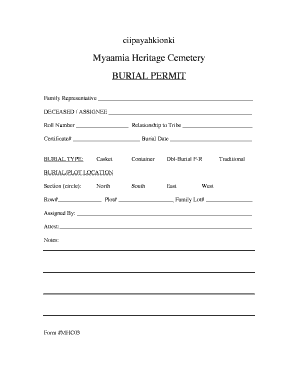
- Begin by entering the name of the family representative in the designated field. This is the person handling arrangements for the deceased.
- In the 'Deceased / Assignee' section, write the full name of the person who has passed away or the individual designated for the burial.
- Fill out the roll number, which is an identification number related to the deceased or the tribe.
- Indicate the relationship to the tribe by selecting the appropriate option. This ensures adherence to tribal regulations.
- Input the certificate number that typically accompanies a burial request. This number is crucial for processing.
- Specify the burial date. It's important to choose a date that aligns with both the family’s wishes and any applicable regulations.
- Select the burial type by circling one of the options provided: Casket, Container, Dbl-Burial F-R, South, East, or Traditional.
- In the burial/plot location section, circle the assigned section: North or West. Then, complete the row number and plot number fields.
- If applicable, enter the family lot number in the respective field for accurately tracking burial locations.
- Provide the name of the person who assigned the plot in the 'Assigned By' section.
- Have the designated attestor sign in the 'Attest' field to verify the information provided.
- Review all entries for accuracy and completeness before finalizing the form.
- When you have finished filling out the form, you can save changes, download, print, or share the completed burial permit as needed.
Complete your documents online for a smoother process.
To apply for a Burial, Removal, and Transit Permits, please contact the Vital Records Office at (213) 288-7816. If you are a current EDRS user, please use the EDRS system to create the permits and contact the Vital Records Office at (213) 288-7816. Learn more about other death related services we are providing.