Loading
Get Medicare Questionnaire
How it works
-

Open form follow the instructions
-

Easily sign the form with your finger
-

Send filled & signed form or save
How to fill out the Medicare Questionnaire online
Completing the Medicare Questionnaire online is a straightforward process that ensures your Medicare benefits are correctly coordinated with other health coverage you may have. This guide walks you through each section of the form to help you provide accurate and complete information.
Follow the steps to complete your Medicare Questionnaire effectively.
- Press the ‘Get Form’ button to access the Medicare Questionnaire and open it in your editor.
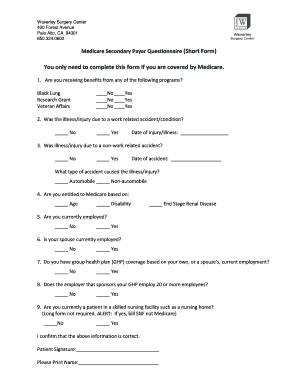
- In the first section, indicate if you are receiving benefits from any of the following programs: Black Lung, Research Grant, or Veteran Affairs by selecting 'Yes' or 'No' for each option.
- In the next section, specify whether your illness or injury was due to a work-related accident or condition. If applicable, provide the date of injury or illness.
- Next, answer whether your illness or injury was due to a non-work-related accident. If so, provide the date of the accident and specify the type of accident as either automobile or non-automobile.
- Indicate your entitlement to Medicare by selecting one or more options: Age, Disability, or End Stage Renal Disease.
- State whether you are currently employed by selecting 'Yes' or 'No.'
- Next, confirm if your spouse is currently employed by selecting the appropriate option.
- Indicate if you have group health plan (GHP) coverage based on your own or your spouse's current employment.
- Confirm the size of the employer sponsoring your GHP. Select 'Yes' or 'No' to indicate if they employ 20 or more employees.
- Specify if you are currently a patient in a skilled nursing facility. If yes, remember to bill the SNF, not Medicare, as a long form is not required.
- Finally, confirm that the information provided is correct by signing the form and printing your name in the designated fields.
Encourage others to complete their forms online for a seamless Medicare experience.
A sample of the MSPQ can be found in the Centers for Medicare & Medicaid Services' (CMS) Internet-Only Manual (IOM), Publication 100-05, Medicare Secondary Payer Manual, Chapter 3, Section 20.2. 1 (PDF). Hospitals are required to verify the information at least every 90 days.