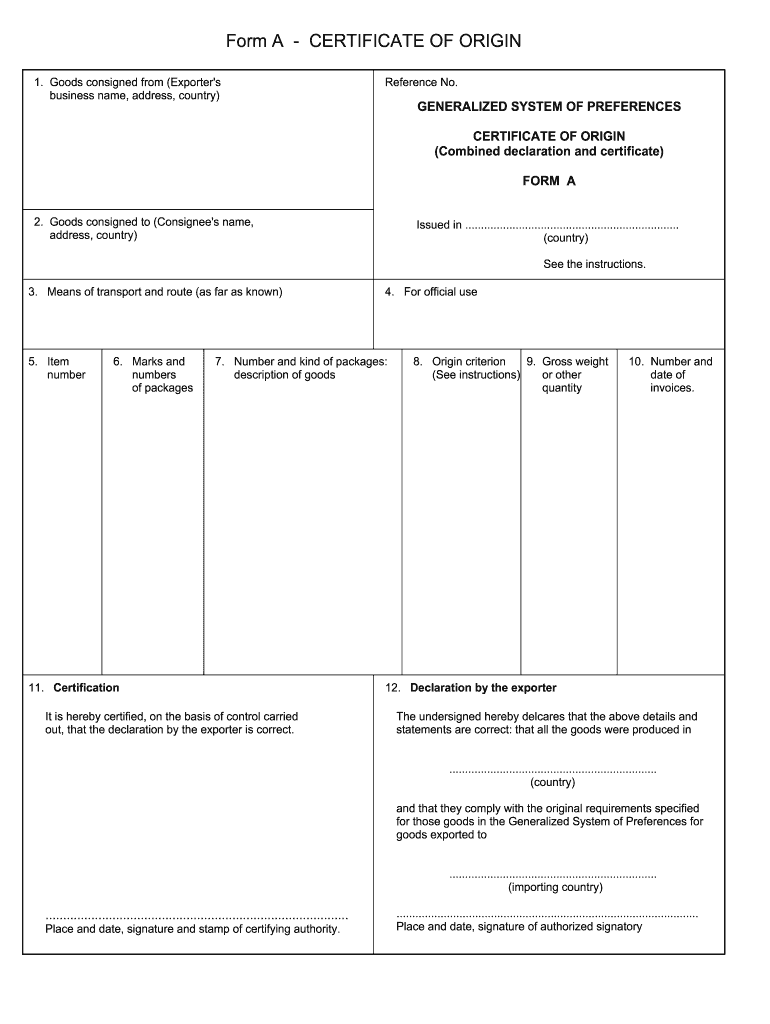
Form A - CERTIFICATE OF ORIGIN 1. Goods consigned from Exporter s business name address country Reference No. GENERALIZED SYSTEM OF PREFERENCES CERTIFICATE OF ORIGIN Combined declaration and certificate FORM A address country Issued in. country See the instructions. 3. Means of transport and route as far as known 5. Item number 6. Marks and of packages 4. For official use 7. Number and kind of packages description of goods 11. Certification It is hereby certified on the basis of control carried out that the declaration by the exporter is correct. 8. Origin criterion 9. Gross weight See instructions or other quantity 10. Number and date of invoices. 12. Declaration by the exporter The undersigned hereby delcares that the above details and statements are correct that all the goods were produced in. and that they comply with the original requirements specified for those goods in the Generalized System of Preferences for goods exported to importing country Place and date signature and stam....
Loading

Open form follow the instructions

Easily sign the form with your finger

Send filled & signed form or save
How to fill out the Form A - Certificate of Origin online
Filling out the Form A - Certificate of Origin online is a straightforward process that ensures the authenticity of goods being exported. This guide will provide you with clear, step-by-step instructions to complete each section of the form accurately.
Follow the steps to successfully complete the Form A online.
- Click the ‘Get Form’ button to access the Form A and open it in your preferred online editor.
- In the first section, enter the exporter's business name, address, and country in the field labeled 'Goods consigned from'. This is essential for identifying the source of the goods.
- Next, fill in the consignee's name, address, and country under the 'Goods consigned to' section. This information specifies who will receive the goods.
- Provide details about the means of transport and the route that will be taken for shipping the goods, if known. This helps in tracking the shipment’s journey.
- Complete item number, marks and numbers of packages, and the number and kind of packages, as well as a description of the goods in their respective fields.
- Fill in the gross weight or other quantity of the goods according to the guidelines provided. This is necessary for customs documentation.
- Enter the number and date of the invoices associated with the shipment. This establishes the commercial transaction.
- Review the origin criterion field and ensure that the information aligns with the definitions specified in the Generalized System of Preferences.
- In the certification section, ensure that the declaration by the exporter is correct, then include the place, date, and signature of the certifying authority.
- Finish by filling out the place, date, and signature of the authorized signatory under the declaration by the exporter. Ensure all details are accurate and complete.
- After reviewing all entries for accuracy, save your changes, and download or print the completed Form A for your records or submission.
Complete the Form A - Certificate of Origin online and ensure your export documents are ready!
Experience a faster way to fill out and sign forms on the web. Access the most extensive library of templates available.
Related content
Jun 21, 2023 — The PDF provided on this page is a fillable template that demonstrates...
A Certificate of Origin must be employed to certify that a textile or apparel article...
... Certificate of Origin(MCO) OR □ Certificate of Title. □ I confirm as the owner...
Get answers to your most pressing questions about US Legal Forms API.
Can I create my own certificate of origin?
Yes, you can create your own Form A - Certificate of Origin, provided you follow the correct format and guidelines set by relevant authorities. Make sure to include accurate details about the product, its origin, and the certifier's signature. Services such as USLegalForms can help you create a compliant and professional certificate efficiently.
Who generates a certificate of origin?
A Form A - Certificate of Origin is generated by the business that exports the goods. This involves filling out the certificate with details about the product and its origin. To simplify this process, consider using resources like USLegalForms that streamline the generation with easy-to-use templates.
Who creates a certificate of origin?
The responsibility of creating a Form A - Certificate of Origin usually falls on the exporter or an authorized agent. They compile the required information and fill out the form to reflect compliance with trade regulations. If you seek a reliable way to create this document, consider using platforms like USLegalForms that provide user-friendly templates for your needs.
Who generates the certificate of origin?
A Form A - Certificate of Origin is usually generated by the exporter or their representative. They complete the form with accurate information about the product's origin and provide necessary supporting documentation. Utilizing a service like USLegalForms can significantly ease this process, offering ready-made templates tailored to meet certification standards.
How to apply for a certificate of origin?
To apply for a Form A - Certificate of Origin, you first need to gather relevant product details and any required documentation. Next, you can either apply through a governmental agency, such as the Chamber of Commerce, or use an online platform like USLegalForms. This platform simplifies the application process, providing templates and guidance to ensure your certificate meets all requirements.
Who is the certifier of a certificate of origin?
The certifier of a Form A - Certificate of Origin is typically an authorized individual, such as a company official or a representative from an industry association. The certifier must have knowledge of the product's origin and confirm that all information is accurate. In many cases, using services like USLegalForms can streamline the certifying process and ensure compliance with regulations.
How do I make a certificate of origin?
To create a Form A - Certificate of Origin, start by identifying the product you are exporting and gathering relevant details, such as the manufacturer's information and product description. Utilize a template or online service to ensure you include all necessary sections, like the producer's declaration and the certifier's details. Platforms like USLegalForms can guide you through the entire process, helping you generate a compliant document quickly.
Who fills out the USMCA certificate of origin?
The USMCA certificate of origin is typically filled out by the exporter of record. This document is crucial in proving that the goods qualify for tariff benefits under the USMCA agreement. For the Form A - Certificate of Origin, ensuring accurate completion benefits both exporters and importers by facilitating smoother customs processing. Utilizing resources like USLegalForms can aid in properly filling this out.
How to fill coo?
Filling out a Certificate of Origin (COO) requires careful attention to detail. For the Form A - Certificate of Origin, make sure to input the correct exporter and importer information, along with a thorough description of the goods. If you're unsure about any section, many online platforms, such as USLegalForms, can help guide you through the completion process. A well-filled COO can facilitate smoother cross-border transactions.
How do you fill out a certificate of origin?
To fill out a Certificate of Origin (COO), or Form A - Certificate of Origin, you need to enter specific details in designated fields. Start with the exporter and importer’s names and addresses, then provide a clear description of the products. Don’t forget to include the origin of the goods. It's wise to double-check your entries before finalizing, as accuracy is key.
Use professional pre-built templates to fill in and sign documents online faster. Get access to thousands of forms.
If you believe that this page should be taken down, please follow our DMCA take down process here.