Loading
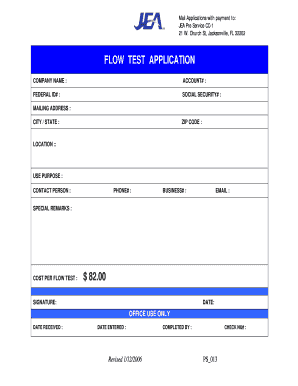
Get Flow Test Application - Jea
How it works
-

Open form follow the instructions
-

Easily sign the form with your finger
-

Send filled & signed form or save
How to fill out the FLOW TEST APPLICATION - JEA online
Filling out the FLOW TEST APPLICATION - JEA online is a straightforward process that allows users to submit their application efficiently. This guide provides a clear step-by-step approach to ensure you complete the application accurately.
Follow the steps to complete your application successfully.
- Press the ‘Get Form’ button to obtain the form and open it in the editor.
- In the first field, enter your company name. This should be the registered name of your business or organization.
- Provide your account number in the designated field to help identify your application.
- Enter your federal identification number. This is crucial for tax identification purposes.
- If applicable, include your social security number in the next field, ensuring to maintain confidentiality.
- Fill in your mailing address accurately, including street address, city, and state.
- Specify your ZIP code in the dedicated field to facilitate any necessary correspondence.
- Indicate the location relevant to your application in the designated section.
- For cost information, note the purpose of use in the provided field.
- Include the contact person's name, ensuring this individual is available for follow-up.
- List the contact person's phone number for further communications.
- Enter the business phone number in the provided field to enable quicker responses.
- Provide a valid email address for electronic communication and confirmations.
- Use the special remarks section to add any additional information or requests related to your application.
- Finally, indicate the cost per flow test, which is set at $82.00.
- Sign and date the application to confirm the accuracy of the information provided.
- After completing the form, you can save your changes, download the document, print it, or share it as needed.
Complete your FLOW TEST APPLICATION - JEA online today to ensure timely processing.
Related links form
Do not read your results until 30 minutes. If the test device is left to develop longer you may receive a false positive result and you will need to repeat the test. This indicates the test is negative. Two lines – even faint lines – indicate the test is positive.
Industry-leading security and compliance
US Legal Forms protects your data by complying with industry-specific security standards.
-
In businnes since 199725+ years providing professional legal documents.
-
Accredited businessGuarantees that a business meets BBB accreditation standards in the US and Canada.
-
Secured by BraintreeValidated Level 1 PCI DSS compliant payment gateway that accepts most major credit and debit card brands from across the globe.