Loading
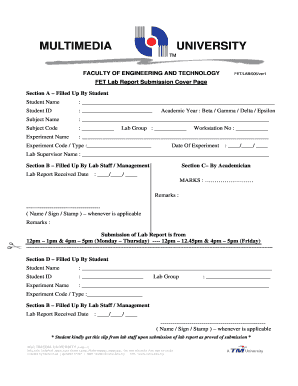
Get Fet Mmu
How it works
-

Open form follow the instructions
-

Easily sign the form with your finger
-

Send filled & signed form or save
How to fill out the Fet Mmu online
Filling out the Fet Mmu form is an essential step in submitting your lab report at Multimedia University. This guide provides a clear, step-by-step approach to ensure that you complete the form accurately and effectively.
Follow the steps to successfully complete the Fet Mmu form.
- Click the ‘Get Form’ button to access the Fet Mmu form and open it in your editing platform.
- In Section A, enter your name in the designated space labeled 'Student Name' and fill in your Student ID. Ensure accuracy in these fields to avoid issues with identification.
- Next, provide details for the 'Subject Name' and 'Subject Code' associated with your lab report. These identifiers are crucial for proper categorization.
- Fill in the 'Experiment Name', 'Academic Year', 'Lab Group', 'Experiment Code / Type', and 'Workstation No.' as instructed, verifying that all entries are correct.
- Record the 'Date of Experiment', ensuring you follow the correct day/month/year format.
- Ask your lab supervisor to complete their section by entering their name in the 'Lab Supervisor Name' field.
- Proceed to Section B, where lab staff or management will record the 'Lab Report Received Date' and sign or stamp as applicable.
- In Section C, an academician will enter the 'MARKS' received along with any remarks.
- Finally, you will need to replicate your details from Section A again in Section D—fill out your name, Student ID, 'Experiment Name', and 'Lab Group' here.
- After completing all sections, save your changes, and consider downloading, printing, or sharing the completed form as needed.
Complete your forms online for a smoother submission process.
An important function of the Memory Management Unit (MMU) is to enable the system to run multiple tasks, as independent programs running in their own private virtual memory space.
Industry-leading security and compliance
US Legal Forms protects your data by complying with industry-specific security standards.
-
In businnes since 199725+ years providing professional legal documents.
-
Accredited businessGuarantees that a business meets BBB accreditation standards in the US and Canada.
-
Secured by BraintreeValidated Level 1 PCI DSS compliant payment gateway that accepts most major credit and debit card brands from across the globe.