Loading
Form preview
  • US Legal Forms
  • Other Templates
  • More Forms
  • More Uncategorized Forms
  • Jim Beckert Beaufort Sc

Get Jim Beckert Beaufort Sc

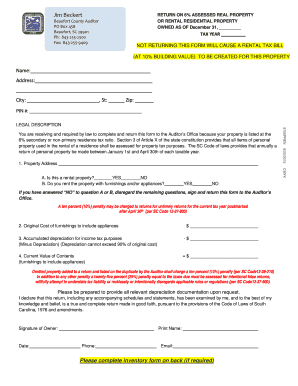
Jim Beckert Beaufort County Auditor PO Box 458 Beaufort, SC 29901 Ph: 8432552500 Fax: 8432559409 RETURN ON 6% ASSESSED REAL PROPERTY OR RENTAL RESIDENTIAL PROPERTY OWNED AS OF December 31, TAX YEAR.

How it works

  1. Open form

    Open form follow the instructions

  2. Easily sign form

    Easily sign the form with your finger

  3. Share form

    Send filled & signed form or save

How to fill out the Jim Beckert Beaufort SC online

Filling out the Jim Beckert Beaufort SC form is essential for reporting rental and assessed real property accurately. This guide provides clear, step-by-step instructions to assist you in completing the form efficiently and correctly.

Follow the steps to fill out the Jim Beckert Beaufort SC form online.

  1. Click ‘Get Form’ button to access the document and open it in the editor.
  2. Begin by entering your name in the designated field. This should include your full name as the property owner.
  3. Next, provide the address of the rental property, ensuring to include the street address, city, state, and zip code in the appropriate fields.
  4. Fill in the Personal Identification Number (PIN) related to the property in the specified section.
  5. Determine whether the property is a rental by selecting 'YES' or 'NO' in question A. If the property is not a rental, skip the remaining questions and return the form to the Auditor’s Office.
  6. In question B, indicate if you rent the property with furnishings and appliances by selecting 'YES' or 'NO'. If you selected 'NO' for either A or B, you can disregard further questions.
  7. Provide the original cost of furnishings and appliances in the corresponding section.
  8. Next, report the accumulated depreciation for income tax purposes. Ensure this does not exceed 90% of the original cost.
  9. Calculate and enter the current value of the furnishings and appliances in the applicable field.
  10. Sign and date the form, printing your name and providing your phone number as required.
  11. If needed, complete the attached rental personal property inventory form, detailing each item, its cost, and service date.
  12. Once completed, ensure all components are accurate. Save the changes, and you can download, print, or share the form as necessary.

Complete your documents online today to ensure timely and accurate reporting.

Get form

Experience a faster way to fill out and sign forms on the web. Access the most extensive library of templates available.
Get form

Related content

Candidate Detail
Mar 26, 2014 — Election: Statewide General Election Office: Auditor Candidate: Jim...
Learn more
2012 - 2013 - SC School Improvement Council
S E A B R O O K , S C 2 9 9 4 0. 8 4 3 . 2 6 6 . 3 0 0 0 ... Our new board members: JoAnn...
Learn more
Slavernij in de Verenigde Staten - Slavery in the...
Jan 4, 2021 — Slaven op een plantage in South Carolina ( The Old Plantation , ca.1790)...
Learn more

Related links form

Quiz 1: Medical Terminology And General Anatomy - NAACCR 2020 Hptr 7 Hdfc Ergo Health Claim Form 2012 Tn Armed Security Guard License 2020

Questions & Answers

Get answers to your most pressing questions about US Legal Forms API.

Contact support

You may apply for the Homestead Exemption at the Beaufort County Auditor's office. If you are unable to go to the Auditor's office, an agent can make an application on your behalf.

Where do I apply? You must apply for the Homestead Exemption at your County Auditor's office. If you are unable to go to the Auditor's office, you may authorize someone to apply for you. Contact the County Auditor's Office for details.

While the county has among the lowest property tax rates in the state (the average effective rate is 0.64%), homeowners in Beaufort County pay some of the highest total annual taxes. The median annual property tax in Beaufort County is $1,970, as the county's median home value is also the highest at $309,600.

South Carolina's Homestead Exemption “is a complete exemption of taxes on the first $50,000 in Fair Market Value of your Legal Residence for homeowners over age 65, totally and permanently disabled, or legally blind.” You must apply for this exemption in-person at the Beaufort County Auditor's Office.

To qualify for the special 4% property tax assessment ratio, the owner of the property must have actually owned and occupied the residence as his legal residence and been occupying that address for some period during the applicable tax year. Only an owner-occupant is eligible to apply for the 4% special assessment.

The Homestead Exemption Program is a State funded program authorized under Section 12-37-250 of the South Carolina Code of Laws. The program exempts the first $50,000 fair market value of primary residence from all property taxes.

Scott Marshall became city manager of Beaufort in January 2023.

120 Day Bills You will receive a tax bill marked “120 Days” about three months after the plate is activated. This bill will tax the period from the date of purchase to the date the decal on the plate expires.

Get This Form Now!

Use professional pre-built templates to fill in and sign documents online faster. Get access to thousands of forms.
Get form
If you believe that this page should be taken down, please follow our DMCA take down processhere.
Get Jim Beckert Beaufort Sc
Get form
  • Adoption
  • Bankruptcy
  • Contractors
  • Divorce
  • Home Sales
  • Employment
  • Identity Theft
  • Incorporation
  • Landlord Tenant
  • Living Trust
  • Name Change
  • Personal Planning
  • Small Business
  • Wills & Estates
  • Packages A-Z
  • Affidavits
  • Bankruptcy
  • Bill of Sale
  • Corporate - LLC
  • Divorce
  • Employment
  • Identity Theft
  • Internet Technology
  • Landlord Tenant
  • Living Wills
  • Name Change
  • Power of Attorney
  • Real Estate
  • Small Estates
  • Wills
  • All Forms
  • Forms A-Z
  • Other Templates
  • Legal Hub
  • About Us
  • Help Portal
  • Legal Resources
  • Blog
  • Affiliates
  • Contact Us
  • Delete My Account
  • Site Map
  • Industries
  • Forms in Spanish
  • Localized Forms
  • State-specific Forms
  • Forms Kit
  • Real Estate Handbook
  • All Guides
  • Notarize
  • Incorporation services
  • For Consumers
  • For Small Business
  • For Attorneys
  • USLegal
  • FormsPass
  • pdfFiller
  • signNow
  • altaFlow
  • DocHub
  • Instapage
Form Packages
  • Adoption
  • Bankruptcy
  • Contractors
  • Divorce
  • Home Sales
  • Employment
  • Identity Theft
  • Incorporation
  • Landlord Tenant
  • Living Trust
  • Name Change
  • Personal Planning
  • Small Business
  • Wills & Estates
  • Packages A-Z
Form Categories
  • Affidavits
  • Bankruptcy
  • Bill of Sale
  • Corporate - LLC
  • Divorce
  • Employment
  • Identity Theft
  • Internet Technology
  • Landlord Tenant
  • Living Wills
  • Name Change
  • Power of Attorney
  • Real Estate
  • Small Estates
  • Wills
  • All Forms
  • Forms A-Z
  • Other Templates
Customer Service
  • Legal Hub
  • About Us
  • Help Portal
  • Legal Resources
  • Blog
  • Affiliates
  • Contact Us
  • Delete My Account
  • Site Map
  • Industries
  • Forms in Spanish
  • Localized Forms
  • State-specific Forms
  • Forms Kit
Legal Guides
  • Real Estate Handbook
  • All Guides
Prepared for you
  • Notarize
  • Incorporation services
Our Customers
  • For Consumers
  • For Small Business
  • For Attorneys
Our Sites
  • USLegal
  • FormsPass
  • pdfFiller
  • signNow
  • altaFlow
  • DocHub
  • Instapage
Social Media
Call us now toll free:
+1 833 426 79 33
As seen in:
© Copyright 1999-2026 airSlate Legal Forms, Inc. 17 Station Street, Suite 303, Brookline, MA 02445
  • Your Privacy Choices
  • Terms of Service
  • Privacy Notice
  • Content Takedown Policy
  • Bug Bounty Program