Loading
Get Volleyball Assessment - Pe Central
How it works
-

Open form follow the instructions
-

Easily sign the form with your finger
-

Send filled & signed form or save
How to fill out the Volleyball Assessment - PE Central online
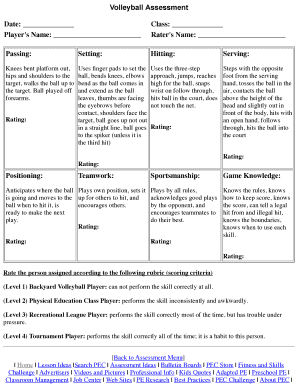
This guide provides a step-by-step approach to completing the Volleyball Assessment - PE Central online. By following these instructions, users can effectively evaluate volleyball skills in a structured manner.
Follow the steps to complete the assessment online.
- Press the ‘Get Form’ button to access the Volleyball Assessment form and open it in your preferred digital editor.
- Fill out the date section by entering the current date. This helps to document when the assessment is conducted.
- Enter the player's name in the designated field to identify the individual being assessed.
- Record the class information, specifying the class or level the player is in.
- Enter the rater's name to acknowledge who is assessing the player's performance.
- Assess the player's skills in the passing section by noting their performance and providing a rating according to the established rubric.
- Repeat the assessment for the setting skill, using the provided guidelines to evaluate and rate accordingly.
- Continue with the hitting and serving sections, providing your observations and ratings for each skill based on the player’s execution.
- In the positioning section, assess the player's ability to anticipate the ball's movement and their readiness to play.
- Evaluate the player's teamwork and sportsmanship by documenting their interactions and behavior during the game.
- Conclude the evaluation by assessing the player's game knowledge, including their understanding of the rules and scoring.
- Once all sections are completed, review your entries for accuracy, then save changes, download, print, or share the completed assessment form as needed.
Complete your assessments online today to effectively evaluate volleyball skills.