Loading
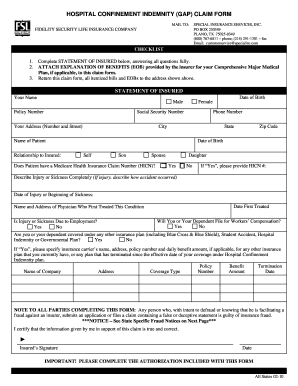
Get Claim Form - Sislink Nexstep Combined-hospital Confinement - All States 02-2013doc
How it works
-

Open form follow the instructions
-

Easily sign the form with your finger
-

Send filled & signed form or save
How to fill out the Claim Form - SISLink NexStep Combined-Hospital Confinement - All States 02-2013doc online
Filling out the Claim Form for SISLink NexStep Combined-Hospital Confinement is a straightforward process that ensures you receive the benefits you are entitled to. This guide provides clear instructions to help you accurately complete the form online, ensuring all necessary details are included.
Follow the steps to successfully complete your claim form.
- Click the ‘Get Form’ button to access the form and open it in the editor.
- Begin by filling out the 'Statement of Insured' section. Identify yourself by providing your name, policy number, and social security number. Make sure the details are accurate as they directly relate to your claim.
- Provide your contact information including your address, phone number, and date of birth. Be sure to include the city, state, and zip code.
- List the name of the patient and their relationship to you. Include their date of birth and indicate whether the patient has a Medicare Health Insurance Claim Number.
- Describe the injury or sickness thoroughly. Include the date of injury or the beginning of sickness and the date you first received treatment.
- Provide the name and address of the physician who first treated the condition. This information is vital for the processing of your claim.
- Indicate if the injury or sickness is work-related and supply information concerning any potential workers’ compensation claims.
- State whether you or your dependent has coverage under any other insurance plans. If applicable, provide details about those plans including their coverage type, benefit amounts, and termination dates.
- Review the fraud notice included in the form – it’s important to understand the legal implications of submitting false information.
- Sign and date the form to certify that the information you have provided is accurate. If applicable, complete the authorization section included with the form.
- Once all fields have been completed and reviewed, you can save your changes, download the form for your records, or print it to send via mail.
Complete your claim form online today to ensure your benefits are processed efficiently.
Industry-leading security and compliance
US Legal Forms protects your data by complying with industry-specific security standards.
-
In businnes since 199725+ years providing professional legal documents.
-
Accredited businessGuarantees that a business meets BBB accreditation standards in the US and Canada.
-
Secured by BraintreeValidated Level 1 PCI DSS compliant payment gateway that accepts most major credit and debit card brands from across the globe.