Loading
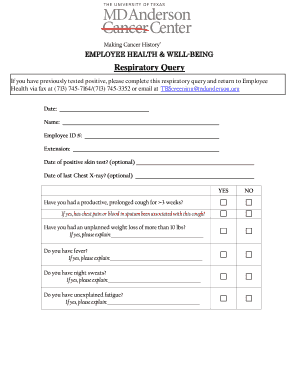
Get Md Anderson Cancer Center Respiratory Query
How it works
-

Open form follow the instructions
-

Easily sign the form with your finger
-

Send filled & signed form or save
How to fill out the MD Anderson Cancer Center Respiratory Query online
Completing the MD Anderson Cancer Center Respiratory Query is an essential step for users who have tested positive for respiratory concerns. This guide will provide clear and supportive instructions to ensure you can fill out the form accurately and efficiently.
Follow the steps to complete the respiratory query form online.
- Press the ‘Get Form’ button to access the respiratory query and open it in your document management system.
- Begin by entering your personal information. Provide your name, employee ID number, and extension in the designated fields.
- Indicate the date of your positive skin test, if applicable, and the date of your last chest X-ray, also if applicable. These fields are optional but can be important for your medical record.
- Respond to the health questions about your respiratory condition. For each question regarding symptoms such as a persistent cough, chest pain, weight loss, fever, night sweats, or fatigue, answer 'yes' or 'no' and provide additional explanations where indicated.
- Once all sections are completed, review the information to ensure accuracy before submitting.
- To submit the completed form, select the submit option via email, ensuring to change the subject line to 'Respiratory Query for TB Screening.' Alternatively, you can choose to print the form or fax it to Employee Health at the provided numbers.
Complete the MD Anderson Cancer Center Respiratory Query online today for your health and well-being.
Gaining access to treatment at MD Anderson can be competitive but manageable. The institution receives numerous applications, yet it offers various programs to streamline the process. Taking advantage of online platforms like US Legal Forms can simplify documentation and help prospective patients navigate the admission requirements efficiently.