Loading
Form preview
  • US Legal Forms
  • Form Library
  • More Forms
  • More Uncategorized Forms
  • Cigna Electronic Remittance Advice Enrollment

Get Cigna Electronic Remittance Advice Enrollment

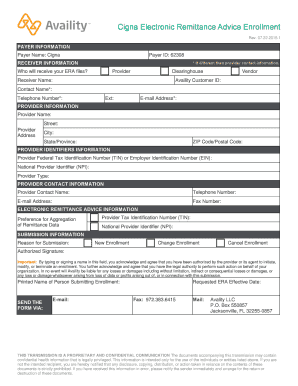
Cigna Electronic Remittance Advice Enrollment Rev. 07.22.2015.1 Overview Availity supports the exchange of electronic remittance advice (ERA) files for various payers in the ASC X12 835 format. Complete.

How it works

  1. Open form

    Open form follow the instructions

  2. Easily sign form

    Easily sign the form with your finger

  3. Share form

    Send filled & signed form or save

How to fill out the Cigna Electronic Remittance Advice Enrollment online

The Cigna Electronic Remittance Advice Enrollment form is essential for providers looking to receive 835 electronic remittance advice files from Cigna. This guide provides a comprehensive step-by-step approach to filling out the form online, ensuring that you provide all necessary information for successful enrollment.

Follow the steps to complete your enrollment form

  1. Click ‘Get Form’ button to obtain the form and open it in the editor.
  2. Fill in the Payer Information section by entering 'Cigna' as the payer name and '62308' as the payer ID.
  3. In the Receiver Information section, select who will receive your ERA files: Provider, Clearinghouse, or Vendor. Provide the Receiver Name and Availity Customer ID, along with the Contact Name, Telephone Number with extension, and Email Address.
  4. Complete the Provider Information section by entering the complete legal name, address, city, state, and postal code of the provider.
  5. In the Provider Identifiers Information section, enter the Federal Tax Identification Number (TIN) or Employer Identification Number (EIN) and the National Provider Identifier (NPI). Specify the Provider Type.
  6. Provide the Provider Contact Information, including the contact person's name, telephone number, email address, and fax number.
  7. Fill in the Electronic Remittance Advice Information by entering the TIN, preference for aggregation of remittance data, and NPI.
  8. In the Submission Information section, choose the Reason for Submission: New Enrollment, Change Enrollment, or Cancel Enrollment. Enter the Authorized Signature and Printed Name of the person submitting the enrollment.
  9. Enter the Requested ERA Effective Date to specify when you want the ERA to begin.
  10. Once all sections are completed, use the Send Form option to submit the completed enrollment to Availity via email, fax, or mail as per the provided instructions.

Complete your Cigna Electronic Remittance Advice Enrollment form online today to ensure timely receipt of your ERA files.

Get form

Experience a faster way to fill out and sign forms on the web. Access the most extensive library of templates available.
Get form

Related content

EDI Review - Maryland Health Care Commission...
Jan 1, 2007 — for Payers to Designate Electronic Heath Networks, the Maryland Health...
Learn more
CIGNA Member Kit
Offered by Cigna Health and Life Insurance Company, or its affiliates. 112366b...
Learn more
CareCentrix Provider Manual (EDRC 746 01242018) VT...
CareCentrixPortal.com Claims Support Team For Cigna 844-457-9969 ... Appeals Forms...
Learn more

Related links form

Mynylottery 2020 Rapid Rehousing Las Vegas Opseu Grievance Form Fontana Adult School Register Form

Questions & Answers

Get answers to your most pressing questions about US Legal Forms API.

Contact support

Electronic Funds Transfer (EFT) The process used to transmit health care payments from a health plan to a health care provider's bank is commonly called EFT.

What Is an EFT? An electronic funds transfer, or EFT, is the electronic message used by health plans to order a financial institution to electronically transfer funds to a provider's account to pay for health care services. An EFT includes information such as: Amount being paid.

62308. CIGNA (Connecticut General)

If you already receive EFT payments and wish to change the method by which your payments are bulked, log in to CignaforHCP.com > Working with Cigna > Manage EFT Settings, then you'll be able to update your payment preferences from this page. Enrolling in EFT is simple!

Submitting medical, dental, and behavioral claims electronically can help you save time, money, and improve claim processing accuracy. Using one of Cigna's electronic data interchange (EDI) options allows you to send, view, and track claims – no faxing, printing, or mailing. Everything is right on your desktop.

Use Cigna payer ID 62308 * Including employee assistance program.

You have immediate access to your digital ID cards and proof of coverage anytime you need them, right from myCigna.com or the mobile app....You can: Show your ID card on your phone screen at the provider's office. Save an image and email it to them from your secure myCigna inbox. Print an ID card to give to them.

Payer Name: Texas Healthspring|Payer ID: 63092|Professional (CMS1500)/Institutional (UB04)[Hospitals]

Get This Form Now!

Use professional pre-built templates to fill in and sign documents online faster. Get access to thousands of forms.
Get form
If you believe that this page should be taken down, please follow our DMCA take down processhere.

Industry-leading security and compliance

US Legal Forms protects your data by complying with industry-specific security standards.
  • In businnes since 1997
    25+ years providing professional legal documents.
  • Accredited business
    Guarantees that a business meets BBB accreditation standards in the US and Canada.
  • Secured by Braintree
    Validated Level 1 PCI DSS compliant payment gateway that accepts most major credit and debit card brands from across the globe.
Get Cigna Electronic Remittance Advice Enrollment
Get form
  • Adoption
  • Bankruptcy
  • Contractors
  • Divorce
  • Home Sales
  • Employment
  • Identity Theft
  • Incorporation
  • Landlord Tenant
  • Living Trust
  • Name Change
  • Personal Planning
  • Small Business
  • Wills & Estates
  • Packages A-Z
  • Affidavits
  • Bankruptcy
  • Bill of Sale
  • Corporate - LLC
  • Divorce
  • Employment
  • Identity Theft
  • Internet Technology
  • Landlord Tenant
  • Living Wills
  • Name Change
  • Power of Attorney
  • Real Estate
  • Small Estates
  • Wills
  • All Forms
  • Forms A-Z
  • Form Library
  • Legal Hub
  • About Us
  • Help Portal
  • Legal Resources
  • Blog
  • Affiliates
  • Contact Us
  • Delete My Account
  • Site Map
  • Industries
  • Forms in Spanish
  • Localized Forms
  • State-specific Forms
  • Forms Kit
  • Real Estate Handbook
  • All Guides
  • Notarize
  • Incorporation services
  • For Consumers
  • For Small Business
  • For Attorneys
  • USLegal
  • FormsPass
  • pdfFiller
  • signNow
  • altaFlow
  • DocHub
  • Instapage
Form Packages
  • Adoption
  • Bankruptcy
  • Contractors
  • Divorce
  • Home Sales
  • Employment
  • Identity Theft
  • Incorporation
  • Landlord Tenant
  • Living Trust
  • Name Change
  • Personal Planning
  • Small Business
  • Wills & Estates
  • Packages A-Z
Form Categories
  • Affidavits
  • Bankruptcy
  • Bill of Sale
  • Corporate - LLC
  • Divorce
  • Employment
  • Identity Theft
  • Internet Technology
  • Landlord Tenant
  • Living Wills
  • Name Change
  • Power of Attorney
  • Real Estate
  • Small Estates
  • Wills
  • All Forms
  • Forms A-Z
  • Form Library
Customer Service
  • Legal Hub
  • About Us
  • Help Portal
  • Legal Resources
  • Blog
  • Affiliates
  • Contact Us
  • Delete My Account
  • Site Map
  • Industries
  • Forms in Spanish
  • Localized Forms
  • State-specific Forms
  • Forms Kit
Legal Guides
  • Real Estate Handbook
  • All Guides
Prepared for you
  • Notarize
  • Incorporation services
Our Customers
  • For Consumers
  • For Small Business
  • For Attorneys
Our Sites
  • USLegal
  • FormsPass
  • pdfFiller
  • signNow
  • altaFlow
  • DocHub
  • Instapage
Social Media
Call us now toll free:
+1 833 426 79 33
As seen in:
© Copyright 1999-2026 airSlate Legal Forms, Inc. 3720 Flowood Dr, Flowood, Mississippi 39232
  • Your Privacy Choices
  • Terms of Service
  • Privacy Notice
  • Content Takedown Policy
  • Bug Bounty Program