Loading
Get Obc Matrix
How it works
-

Open form follow the instructions
-

Easily sign the form with your finger
-

Send filled & signed form or save
How to fill out the OBC Matrix online
Filling out the OBC Matrix is an essential step in the documentation process for building projects. This guide provides clear, step-by-step instructions on how to complete the form online efficiently and accurately.
Follow the steps to complete your OBC Matrix form online.
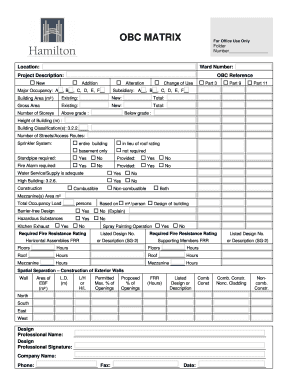
- Click ‘Get Form’ button to obtain the OBC Matrix form and open it in your preferred online editing tool.
- Begin by filling in the 'Folder Number' and 'Location' at the top of the form. Ensure to enter the correct 'Ward Number' and a brief 'Project Description' for clarity.
- In the 'OBC Reference' section, indicate whether the project is 'New', 'Addition', or 'Alteration' by checking the appropriate box.
- Document the 'Major Occupancy' and 'Subsidiary' categories by selecting the applicable options from the provided letter codes.
- Fill in the 'Building Area' fields, specifying the 'Existing', 'New', and 'Total' areas in square meters.
- Indicate the 'Gross Area' for both 'Existing' and 'New' structures; also include the total gross area.
- Complete the section for 'Number of Storeys', detailing the number of storeys 'Above grade' and 'Below grade'.
- Provide the 'Height of Building' in meters and classify the building with a relevant code in the 'Building Classification(s)' field.
- Count and record the 'Number of Streets/Access Routes' available for the project and indicate the requirements for a 'Sprinkler System' and 'Standpipe'.
- Fill the 'Fire Alarm' requirements and confirm if provided. Mark 'Water Service/Supply' adequacy and identify whether the building is defined as a 'High Building'.
- Supply information about the 'Construction' type of your building — whether it is combustible, non-combustible, or both.
- Complete the 'Mezzanine(s) Area' field if applicable and indicate the 'Total Occupancy Load' based on the specified calculation.
- Determine if 'Barrier-free Design' is applicable and provide explanations if necessary.
- Address 'Hazardous Substances' by marking yes or no, and similarly indicate the status of 'Kitchen Exhaust' and 'Spray Painting Operation'.
- Detail the required fire resistance ratings for horizontal assemblies and supporting members, including specific hours for each area.
- Document the 'Spatial Separation' for each exterior wall, providing area dimensions, proposed openings, and fire resistance ratings.
- Conclude by providing the 'Design Professional Name', 'Signature', and contact information, including 'Company Name', phone, and date.
- Once you have filled out all required sections, make sure to save your changes, download a copy, print, or share the completed form as necessary.
Get started on completing your OBC Matrix form online today!
Part 3 Buildings are those classified as Group A, B or F-1, or exceeding 600 m2 in building area or exceeding three storeys in building height and have major occupancies. Part 9 buildings include houses and certain other small buildings that are less than three stories high and 600 m2.