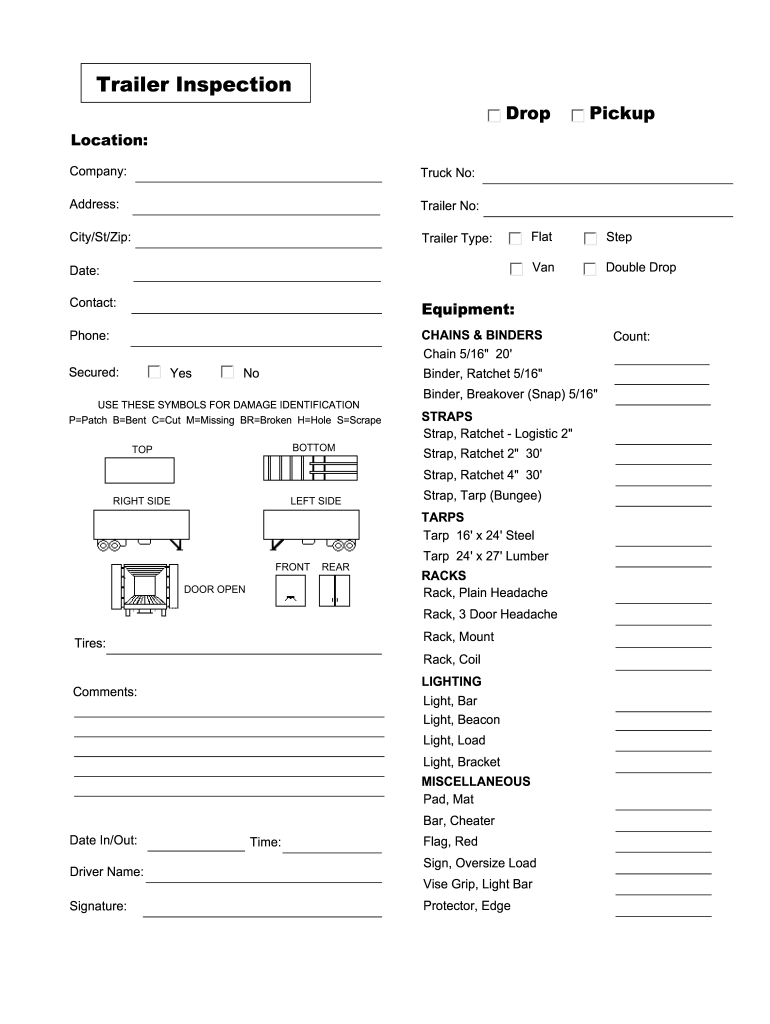
Phone: CHAINS & BINDERS Chain 5/16" 20' Secured: Yes No Binder, Ratchet 5/16" USE THESE SYMBOLS FOR DAMAGE IDENTIFICATION P=Patch B=Bent C=Cut M=Missing BR=Broken H=Hole S=Scrape BOTTOM TOP Binder, Breakover (Snap) 5/16" STRAPS Strap, Ratchet - Logistic 2" Strap, Ratchet 2" 30' Strap, Ratchet 4" 30' RIGHT SIDE LEFT SIDE Strap, Tarp (Bungee) TARPS Tarp 16' x 24' Steel FRONT DOOR OPEN REAR Tarp 24' x 27' Lumber RACKS Rack, Plain Headache Rack, 3 Door Headache Rack, Mount Tires: Rac.
Loading

Open form follow the instructions

Easily sign the form with your finger

Send filled & signed form or save
How to fill out the Trailer Inspection online
Filling out the Trailer Inspection form online is a straightforward process that ensures your equipment is thoroughly assessed for safety and compliance. This guide provides clear, step-by-step instructions tailored to help users complete the form efficiently.
Follow the steps to fill out the Trailer Inspection form correctly.
- Press the ‘Get Form’ button to access the Trailer Inspection form and open it in your preferred editing tool.
- Begin by entering the location, including the company name, truck number, address, trailer number, and city/state/zip code. Ensure that all fields are accurately filled out to avoid any delays.
- Specify the trailer type by selecting one of the following options: step, van, flat, or double drop. This classification is essential for the assessment process.
- Record the date of inspection in the specified field. Accuracy in this date is important for tracking purposes.
- Provide your contact information, including your name and phone number. This ensures that you can be reached for any follow-up inquiries.
- Review the section on chains and binders. Indicate whether the chain and binder are secured by selecting 'Yes' or 'No' in the provided options.
- Utilize the damage identification symbols provided — such as P for Patch, B for Bent, and C for Cut — to document any damages observed on the trailer. Be thorough in your descriptions.
- Fill out the sections for straps, tarps, and racks in a similar manner, ensuring to check all required fields and providing any necessary comments.
- Complete the lighting section by confirming the presence and condition of lights such as bar, beacon, load, and bracket lights. Mark any damages as you have done in previous sections.
- Lastly, fill in any miscellaneous items and ensure the date in/out and driver name and signature fields are completed accurately.
- Once all sections are filled out, review the form for any errors. You can save changes, download, print, or share the completed form as necessary.
Complete your Trailer Inspection online today for a seamless evaluation process.
Experience a faster way to fill out and sign forms on the web. Access the most extensive library of templates available.
Related content
At the time of an inspection, you'll need to bring supporting documents showing proof of...
ITEM INSPECTED. OK. REPAIR. COMMENTS. Tires, including wear and air pressure. Engine fluid...
Sep 1, 2023 — Periodic inspection also known as annual vehicle inspection is a...
Get answers to your most pressing questions about US Legal Forms API.
How do I fill out an inspection report?
Filling out an inspection report involves documenting the condition of all inspected components accurately. Start by noting any defects or repairs needed, and ensure all fields are complete. Utilize a clear and consistent format for easy readability. Platforms like US Legal Forms offer templates to streamline the inspection report process, making it simpler to maintain records.
What will fail a DOT inspection?
A DOT inspection may fail due to several issues, including faulty brakes, non-functional lights, or worn tires. Additionally, improper load securement and visible damage can lead to failure. To avoid this, prioritize regular maintenance and thorough pre-inspection checks. Being proactive will support successful trailer inspections.
How do I prepare for a DOT inspection?
To prepare for a DOT inspection, perform a pre-inspection check of your trailer. Ensure all lights, brakes, and tires are functioning correctly. Gather your maintenance records and necessary documentation. Familiarizing yourself with the inspection process also helps ensure a smoother experience during the trailer inspection.
What is a DOT inspection on a trailer?
A DOT inspection on a trailer is a rigorous examination mandated by the Department of Transportation to ensure safety and regulatory compliance. This inspection covers essential components such as brakes, lights, and tires, as well as overall trailer condition. Regular DOT inspections help identify potential problems before they become serious. Maintaining compliance fosters safer road travel.
What is checked on a DOT inspection?
During a DOT inspection, several critical components are checked to ensure safety and compliance. Inspectors evaluate the brake system, lights, tires, and hitch mechanisms, among other parts. They also assess any visible damage and ensure that all equipment meets federal standards. Knowing these points can streamline your trailer inspection journey.
What does a DOT trailer inspection consist of?
A DOT trailer inspection includes a comprehensive assessment of the vehicle's overall condition. Inspectors will evaluate the braking system, lights, tires, and load securement devices. Additionally, they will review compliance with federal regulations and safety standards. Understanding what to expect during a DOT trailer inspection can help you better prepare and improve safety.
How do you pass a trailer inspection?
To pass a trailer inspection, ensure that all components are in optimal condition. Start by checking brakes, lights, and tires beforehand. Make necessary repairs and address any maintenance issues. Finally, gather all necessary documentation and ensure your trailer complies with all applicable regulations. This proactive approach increases your chances of a successful trailer inspection.
What are the 7 steps of the inspection process?
The trailer inspection process involves seven key steps that ensure safety and compliance. First, inspect the exterior for any visible damage. Next, check the braking system, lights, and tires to ensure proper functionality. Then, assess the cargo area and loading mechanisms, followed by inspecting the hitch and coupling devices. After that, review the paperwork and maintenance records. Finally, conduct a road test to confirm overall performance. Each step is crucial for a thorough trailer inspection.
What do you need for a trailer inspection?
To prepare for a trailer inspection, gather essential documents such as your trailer registration and proof of insurance. Ensure that your trailer is clean and accessible, allowing inspectors to conduct a thorough review. Additionally, have maintenance records available that document any previous inspections and repairs. Using our services at US Legal Forms, you can easily find templates and checklists to help you prepare for your trailer inspection.
Do trailers need to be DOT inspected?
Yes, trailers that are used for commercial purposes typically need to be DOT inspected. This inspection ensures that the trailer meets all federal safety regulations. Even if your trailer is not used commercially, it is a good practice to have it inspected for peace of mind. US Legal Forms can provide you with resources and forms necessary for preparing for your DOT inspection.
Use professional pre-built templates to fill in and sign documents online faster. Get access to thousands of forms.
If you believe that this page should be taken down, please follow our DMCA take down process here.