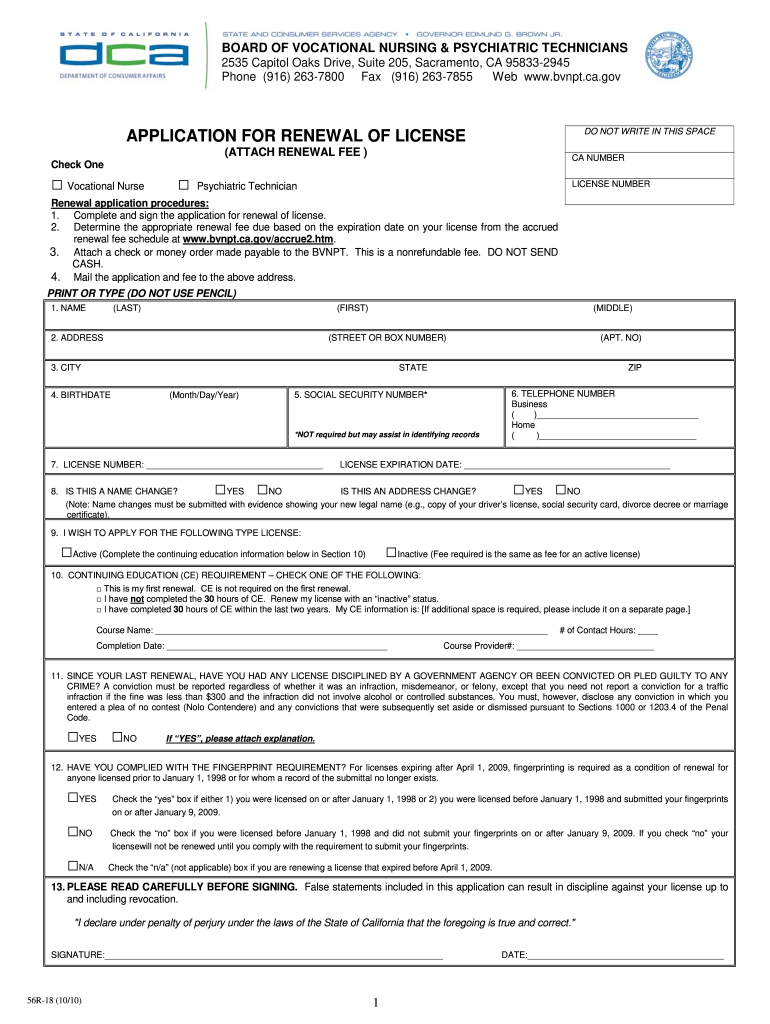
IS SPACE APPLICATION FOR RENEWAL OF LICENSE (ATTACH RENEWAL FEE ) Check One □ Vocational Nurse □ CA NUMBER LICENSE NUMBER Psychiatric Technician Renewal application procedures: 1. Complete and sign the application for renewal of license. 2. Determine the appropriate renewal fee due based on the expiration date on your license from the accrued renewal fee schedule at www.bvnpt.ca.gov/accrue2.htm. 3. Attach a check or money order made payable to the BVNPT. This is a nonrefundable fee. DO.
Loading

Open form follow the instructions

Easily sign the form with your finger

Send filled & signed form or save
How to fill out the CA 56R-18 online
The CA 56R-18 form is essential for the renewal of a vocational nurse or psychiatric technician license in California. Filling out this form online can streamline the process, making it more efficient and accessible.
Follow the steps to complete the CA 56R-18 form online.
- Click the ‘Get Form’ button to obtain the form and open it in your preferred online editor.
- Begin by selecting the type of license you are renewing: vocational nurse or psychiatric technician. Indicate your selection clearly on the form.
- Fill in your license number and CA number to ensure accurate processing of your application.
- Provide your personal information, including your full name (last, first, middle), address, city, state, and zip code. Ensure all details are current and accurate.
- Enter your birthdate in the format (Month/Day/Year) and your telephone numbers for both business and home contacts.
- Answer the questions regarding any name and address changes. If applicable, attach legal documentation for name changes.
- Select whether you wish to apply for an active or inactive license and indicate your continuing education status if relevant.
- Detail your continuing education courses, including the course name, completion date, contact hours, and provider number if applicable.
- Answer questions regarding any disciplinary actions or criminal convictions since your last renewal, attaching an explanation if necessary.
- Confirm your compliance with the fingerprint requirement, ensuring you check the correct box based on your situation.
- Read the declaration carefully before signing. Ensure you understand the implications of any false statements.
- Sign and date the form at the designated areas to complete your application.
- Finally, save your changes, download the completed form, and print it for mailing along with the renewal fee to the specified address.
Complete your CA 56R-18 application online today to ensure your license renewal is processed without delay.
Experience a faster way to fill out and sign forms on the web. Access the most extensive library of templates available.
Related content
by S Liu · 2021 · Cited by 79 — Fusarium wilt (FW) disease of cotton, caused by the...
Calcareous nannofossil range chart, Zones NN18–NN6. ... 56R-2, 75-76. 670.95. NN17...
Direct Burial — Blackburn® Grounding compression products are compliant with. IEEE 837...
Get answers to your most pressing questions about US Legal Forms API.
How to fill out child support forms?
To fill out child support forms, especially the CA 56R-18, start by gathering all necessary information about your finances and your child's needs. Visit the US Legal Forms platform where you can find detailed instructions and downloadable templates for the CA 56R-18. Fill in each section carefully, ensuring accuracy and completeness to avoid delays in processing your forms. Lastly, review your entries to ensure all information is correctly captured, as this will help in smooth navigation through the legal process.
Where do I send my amended California tax return?
You should send your amended California tax return to the address listed on the California Franchise Tax Board’s website for amended returns. If you are using the CA 56R-18 for amendments, be sure to follow the guidelines provided to ensure proper processing.
Do I need to send a copy of my W2 with my state tax return?
No, you usually do not have to send a copy of your W-2 with your California state tax return. However, keeping copies of your W-2 is crucial for your records and for confirming your income on your CA 56R-18 form. Make sure all income information matches your W-2 when filing.
Do I need to attach a copy of my federal return to my California return?
You typically do not need to attach a copy of your federal return to your California return when you file. However, it is advisable to keep your federal return on hand as California may request it for verification. Ensure that all information in your CA 56R-18 form matches what you reported federally to avoid any issues.
Do I need to send my state tax return with my federal return?
No, you do not need to send your California state tax return with your federal return. Each return is submitted separately to the respective tax agencies. However, if you are filing your state return, using the CA 56R-18 form can simplify your state filing process.
Does the state have access to my federal tax return?
Yes, the state has access to your federal tax return through the information-sharing agreements with the IRS. This means the California Franchise Tax Board can use data from your federal return to help assess your state tax obligations. It's essential to ensure that your CA 56R-18 form accurately reflects your reported income to avoid discrepancies.
Do I need to send a copy of my federal return with my California state return?
Generally, you do not need to send a copy of your federal return with your California state return. However, the California Franchise Tax Board may request it in some cases, especially if they need to verify your income. Utilizing the CA 56R-18 form can streamline your submission process and help you meet all requirements.
How to file California corporate disclosure statement online?
You can file your California corporate disclosure statement online by visiting the California Secretary of State’s website. There, you will find the necessary forms and guidance for submitting your disclosure statement electronically. Using the CA 56R-18 form simplifies this process, ensuring you provide all required information accurately.
How much does it cost to renew a nursing license in California?
Step 3: Submit your renewal application Your registered nurse license can be renewed online through BreEZe Online services. The fee is $190.
How soon can I renew my LVN license in California?
Renewal notices are mailed 6 weeks prior to the license expiration date. The renewal fee must be received on or before the expiration date in order for the licensee to continue to legally work. Delinquent Licenses -- A delinquency fee is assessed if the renewal fee is not paid within 30 days after the expiration date.
Use professional pre-built templates to fill in and sign documents online faster. Get access to thousands of forms.
If you believe that this page should be taken down, please follow our DMCA take down process here.