Loading
Get Borderel
How it works
-

Open form follow the instructions
-

Easily sign the form with your finger
-

Send filled & signed form or save
How to fill out the Borderel online
This guide provides clear instructions on how to complete the Borderel form online. Follow these steps to ensure that you fill out each section accurately and efficiently.
Follow the steps to successfully complete the Borderel form online.
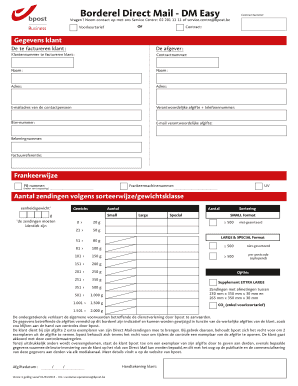
- Press the ‘Get Form’ button to access the Borderel form and open it in your preferred editing tool.
- Begin by entering your contract number as indicated in the appropriate field.
- Proceed to fill in the details of the customer to be invoiced in the 'Gegevens klant' section, including name, address, and contact email.
- Enter the information for the sender, including their name and address, in the section labeled 'De afgever'.
- Input the customer number and contract number for the invoiced customer, ensuring it matches the details you have.
- Fill in the required contact details for the person responsible for the shipment, including their phone number and email address.
- If applicable, provide the VAT number and the account number in the designated fields.
- Include a reference for the invoice that can be used to identify this particular shipment.
- Specify the postage method by entering the PB number and franking machine number if they are relevant to your shipment.
- Indicate the total number of shipments based on the sorting method and weight classes, ensuring you check the specifications regarding the weights.
- Review the information entered to confirm its accuracy and completeness.
- Once all required fields are filled out, you can save changes, download, print, or share the completed Borderel form as needed.
Complete your Borderel form online today for a seamless mailing experience.