Loading
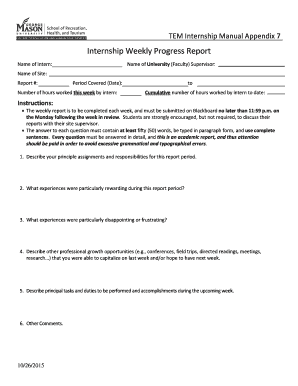
Get Weekly Progress Report For Internship
How it works
-

Open form follow the instructions
-

Easily sign the form with your finger
-

Send filled & signed form or save
How to fill out the Weekly Progress Report for Internship online
Completing the Weekly Progress Report for Internship online is a vital step in documenting your experiences and growth during your internship. This guide provides clear and concise steps to ensure you fill out the report accurately and effectively.
Follow the steps to successfully complete your report
- Click 'Get Form' button to obtain the form and open it in an online editor.
- Begin by filling in the name of your university or faculty supervisor in the designated field. This establishes the context of your report and credentials.
- Input your name in the 'Name of Intern' section. Ensure that the name is spelled correctly as it will be associated with your report.
- Enter the name of the site where you are completing your internship. This should be the organization or business that you are working with.
- Record the report number in the 'Report #' field. This helps keep track of your submissions and progress over the internship period.
- Fill in the period covered by this report by entering the appropriate dates. This indicates what time frame the report reflects.
- Indicate the number of hours worked during the week by entering the total in the specified field. Document your efforts accurately.
- Provide the cumulative number of hours worked to date. This section helps convey your overall commitment to the internship.
- Respond to the report questions in detail. Each answer must be a minimum of fifty words, typed in paragraph form, and written in complete sentences. Ensure clarity and attention to grammatical accuracy.
- Once all sections are completed, review your report for accuracy and completeness. You can then save changes, download, print, or share the form as needed.
Complete your Weekly Progress Report for Internship online today to effectively track your progress and professional development!
Make An Internship Journal - Here's How! The first item in your intern journal is a general explanation of any projects/tasks you have been assigned. ... You should also include a "soul-searching" bit. ... Include dates the projects, tasks or assignments were completed. ... Make note of the general category of the project or task.
Industry-leading security and compliance
US Legal Forms protects your data by complying with industry-specific security standards.
-
In businnes since 199725+ years providing professional legal documents.
-
Accredited businessGuarantees that a business meets BBB accreditation standards in the US and Canada.
-
Secured by BraintreeValidated Level 1 PCI DSS compliant payment gateway that accepts most major credit and debit card brands from across the globe.